
Python If, If-else, Nested Statements – Python Decision Making Statements
Master Python with 70+ Hands-on Projects and Get Job-ready - Learn Python
Today, we talk about Python decision-making constructs. This includes Python if statements, if else statements, elif statements, nested if conditions, and single statement conditions.
We will understand these with syntax and examples to get a clear understanding.
So, let’s start the Python Decision-Making Tutorial.
What are Python Decision-Making Statements?
Before we begin with Python decision-making expressions, let us review Python concepts.
Sometimes, in a program, we may want to make a decision based on a condition. We know that an expression’s value can be True or False. We may want to do something only when a certain condition is true.
Advantages of decision-making statements in Python:
- Interaction: The computer guides the user on what he is doing, like showing a wrong password message if the password is wrong.
- Clean and tidy: By using statements, you can keep your code organized and easy to read.
- Efficient: It makes sure that the program runs faster as it avoids working on parts that are not required.
- Safety network: In a program, it is made sure that if an unexpected problem occurs, there is a backup.
Let us see at various Python decision-making expressions in detail with syntax and examples. So let’s install Python on Windows first and review Python syntax for programming in Python.
Python if Statements
An if statement in Python takes an expression with it. If the expression amounts to True, then the block of statements under it is executed.
If it amounts to False, then the block is skipped and control transfers to the statements after the block. But remember to indent the statements in a block equally.
This is because we don’t use curly braces to delimit blocks. Also, use a colon(:) after the condition.
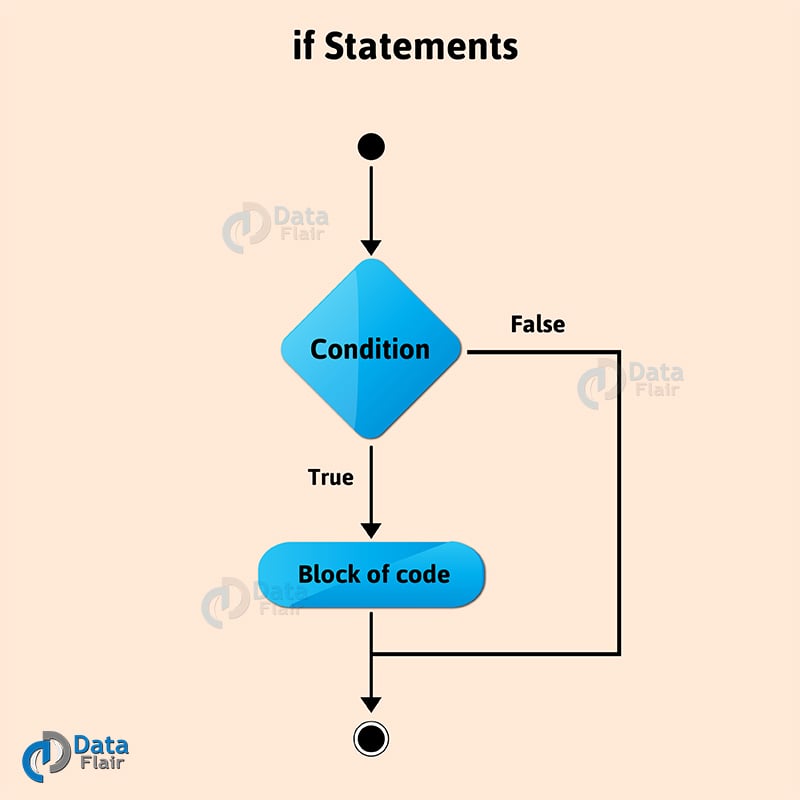
Python Decision Making – Python if Statement
Before starting with the example, let us see various types of variables and data types in Python as it will help in better programming.
a=7
if a>6:
     print(f"{a} is good")
Output
Here, since 7>6, the condition is true. So, it prints the given string.
if 1:
    print("yay")
Output
We know, 1 has a Boolean value of True. So, the condition is true, and it prints ‘yay’.
if(1==1):
   print("1")
Output
>>>
You can also write the condition in parentheses. It does not cause a syntax error.
Python if-else Statements
What happens when the condition is untrue? We can mention that it is in the block after the else statement. An else statement comes right after the block after ‘if’.
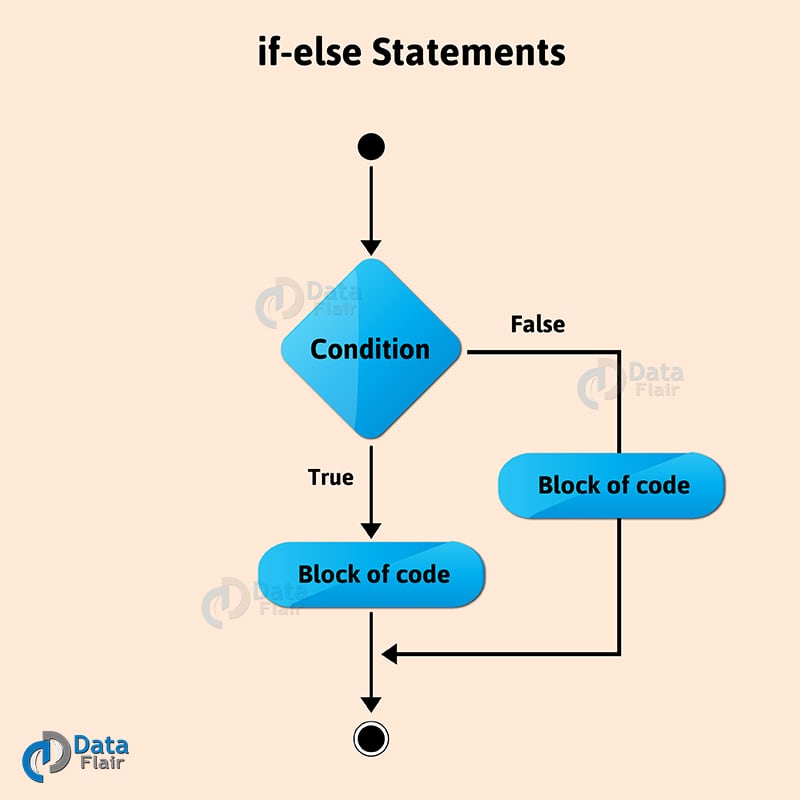
Python Decision Making – Python if-else Statement
if 2<1:
     print("2")
     else:
SyntaxError: Invalid syntax
if 2<1:
     print("2")
else:
     print("1")
Output
Pay attention to the indent. The else keyword does not appear in the if-block.
Press Backspace to undo the automatic indent. Here, 2 is not less than 1. So, the statements in the else-block are executed. It prints 1.
if 2<1:
    print("2")
else:
    print("1")
else:
SyntaxError: invalid syntax
>>>
As appears in the above example, you cannot posit two else statements under an if. It causes a syntax error.
Chained Conditionals (elif ladder)
Python allows the elif keyword as a replacement to the else-if statements in Java or C++. When we have more than one condition to check, we can use it.
If condition 1 isn’t True, condition 2 is checked. If it isn’t true, condition 3 is checked.
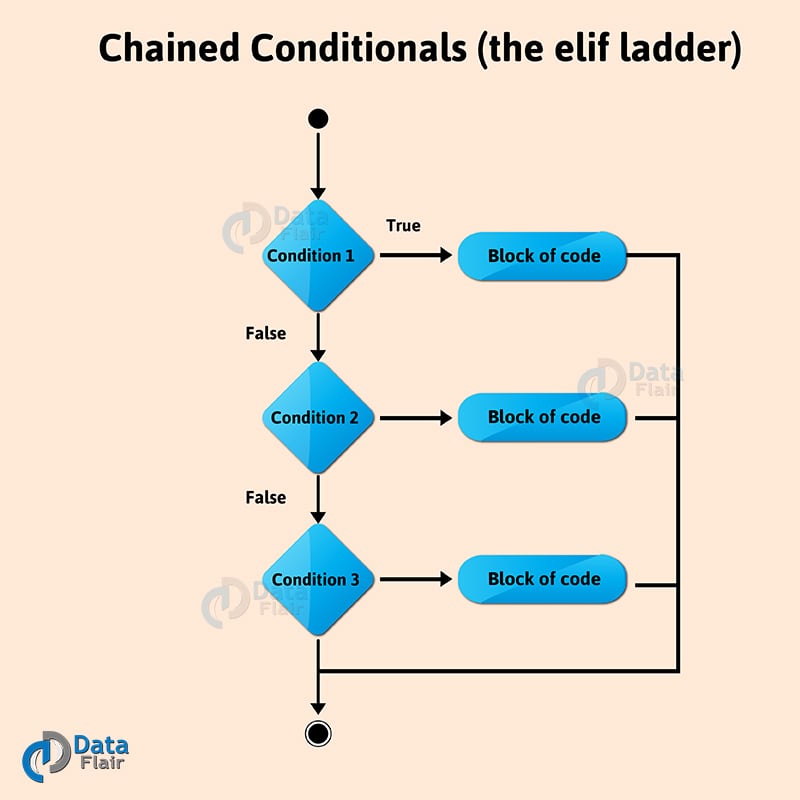
Python Decision Making Statements – Python Chained Operators
if 2<1:
     print("2")
     else if 3<1:
SyntaxError: invalid syntax
if 2<1:
     print("2")
elif 1<3:
     print("1")
Output
if 2<1:
     print("2")
elif 3<1:
     print("3")
else:
     print("1")
Output
>>>
As we saw, else if causes a syntax error. We must use elif. Here, 2 is not less than 1, so, the condition with elif is checked.
Since it is true (1<3), it prints 1. Also, you can put an else statement after your elif statements if you want. Since in the last example, the first two conditions are false, the else is executed. So, it prints 1.
Nested if Statements in Python
You can put an if statement in the block under another if statement. This is to implement further checks.
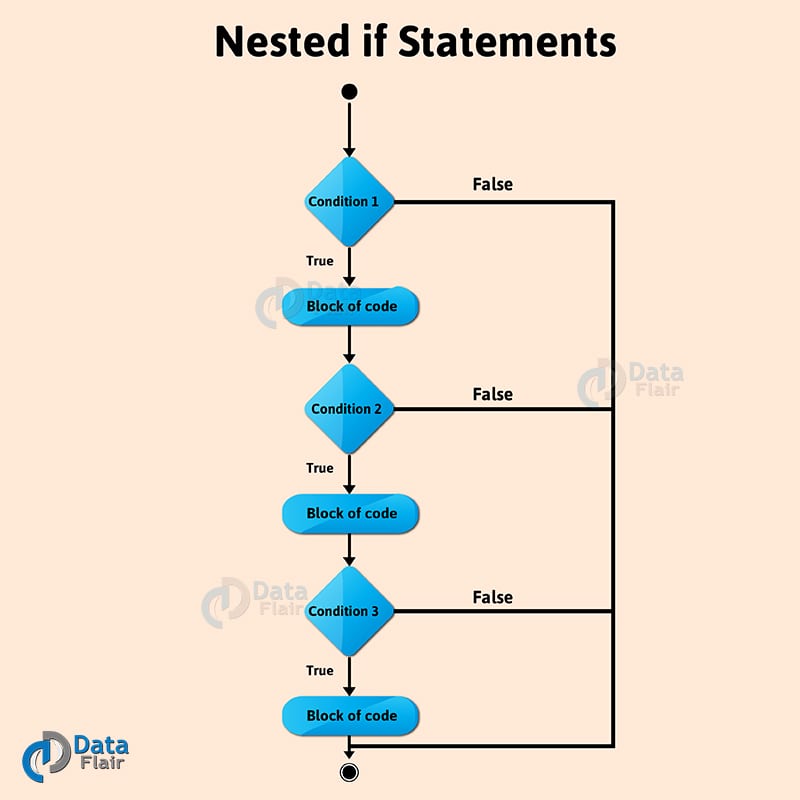
Python Decision Making – Nested if Statements in Python
>>>a=1
>>>b=2
>>>if a==1:
         if b==2:
               print("a is 1 and b is 2")
Output
>>>
Here, a is 1. So, b is checked. Since it is 2, it prints the given string. Not every if block has to have statements, though.
Single Statement Condition in Python
If you only need to write a single statement under if, you can write it in the same line using single-statement Python decision-making constructs.
a=7
if a>4: print("Greater")
Output
>>>
Here, we wrote it in one line, but it works without a problem.
if a>4: print("Hi"); print("Works")Output
Works
>>>
You can also use semicolons to write more than one statement in the same line as the condition. However, this may affect the readability of your code.
So, this was all about Python Decision-Making Statements. Hope you like our explanation.
Python Interview Questions on Decision-Making Statements
1. What is a decision-making statement in Python?
2. How do you make a decision in Python?
3. How many types of decision-making statements are there in Python?
4. What is an Elif statement in Python?
5. Can you have two if statements in Python?
Conclusion
Decision-making in Python centers on the if, elif, and else keywords, which steer the route your program walks based on boolean tests. A clear condition checks the value of variables, the length of lists, or the truth of function calls, and then runs only the branch that passes. Compound conditions use and and or to tie tests together, while the walrus operator,: =, can store a value inside the if line itself, saving a lookup.
We have discussed all these statements with syntax and examples for better understanding. They allow us to make decisions in Python so that we can choose a set of statements to execute.
Don’t forget to try your own combinations in the shell.
Furthermore, if you have any queries, feel free to share them with us!
Did you like our efforts? If Yes, please give DataFlair 5 Stars on Google






Great tutorial
Glad, you like our article – Python Decision Making Statement. Hope, it helped and cleared all your Python concept. For more informative Python Tutorial follow our sidebar.
Keep learning and keep exploring DataFlair
this is a good lesson ,which can open up the eyes of most blinds in programming
Thanks for liking Python if statements article. Keep visiting DataFlair for more learning!!!!
Yes, it is great tutorial
Great Work!