
Python Variables and Data Types – A complete guide for beginners
Master Python with 70+ Hands-on Projects and Get Job-ready - Learn Python
In this Python tutorial, we will learn about Python variables and data types being used in Python.
We will also learn about converting one data type to another in Python and local and global variables in Python.
So, let’s begin with Python variables and data types Tutorial.
What are Python Variables?
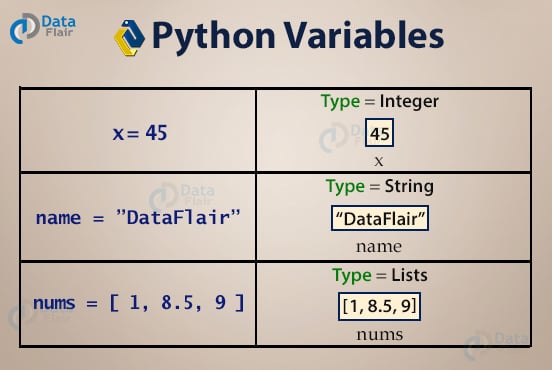
Python lets you store information in variables. Think of a variable as a named box where you keep data while your program runs. You choose a short, clear name, then use the equal sign (=) to place a value inside that box.
For example, if you store 7 in a variable, later, you can store ‘Dinosaur’.
1. Python Variables Naming Rules
There are certain rules for what you can name a variable(called an identifier).
- Variables in Python can only begin with a letter(A-Z/a-z) or an underscore(_).
>>> 9lives=9
Output
>>> flag=0
>>> flag
>>> _9lives='cat'
>>> _9lives
Output
- The rest of the identifier may contain letters(A-Z/a-z), underscores(_), and numbers(0-9).
>>> year2='Sophomore'
>>> year2
Output
>>> _$$=7
Output
- Python is case-sensitive, and so are Python identifiers. Name and name are two different identifiers.
>>> name='Ayushi'
>>> name
Output
>>> Name
Output
File “<pyshell#21>”, line 1, in <module>
Name
NameError: name ‘Name’ is not defined
- Reserved words (keywords) cannot be used as identifier names.
| and | def | False | import | not | True |
| as | del | finally | in | or | try |
| assert | elif | for | is | pass | while |
| break | else | from | lambda | with | |
| class | except | global | None | raise | yield |
| continue | exec | if | nonlocal | return |
2. Assigning and Reassigning Python Variables
To assign a value to Python variables, you don’t need to declare its type.
You name it according to the rules stated in section 2a, and type the value after the equal sign(=).
>>> age=7
>>> print(age)
Output
>>> age='Dinosaur'
>>> print(age)
Output
However, age=Dinosaur doesn’t make sense. Also, you cannot use Python variables before assigning it a value.
>>> name
Output
File “<pyshell#8>”, line 1, in <module>
name
NameError: name ‘name’ is not defined
You can’t put the identifier on the right-hand side of the equal sign, though. The following code causes an error.
>>> 7=age
Output
Neither can you assign Python variables to a keyword.
>>> False=choice
Output
3. Multiple Assignment
You can assign values to multiple Python variables in one statement.
>>> age,city=21,'Indore'
>>> print(age,city)
Output
Or you can assign the same value to multiple Python variables.
>>> age=fav=7
>>> print(age,fav)
Output
This is how you assign values to Python Variables
4. Swapping Variables
Swapping means interchanging values. To swap Python variables, you don’t need to do much.
>>> a,b='red','blue'
>>> a,b=b,a
>>> print(a,b)
Output
5. Deleting Variables
You can also delete Python variables using the keyword ‘del’.
>>> a='red'
>>> del a
>>> a
Output
File “<pyshell#39>”, line 1, in <module>
a
NameError: name ‘a’ is not defined
Python Data Types
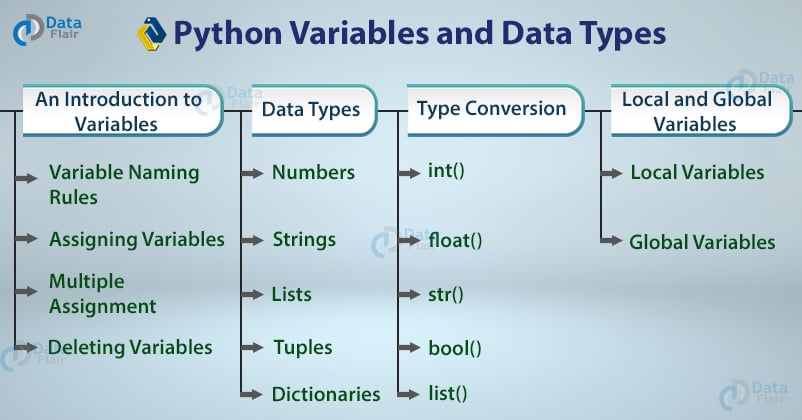
Different kinds of data need different boxes. Python calls these kinds data types. The most common are numbers, text (called strings), lists, and True/False values (called booleans). Knowing the right type helps Python decide what actions are allowed.
You can check a variable’s type with the built-in type() function. If you mix the wrong types, Python shows an error. For smooth coding, always know what type you have and what type you need before you combine data.
Python supports the following data types.
1. Python Numbers
There are four numeric data types in Python.
a. int in Pythin
int stands for integer. The integer data type in Python holds signed integers. We can use the type() function to find which class it belongs to.
>>> a=-7
>>> type(a)
Output
An integer can be of any length, with the only limitation being the available memory.
>>> a=9999999999999999999999999999999
>>> type(a)
Output
b. float in Python
The float data type in Python holds floating-point real values. An int can only store the number 3, but a float can store 3.25 if you want.
>>> a=3.0
>>> type(a)
Output
c. long
Long Data type in Python holds a long integer of unlimited length. But this construct does not exist in Python 3.x.
d. complex
A complex data type in Python holds a complex number. A complex number looks like this: a+bj Here, a and b are the real parts of the number, and j is imaginary.
>>> a=2+3j
>>> type(a)
Output
Use the isinstance() function to tell if Python variables belong to a particular class. It takes two parameters- the variable/value, and the class.
>>> print(isinstance(a,complex))
Output
2. Python Strings
A string is a sequence of characters. Python does not have a char data type, unlike C++ or Java. You can delimit a string using single quotes or double quotes.
>>> city='Ahmedabad'
>>> city
Output
>>> city="Ahmedabad"
>>> city
Output
a. Spanning a String Across Lines in Python
To span a string across multiple lines, you can use triple quotes.
>>> var="""If
only"""
>>> var
Output
>>> print(var)
Output
Only
>>> """If
only"""
Output
As you can see, the quotes preserved the formatting (\n is the escape sequence for newline, \t is for tab).
b. Displaying Part of a String in Python
You can display a character from a string using its index in the string. Remember, indexing starts with 0.
>>> lesson='disappointment'
>>> lesson[0]
Output
You can also display a burst of characters in a string using the slicing operator [].
>>> lesson[5:10]
Output
This prints the characters from 5 to 9.
c. String Formatters in Python
String formatters in Python allow us to print characters and values at once. You can use the % operator.
>>> x=10;
>>> printer="Dell"
>>> print("I just printed %s pages to the printer %s" % (x, printer))
Or you can use the format method.
>>> print("I just printed {0} pages to the printer {1}".format(x, printer))
>>> print("I  just printed {x} pages to the printer {printer}".format(x=7, printer="Dell"))
A third option is to use f-strings.
>>> print(f"I just printed {x} pages to the printer {printer}")d. String Concatenation in Python
You can concatenate(join) strings in Python.
>>> a='10'
>>> print(a+a)
Output
However, you cannot concatenate values of different types.
>>> print('10'+10)Output
Traceback (most recent call last):File “<pyshell#89>”, line 1, in <module>;
print(’10’+10)
TypeError: must be str, not int
3. Python Lists
A list is a collection of values. Remember, it may contain different types of values.
To define a list in Python, you must put values separated by commas in square brackets. You don’t need to declare a type for a list either.
>>> days=['Monday','Tuesday',3,4,5,6,7]
>>> days
Output
a. Slicing a List in Python
You can slice a list in python the way you’d slice a string- with the slicing operator.
>>> days[1:3]
Output
Indexing for a list begins with 0, like for a string. Python doesn’t have arrays.
b. Finding the Length of a List in Python
Python supports an inbuilt function to calculate the length of a list.
>>> len(days)
Output
c. Reassigning Elements of a List
A list is mutable in Python. This means that you can reassign elements later on.
>>> days[2]='Wednesday'
>>> days
Output
d. Iterating on the List in Python
To iterate over the list in Python, we can use the for loop. By iterating, we can access each element one by one, which is very helpful when we need to perform some operations on each element of a list.
nums = [1,2,5,6,8]
for n in nums:
    print(n)
Output
2
5
6
8
e. Multidimensional Lists
A list may have more than one dimension. Have a detailed look at this in DataFlair’s tutorial on Python Lists.
>>> a=[[1,2,3],[4,5,6]]
>>> a
Output
4. Python Tuples
A tuple in Python is like a list. You declare it using parentheses instead.
>>> subjects=('Physics','Chemistry','Maths')
>>> subjects
Output
a. Accessing and Slicing a Tuple in Python
You access a tuple in Python the same way as you’d access a list. The same goes for slicing it.
>>> subjects[1]
Output
>>> subjects[0:2]
Output
b. A tuple is Immutable
Python tuple is immutable. Once declared, you can’t change its size or elements.
>>> subjects[2]='Biology'
Output
File “<pyshell#107>”, line 1, in <module>
subjects[2]=’Biology’
TypeError: ‘tuple’ object does not support item assignment
>>> subjects[3]='Computer Science'
Output
File “<pyshell#108>”, line 1, in <module>
subjects[3]=’Computer Science’
TypeError: ‘tuple’ object does not support item assignment
5. Python Dictionaries
A dictionary in Python holds key-value pairs. Declare it in curly braces, with pairs separated by commas. Separate keys and values by a colon(:).
>>> person={'city':'Ahmedabad','age':7}
>>> person
Output
The type() function works with dictionaries too.
>>> type(person)
Output
a. Accessing a Value in a Dictionary
To access a value in a dictionary, you mention the key in square brackets.
>>> person['city']
Output
b. Reassigning Elements in Dictionary
You can reassign a value to a key.
>>> person['age']=21
>>> person['age']
Output
c. List of Keys
Use the keys() function to get a list of keys in the dictionary.
>>> person.keys()
Output
6. bool
A Boolean value can be True or False.
>>> a=2>1
>>> type(a)
Output
7. Python Sets
A set can have a list of values. In Python, a set is defined using curly braces.
>>> a={1,2,3}
>>> a
Output
It returns only one instance of any value present more than once.
>>> a={1,2,2,3}
>>> a
Output
However, a set is unordered, so it doesn’t support indexing.
>>> a[2]
Output
File “<pyshell#127>”, line 1, in <module>
a[2]
TypeError: ‘set’ object does not support indexing
Also, it is mutable. You can change its elements or add more. Use the add() and remove() methods to do so.
>>> a={1,2,3,4}
>>> a
Output
>>> a.remove(4)
>>> a
Output
>>> a.add(4)
>>> a
Output
Type Conversion in Python
Since Python is a dynamically-typed language, you may want to convert a value into another type. Python supports a list of functions for the same.
1. int() in Python
Python int() function converts the value into an int.
>>> int(3.7)
Output
Notice how it truncated 0.7 instead of rounding the number off to 4. You can also turn a Boolean into an int.
>>> int(True)
Output
>>> int(False)
However, you cannot turn a string into an int. It throws an error.
>>> int("a")Output
File “<pyshell#135>”, line 1, in <module>;
int(“a”)
ValueError: invalid literal for int() with base 10: ‘a’
However, if the string has only numbers, then you can.
>>> int("77")Output
2. float() in Python
Python float() function converts the value into a float.
>>> float(7)
Output
>>> float(7.7)
Output
>>> float(True)
Output
1.0
>>> float("11")Output
You can also use ‘e’ to denote an exponential number.
>>> float("2.1e-2")Output
>>> float(2.1e-2)
Output
However, this number works even without the float() function.
>>> 2.1e-2
Output
3. str() in Python
Python str() function converts the value into a string.
>>> str(2.1)
Output
>>> str(7)
Output
>>> str(True)
Output
You can also convert a list, a tuple, a set, or a dictionary into a string.
>>> str([1,2,3])
Output
4. bool() in Python
Python bool() function converts the value into a boolean.
>>> bool(3)
Output
>>> bool(0)
Output
>>> bool(True)
Output
>>> bool(0.1)
Output
You can convert a list into a Boolean.
>>> bool([1,2])
Output
The function returns False for empty constructs.
>>> bool()
Output
>>> bool([])
Output
>>> bool({})Output
None is a keyword in Python that represents an absence of value.
>>> bool(None)
Output
5. set() in Python
python set() function converts the value into a set.
>>> set([1,2,2,3])
Output
>>> set({1,2,2,3})Output
6. list() in Python
Python list() function converts the value into a list.
>>> del list
>>> list("123")
Output
>>> list({1,2,2,3})Output
>>> list({"a":1,"b":2})Output
However, the following raises an error.
>>> list({a:1,b:2})Output
File “<pyshell#173>”, line 1, in <module>;
list({a:1,b:2})
TypeError: unhashable type: ‘set’
7. tuple() in Python
Python tuple() function converts the value into a tuple.
>>> tuple({1,2,2,3})Output
You can try your own combinations. Also, try composite functions.
>>> tuple(list(set([1,2])))
Output
Python Local and Global Variables
Another classification of Python variables is based on scope.
1. Python Local Variables
When you declare a variable in a function, class, or so on, it is only visible in that scope. If you call it outside of that scope, you get an ‘undefined’ error.
- Local variables in Python can be accessed only within a particular function.
- It executes when a function is called in which the local variable is defined.
>>> def func1():
	uvw=2
	print(uvw)
>>> func1()
Output
2
>>> uvw
Output
File “<pyshell#76>”, line 1, in <module>
uvw
NameError: name ‘uvw’ is not defined[/php]
Here, the variable uvw is local to the function func1().
2. Global Variables in Python
When you declare a variable outside any context/scope, it is visible in the whole program.
- It can be accessed anywhere in the entire program.
- If the value of a global variable is changed, it will affect the whole program.
>>> xyz=3
>>> def func2():
	xyz=0
	xyz+=1
	print(xyz)
>>> func2()
Output
>>> xyz
Output
You can use the ‘global’ keyword when you want to treat a variable as global in a local scope.
>>> foo=1
>>> def func2():
	global foo
	foo=3
	print(foo)
>>> func2()
Output
>>> foo
Output
Frequently asked Python Interview Questions on Python Variables and Datatypes?
1. What are variables and data types in Python?
2. What is type () in Python?
3. What are Local and Global variables in Python?
4. Explain various naming rules for Python Variables.
5. How to display part of a string?
Summary
In this tutorial on Python Variables and Data Types, we learned about different variables in Python and data types in Python with examples.
We looked at the naming rules, and defining and deleting them. Then we saw different data types in python – numbers, strings, lists, dictionaries, tuples, sets, and many more.
We also learned how to convert one variable type into another and local and global variables in Python.
Did you know we work 24x7 to provide you best tutorials
Please encourage us - write a review on Google






>>>person={city:’Ahmedabad’age:7}
>>> person
>>>{‘Ahmedabad’: ‘Ahmedabad’, 7: 7}
this code is giving error ,please improve it.
Check Json format
person={“city”:”Ahmedabad”,”age”:7}
Thanks for Pointing out the Typo in Python Variable and Dataset. We have made the necessary changes.
Regards,
DataFlair
In datatype conversions i am unable to convert str(2) into string.As output showing me as a integer.
Hi Padmaja,
Thanks for the comment. It should work. Try this:
>>> str(2)
‘2’
>>> type(str(2))
Hope, it will help you!
For more queries regarding Python variable and datatype, ping here.
Regards,
DataFlair
Great explanation. Is there a way you can put practice questions at the end of each topic?
Hello Bakare,
We have 6 Articles on Python Interview Questions, you can practice from there and soon we will publish a series of Python Quiz. So, stay connected from DataFlair to get it.
Hello,
print(“I just printed {x} pages to the printer {printer}”.format(x=7, printer=Dell)) there is a little mistake here, just wanted to let you know. It should be: printer=”Dell”, you forgot the quotes there 🙂
Thank you for such a great site.
Hey Semih,
Thanks for improving us. It was a typo error, we have corrected it. Now, you can learn Python Variables and data types hassle free.
Regards,
DataFlair
Hi Team,
Can you pleas give more explanation on f string – string formaters
Hey Durga,
Thanks for connecting with DataFlair, we have another article on Python Strings, in which you can get all the details about f-strings and string formatters. Please refer to our sidebar for the same.
Hope it helps!
Hi Team
If I try the code for Global variables as typed:
xyz=3
def func2():
xyz+=1
print(xyz)
xyz
I get a few issues – namely around indents which I correct and then that the statement xyz has no effect. Changing this to func2() then causes an error that says local variable ‘xyz’ referenced before assignment.
Have I misunderstood the tutorial? I thought that defining xyz in line 1 made it global? But it seems not. If I add ‘global xyz’ as line 3 then it works.
Can you help explain?
Thanks
Hi, Ben
Thanks for pointing this out. We have made the necessary changes.
Also, defining xyz=1 does not make it global for func2- you need to put ‘global xyz’ in func2 so it can modify the value of the global xyz.
Hope, it helps!
you should give practice questions after each important article.Like in this Python Variable article questions are must for practice.Hope you will understand it
Yes we do understand your requirement and hence we have launched free Python course which is a complete blend of practicals and projects.
i am here to build logics and learn or gain knowledge about python beginner level to deep learning advance level but i am confusing so give me some suggetion or a list of learning way of right method.
Hello Rahul,
Here you go, we are providing 270+ free Python tutorials from beginners to advanced level in a proper sequence. It will help you to understand from where you should start.
hi all, guys i am a beginner and i am really struggling to understand string formatting as it does’nt show a syntax and it has’nt even posted any outcome , so i had to run this program and it took me a while to understand the syntax but still i am not very clear about it , for those who faced the same problem , i am gonna post the outcome:
x=10
printer=”Dell”
print(“I just printed %s pages to the printer %s” % (x, printer))
print(“I just printed {0} pages to the printer {1}”.format(x, printer))
print(“I just printed {x} pages to the printer {printer}”.format(x=7, printer=”Dell”))
print(f”I just printed {x} pages to the printer {printer}”)
Outcome/Output
I just printed 10 pages to the printer Dell
I just printed 10 pages to the printer Dell
I just printed 7 pages to the printer Dell
I just printed 10 pages to the printer Dell