
Python Pandas Tutorial – Learn Pandas in Python
Master Python with 70+ Hands-on Projects and Get Job-ready - Learn Python
In our last Python Library tutorial, we discussed Python Scipy. Today, we will look at a Python Pandas Tutorial. In this Pandas tutorial, we will learn the exact meaning of Pandas in Python. Moreover, we will see the features, installation, and dataset in Pandas. Along with this, we will discuss Pandas data frames and how to manipulate the dataset in Python Pandas. Also, we will discuss Pandas examples and some terms, such as ranking, series, and panels.
So, let’s start the Python Pandas Tutorial.
Python Pandas Tutorial 2018 | Learn Pandas in Python
What is Pandas in Python?
As discussed above, you can use pandas to manipulate and analyze data. With the data structures and operations it has to offer, you can play around with time series and numerical tables.
Python Pandas Tutorial
Let’s take a look at some bullet points about this-
- Author: Wes McKinney
- First Release: version 0.23.2; July, 2018
- Written in: Python
Pandas is under a three-clause BSD license and is free to download, use, and distribute. Etymologically, the term is a portmanteau of the words “panel” and “data”. What this means is that you need to supervise data sets multiple times for one individual.
Do you know about Python Multiple Inheritance?
Benefits of using pandas:
- Organised tables: It lets you work in a dataframe, which looks the same as a spreadsheet.
- Fast and powerful: It can process a vast amount of data at a time.
- Easy cleaning: It has commands like one click, which help in fixing the errors easily.
- Works with others: It helps in directly connecting with the tools used to make charts and AI models.
Python Pandas Features
Here, in this Python pandas Tutorial, we are discussing some Pandas features:
- Inserting and deleting columns in data structures.
- Merging and joining data sets.
- Reshaping and pivoting data sets.
- Aligning data and dealing with missing data.
- Manipulating data using integrated indexing for DataFrame objects.
- Performing split-apply-combine on data sets using the group-by engine.
- Manipulating high-dimensional data in a data structure with a lower dimension using hierarchical axis indexing.
- Subsetting, fancy indexing, and label-based slicing data sets that are large in size.
- Generating data range, converting frequency, date shifting, lagging, and other time-series functionality.
- Reading from files with CSV, XLSX, TXT, and other formats.
- Arranging data in an ascending or descending order.
- Filtering data around a condition.
- Analyzing time series.
- Iterating over a data set.
With Python Pandas, it is easier to clean and wrangle your data. Pandas Features like these make it a great choice for data science and analysis. Using it with libraries like NumPy and Matplotlib makes it all the more useful.
Do you know about NumPy, a Python Library
How to Install Pandas?
Below are the steps to install Pandas in Python:
a. Installing Pandas
To install pandas, you can use pip-
pip install pandas
b. Importing Pandas
Now let’s import this using an alias-
>>>import pandas as pd
This lets us enjoy the liberty of mentioning pandas as pd.
c. Importing a Dataset
You can use the function read_csv() to make it read a CSV file. Let’s import the furniture dataset.
Let’s discuss Python File Format
>>> furniture=pd.read_csv('furniture.csv')
>>> furniture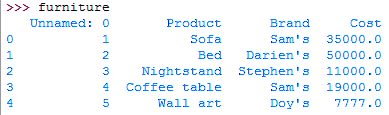
Python Pandas Tutorial – Importing a Dataset in Pandas
Dataset in Pandas
Following are the Pandas datasets, let’s discuss them in detail:
a. Column names
The following command will give us all the column names-
>>> furniture.columns
Index([‘Unnamed: 0’, ‘Product’, ‘Brand’, ‘Cost’], dtype=’object’)
We can slice it-
>>> furniture.columns[0:2]
Index([‘Unnamed: 0’, ‘Product’], dtype=’object’)
b. Data types
>>> furniture.dtypes
Unnamed: 0 int64
Product object
Brand object
Cost int64
dtype: object
Read Python namedtuple
To find out more about data types, read up on NumPy with Python. Let’s find out the data types of one column.
>>> furniture['Brand'].dtypes
dtype(‘O’)
O denotes an object.
c. Shape
To find out what shape your data set is, you can use the shape tuple-
>>> furniture.shape
(5, 4)
Number of rows-
>>> furniture.shape[0]
5
Number of columns-
>>> furniture.shape[1]
4
d. Individual rows
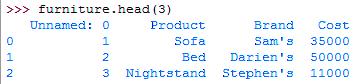
The head() method will give us the first 5 rows of the data set, but we can also choose to print fewer or more.
>>> furniture.head(3)
Python Pandas Tutorial – Individual rows
>> furniture.tail(2)

Python Pandas Tutorial – Individual rows
e. Unique values
We can use the unique() function when we want to see what categories in the data set are unique.
Let’s discuss Python Defaultdict
>>> furniture.index.unique()
Int64Index([0, 1, 2, 3, 4], dtype=’int64′)
And to find out how many, we make a call to nunique().
>>> furniture.index.nunique()
5
DataFrames in Pandas
A DataFrame is an essential data structure with pandas. It lets us deal with data in a tabular fashion. The rows are observations, and the columns are variables.
We have the following syntax for this-
pandas.DataFrame( data, index, columns, dtype, copy)
Such a data structure is-
- Mutable
- Variable columns
- Labeled axes
- Capable of performing arithmetic operations on columns and rows
a. Creating a DataFrame
Let’s see how we can create a DataFrame.
>>> df=pd.DataFrame({'company':['Amazon','Apple','Google','Facebook','Microsoft'],
    'CEO':['Jeff Bezos','Tim Cook','Sundar Pichai','Mark Zuckerberg','Satya Nadella'],
    'Founded':[1994,1976,1998,2004,1975]})
>>> df
Python Pandas Tutorial – Creating a DataFrame
b. Setting Indexes for a DataFrame
Now this indexes the dataframe as integers starting at 0. But we can put labels on these. Let’s see how we can index it based on which company came first.
>>> df.index=['Third','Second','Fourth','Fifth','First']
>>> df
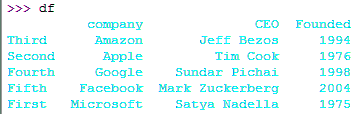
Python Pandas Tutorial – Setting Indexes for a DataFrame
c. Indexing a DataFrame
A column-
Let’s learn about Python collections
>>> df['company']
Third Amazon
Second Apple
Fourth Google
Fifth Facebook
First Microsoft
Name: company, dtype: object
This prints out a Series. Now, to print out a DataFrame, we can:
>>> df[['company']]
company
Third Amazon
Second Apple
Fourth Google
Fifth Facebook
First Microsoft
>>> df[['company','Founded']]
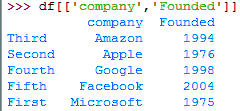
Indexing a DataFrame
d. Slicing a DataFrame
It is possible to slice a DataFrame to retrieve rows from it.
>>> df[0:3]
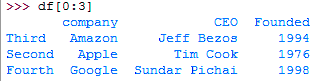
Python Pandas Tutorial – Slicing a DataFrame
e. More data selection operations
Using loc and iloc, you can select certain rows in a data set. loc uses string indices; iloc uses integers.
>>> df.loc[['Second','Fifth']]

Python Pandas Tutorial – More data selection operations
>>> df.iloc[3]
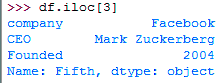
Pandas Tutorial
Getting more than one column-
>>> df.iloc[:,1:4]
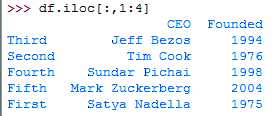
Python Pandas Tutorial
Manipulating the Datasets in Pandas
So far, we’ve seen how we can find out more about a dataset (and also, how to set indexes to it, okay). Now let’s see what we can do to it.
Let’s explore Python Jobs.
a. Changing the data type
Let’s use the furniture dataset for this.
>>> furniture.Cost=furniture.Cost.astype(float)
>>> furniture
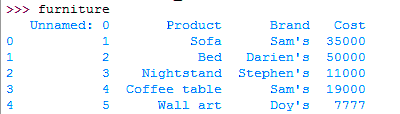
Python Pandas Tutorial – Changing the data type
b. Creating a frequency distribution
For this purpose, we have the method value_counts().
>>> furniture.index=['A','B','A','A','C']
>>> furniture.index.value_counts(ascending=True)
C 1
B 1
A 3
dtype: int64
c. Creating a crosstab
A crosstab creates a bivariate frequency distribution.
Learn more about Python read & write files
>>> pd.crosstab(furniture.index,furniture.Brand)
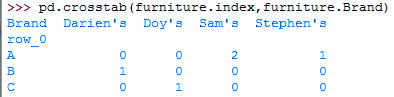
Python Pandas Tutorial – Creating a crosstab
d. Choosing one column as an index
You can choose one of the columns in your dataset to index others.
>>> df.set_index('company',inplace=True)
>>> df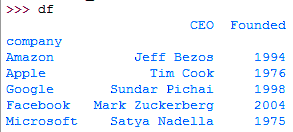
Pandas Tutorial -Choosing one column as index
To reset this, you can:
>>> df.reset_index(inplace=True)
>>> df
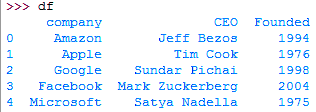
Pandas Tutorial – Choosing one column as index
e. Sorting data
For this, we use the function sort_values().
>>> furniture.sort_values('Cost',ascending=False)
Python Pandas Tutorial – Sorting data
f. Renaming variables
Let’s rename the variable ‘company’ to ‘Company’.
>>> df.columns=['Company','CEO','Founded']
>>> df

Python Pandas Tutorial – Renaming variables
Or we can:
Do you know about Python Data Science
>>> furniture.rename(columns={'Product':'Category'},inplace=True)
>>> furniture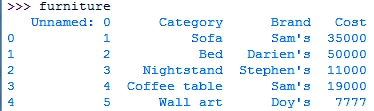
Renaming variables
g. Dropping rows and columns
It is possible to drop any number of rows and columns you want.
>>> furniture.drop('Cost',axis=1)
Dropping rows and columns
h. Creating new variables
Now, let’s add 10% of the cost to itself and find out the gross amount.
>>> furniture['Gross']=furniture.eval('Cost+(Cost*(0.1))')
>>> furniture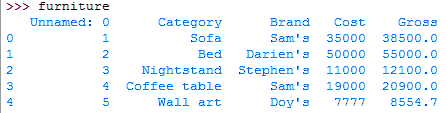
Creating New Variables
Describing a Dataset in Pandas
Here, with the describe() method, we can find out information about a dataset- min, max, mean, count, and more.
>>> furniture.describe()
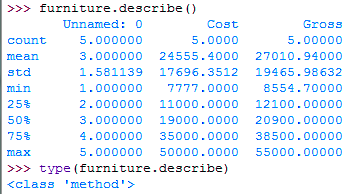
Pandas Tutorial – Describing a Dataset
>>> furniture.Gross.max()
55000.0
Pandas groupby Function
Generally, this operation lets you group data on a variable.
>>> furniture.groupby('Category').Gross.min()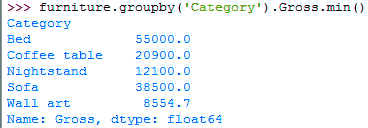
Pandas Tutorial – groupby Function
agg() lets us find out different values like count and min.
Have a look at Python Modules vs packages
>>> furniture.groupby('Category').Gross.agg(['count','min','max','mean'])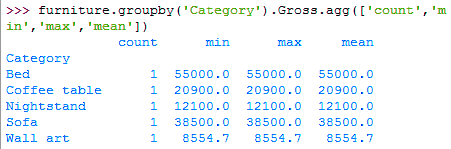
Group by function in pandas
Filtering in Python Pandas
Now, you can perform filtering in two ways-
>>> furniture[furniture.index==2]

Python Pandas – Filtering
>>> furniture.loc[furniture.index==2,:]
And then of course, you can group conditions. Or:
>>> furniture[furniture.index.isin([1,3])]

Filtering in Groupby
Missing Values in Pandas
Basically, isnull() will tell her if a column misses a value or more.
>>> furniture.isnull()
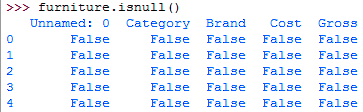
Missing Values in Pandas
Similarly, notnull() returns False for a NaN.
Number of missing values-
>>> furniture.isnull().sum()

Missing Values in Pandas
To drop a missing value, you can use dropna(), and to fill it, use fillna().
Learn about Python regular expressions
Ranking in Python Pandas
Now, to rank every variable according to its value, we can use rank().
>>> furniture.rank()
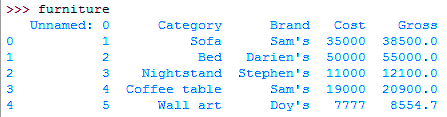
Python Pandas – Ranking
13. Python Pandas Tutorial – Concatenating DataFrames
So, with the concat() method, we can concatenate two or more DataFrames.
>>> pd.concat([df,furniture])
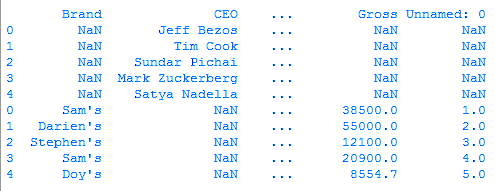
Python Pandas – Concatenating DataFrames
Let’s see what happens when we concatenate this with df.
>>> pd.concat([df,furniture,df])
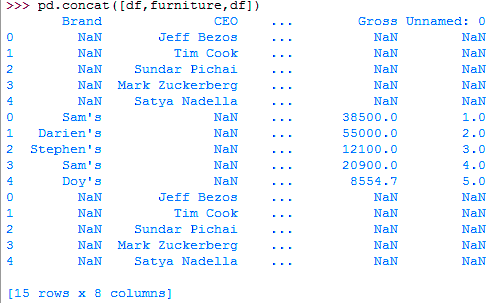
Concatenating DataFrames in Pandas
Series in Pandas
Now, another important data structure in pandas is a Series. This is a one-dimensional array; it is labeled and can hold more than one kind of data.
>>> pd.Series([2,4,'c'])
0 2
1 4
2 c
dtype: object
>>> pd.Series({1:'a',2:'b'})1 a
2 b
dtype: object
Read Python packages
Panels in Pandas
Finally, we come to panels. A panel holds data in 3 dimensions. As we said above, the term ‘pandas’ comes as a portmanteau of the words “panel” and “data”. A declaration for a panel takes in three parameters- items, major_axis, and minor_axis.
>>> import numpy as np
>>> pd.Panel(np.random.rand(2,4,5))
<class 'pandas.core.panel.Panel'>
Dimensions: 2 (items) x 4 (major_axis) x 5 (minor_axis)
Items axis: 0 to 1
Major_axis axis: 0 to 3
Minor_axis axis: 0 to 4
So, this was all in the Python pandas Tutorial. Hope you like our explanation.
Conclusion
Hence, in this Python Pandas Tutorial, we learn Pandas in Python. Moreover, we discussed Pandas example, features, installation, and data sets. Also, we saw Data frames and the manipulation of data sets. Still, if any doubt regarding Pandas in Python, ask in the comments tab.
See also –
Python Interpreter
For reference
Did we exceed your expectations?
If Yes, share your valuable feedback on Google






Thanks
How can I get a copy of furniture csv?
Hey, Sue!
Thanks for connecting with DataFlair through this Python Pandas tutorial. You can get CSV on your own, by inserting the following values into a Microsoft Excel spreadsheet:
Serial, Product, Brand, Cost
1, Sofa, Sam’s, 35000
2, Bed, Darien’s, 50000
3, Nightstand, Stephen’s, 11000
4, Coffee table, Sam’s, 19000
5, Wall art, Doy’s, 7777
Save it as furniture.csv (remember to select ‘Save as type: CSV (Comma delimited) (*.csv). Won’t take more than a minute.
Keep learning and keep sharing
I have a pandas dataframe with three columns, column A is Id- str, column B is event date-object i.e list and column C is event name -object i.e list. For each value of column A there are multiple values of Columns B & C. What is the best way to query them? the file size is ~120 GB.
Hello,
In the beginning it is stated that this tutorial addresses dataframe merging and pivot tables, but there is no mention of these two features. Will you please add those?
Hey, the topics are covered under the heading “13. Python Pandas Tutorial – Concatenating DataFrames” and you can use the discussed functions for pivoting datasets.
correction needed here I guess. imported numpy rather than pandas
>>> import numpy as np
>>> pd.Panel(np.random.rand(2,4,5))
Hey, the code is in continuation with previous codes, we have added output and expliantion after each snippet of code to increase the clarity. If you just want to execute only this two lines then yes, you have to import pandas and numpy both.