
Java Project – Rock Paper Scissors Game
Get Job-ready: Java Course with 45+ Real-time Projects! - Learn Java
Welcome to the fascinating world of Rock-Paper Scissors, where quick thinking, strategy, and a little bit of luck collide! Regardless of whether you seek enjoyment or friendly competition, this widely loved hand game consistently generates thrill and eager anticipation. Are you ready to explore programming and unleash your creativity? No matter your level of coding expertise, this interactive blog is designed to lead you through each stage, providing step-by-step guidance to create your very own game from the ground up. Upon completing this blog, you will have a fully operational game that you can enjoy playing and sharing with your friends.
About Java Rock Paper Scissors Game
We will implement the following functionalities in the Java Rock Paper Scissors Game:
1)We will prompt the user to enter their choice (rock, paper, or scissors) using the Scanner class. The user’s input will be stored in the userChoice variable.
2)We will validate the user’s input to ensure it is one of the valid choices (rock, paper, or scissors). The isValidChoice function will check if the user’s choice matches any of the valid choices in the choices array.
3)We will generate the computer’s choice randomly using the generateComputerChoice function. It will select a random element from the choices array as the computer’s choice.
4)We will call the determineWinner function, passing the user’s choice and the computer’s choice as arguments. The function will compare the choices based on the rules of the Rock-Paper-Scissors game and determine the winner. If the choices are the same, it will be a tie. If the user wins, the program will return “You win!” as a result. Otherwise, the computer will win and “Computer wins!” will be returned.
Prerequisites for Java Rock Paper Scissors Game
To write and run the Rock Paper Scissors Game code, the following prerequisites are required:
1)Basic understanding of the Java programming language, including knowledge of loops, conditional statements, and object-oriented programming concepts.
2)Familiarity with array data structures and the Java.util package, which provides utility classes like Random and Arrays.
3)A working Java development environment, which includes installing the Java Development Kit (JDK) on your computer. You can download the JDK from the official Oracle website or use a package manager specific to your operating system.
4)An Integrated Development Environment (IDE) like IntelliJ IDEA, Eclipse, or NetBeans, which can greatly simplify Java development. Choose an IDE you are comfortable with and set it up.
Download Java Rock Paper Scissors Game
Please download the source code of the Java Rock Paper Scissors Game: Java Rock Paper Scissors Game Project Code.
Code Breakdown
The main() function serves as the starting point for the program. It sets up a Scanner object to read user input. It prompts the user to enter their choice and stores it in the userChoice variable. It then validates the user’s input using the isValidChoice function in a loop until a valid choice is entered. After that, it generates the computer’s choice using the generateComputerChoice function. It prints both the computer’s choice and the user’s choice. Finally, it calls the determineWinner function to determine the winner based on the choices and prints the result. It closes the scanner at the end.
public static void main(String[] args)
    {
        Scanner scanner = new Scanner(System.in);
        String[] choices = {"rock", "paper", "scissors"};
        System.out.println("Welcome to Rock Paper Scissors Game by DataFlair!");
        System.out.println("Enter your choice (rock, paper, or scissors): ");
        String userChoice = scanner.nextLine().toLowerCase();
        // Validate user input
        while (!isValidChoice(userChoice, choices))
        {
            System.out.println("Invalid choice! Please enter rock, paper, or scissors: ");
            userChoice = scanner.nextLine().toLowerCase();
        }
        String computerChoice = generateComputerChoice(choices);
        System.out.println("Computer chooses: " + computerChoice);
        System.out.println("You chose: " + userChoice);
        String result = determineWinner(userChoice, computerChoice);
        System.out.println(result);
        scanner.close();
    }
The isValidChoice() function takes a user’s choice and an array of valid choices as parameters. It verifies whether the user’s selection corresponds to any of the legitimate choices in the array. If it is valid, it returns true; otherwise, it returns false.
private static boolean isValidChoice(String choice, String[] validChoices)
    {
        for (String validChoice : validChoices)
        {
            if (choice.equals(validChoice))
            {
                return true;
            }
        }
        return false;
    }
The generateComputerChoice() function takes an array of choices as a parameter. It generates a random index within the range of the array and returns the choice at that index as the computer’s choice.
private static String generateComputerChoice(String[] choices)
    {
        int randomIndex = (int) (Math.random() * choices.length);
        return choices[randomIndex];
    }
The determineWinner() function takes the user’s choice and the computer’s choice as parameters. It compares the choices based on the rules of the Rock Paper Scissors game. If the choices are the same, it returns “It’s a tie!”. If the user succeeds according to the game rules, the program will show “You win!” as a result. Otherwise, it will display “Computer wins!” if the user doesn’t win.
private static String determineWinner(String userChoice, String computerChoice)
    {
        if (userChoice.equals(computerChoice))
        {
            return "It's a tie!";
        }
        else if ((userChoice.equals("rock") && computerChoice.equals("scissors")) ||
                (userChoice.equals("paper") && computerChoice.equals("rock")) ||
                (userChoice.equals("scissors") && computerChoice.equals("paper")))
                {
                return "You win!";
                }
        else
        {
            return "Computer wins!";
        }
    }
Code to illustrate the Java Rock Paper Scissors Game
import java.util.Scanner;
public class Rock_Paper_Scissors
{
    public static void main(String[] args)
    {
        Scanner scanner = new Scanner(System.in);
        String[] choices = {"rock", "paper", "scissors"};
        System.out.println("Welcome to Rock Paper Scissors Game by DataFlair!");
        System.out.println("Enter your choice (rock, paper, or scissors): ");
        String userChoice = scanner.nextLine().toLowerCase();
        // Validate user input
        while (!isValidChoice(userChoice, choices))
        {
            System.out.println("Invalid choice! Please enter rock, paper, or scissors: ");
            userChoice = scanner.nextLine().toLowerCase();
        }
        String computerChoice = generateComputerChoice(choices);
        System.out.println("Computer chooses: " + computerChoice);
        System.out.println("You chose: " + userChoice);
        String result = determineWinner(userChoice, computerChoice);
        System.out.println(result);
        scanner.close();
    }
    // Function to validate user's choice
    private static boolean isValidChoice(String choice, String[] validChoices)
    {
        for (String validChoice : validChoices)
        {
            if (choice.equals(validChoice))
            {
                return true;
            }
        }
        return false;
    }
    // Function to generate computer's choice
    private static String generateComputerChoice(String[] choices)
    {
        int randomIndex = (int) (Math.random() * choices.length);
        return choices[randomIndex];
    }
    // Function to determine the winner
    private static String determineWinner(String userChoice, String computerChoice)
    {
        if (userChoice.equals(computerChoice))
        {
            return "It's a tie!";
        }
        else if ((userChoice.equals("rock") && computerChoice.equals("scissors")) ||
                (userChoice.equals("paper") && computerChoice.equals("rock")) ||
                (userChoice.equals("scissors") && computerChoice.equals("paper")))
                {
                return "You win!";
                }
        else
        {
            return "Computer wins!";
        }
    }
}
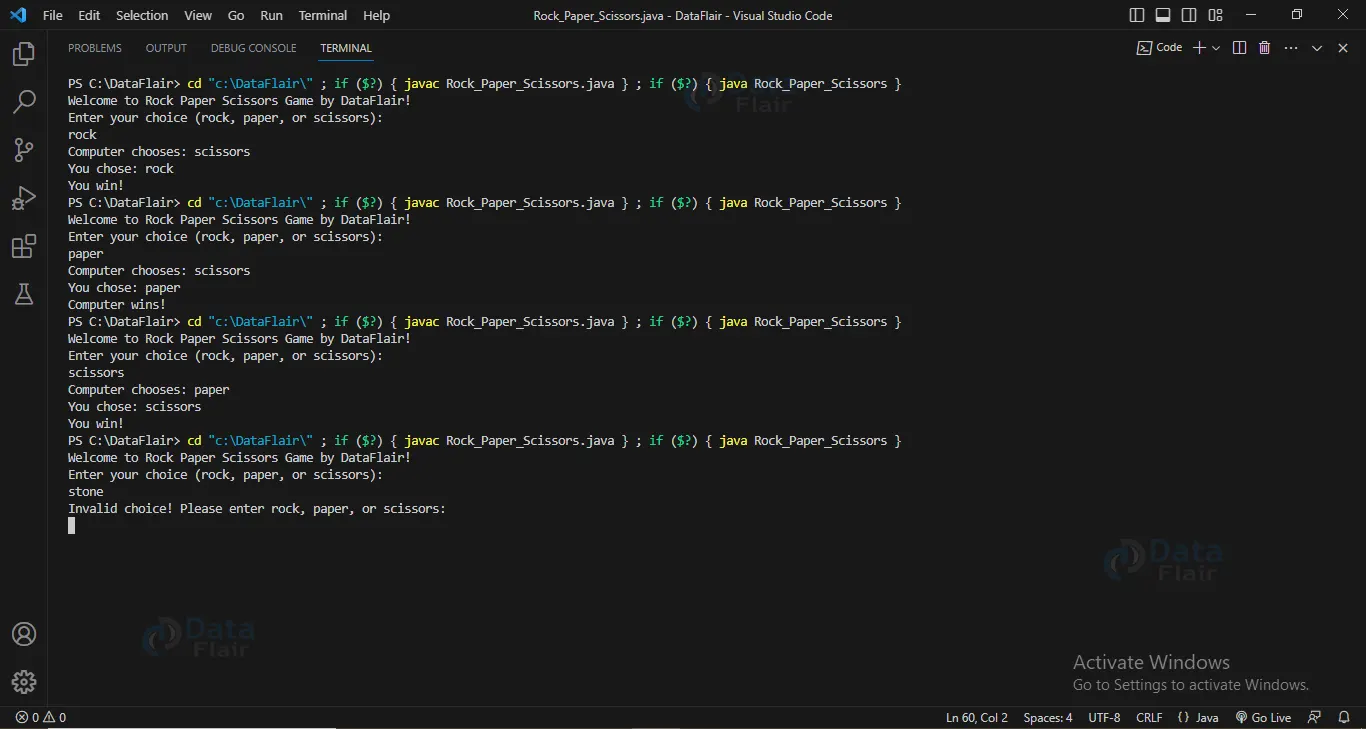
Java Rock Paper Scissors Game Output
Summary
Congratulations! You’ve now uncovered the secrets of building a Rock-Paper-Scissors game in Java. By breaking down the code and understanding its inner workings, you’re well-equipped to modify and enhance it to suit your creative ideas. Therefore, explore the code, try different approaches, and elevate your coding abilities to new heights. Enjoy the thrill of Rock-Paper-Scissors, now in your hands!
Did we exceed your expectations?
If Yes, share your valuable feedback on Google





