
OpenCV Project – Social Distancing Alert System
Machine Learning courses with 100+ Real-time projects Start Now!!
Introducing the Social Distancing Alert System using OpenCV—a groundbreaking solution aimed at keeping people safe and reducing the spread of COVID-19. This system utilizes advanced computer vision technology to effectively detect and monitor social distancing practices in different environments. By doing so, it helps ensure public health and safety by alerting individuals when they are not maintaining a safe distance from others.
In this introduction, we will delve into the system’s main features and advantages, emphasizing its potential to enhance overall well-being and create a safer environment for everyone.
How OpenCV Works?
The Social Distancing Alert System uses cameras and smart software called OpenCV to detect and track people in video footage. It calculates the distances between individuals accurately and compares them to recommended guidelines for social distancing. If people get too close, the system triggers alerts, like visual signals or alarms, to remind them to keep their distance. It can also integrate with other technologies for advanced features like generating compliance reports and monitoring in real-time.
The Role of HaarCascade
HarCascade, a specialized algorithm within OpenCV, plays a key role in a Social Distancing Alert System. It uses machine learning to detect human bodies in real-time video. By analyzing the distances between detected individuals, the system alerts us if they are too close, violating social distancing guidelines. OpenCV provides the necessary tools for video analysis and object detection, making it possible to implement this system effectively.
Distance Calculation
The provided code uses OpenCV and Haarcascade to detect people in a video and calculate the distance between them. It draws rectangles around the detected individuals and calculates the distance based on the size of their bounding boxes. If the distance between two people is less than a specified threshold, it indicates a violation of social distancing. The code then visually highlights the violating individuals and displays an alert message if any violations are found. Overall, the code helps identify social distancing breaches in the given video.
Prerequisites Social Distancing Alert System Using OpenCV
It is important to have a solid understanding of the Python programming language and the OpenCV library. Apart from this, you should have the following system requirements.
- Python 3.7 and above
- Any Python editor (VS code, Pycharm, etc.)
Download OpenCV Social Distancing Alert System Project
Please download the source code of OpenCV Social Distancing Alert System: OpenCV Social Distancing Alert System Project Code.
Installation
Open windows cmd as administrator
1. To install the opencv library run the command from the cmd.
pip install opencv-python
Let’s Implement It
To implement it follow the below step.
1. First of all we are importing all the necessary libraries that are required during implementation.
import cv2
import numpy as np
import time
2. The function detect_people detects people in a given frame. It converts the frame to grayscale and applies a cascade classifier specifically designed to detect people. It then returns the coordinates and dimensions of the bounding boxes around the detected people in the frame.
def detect_people(frame, cascade):
    gray = cv2.cvtColor(frame, cv2.COLOR_BGR2GRAY)
    detections = cascade.detectMultiScale(gray, scaleFactor=1.1, minNeighbors=5, minSize=(30, 30))
    return detections
Output of this step
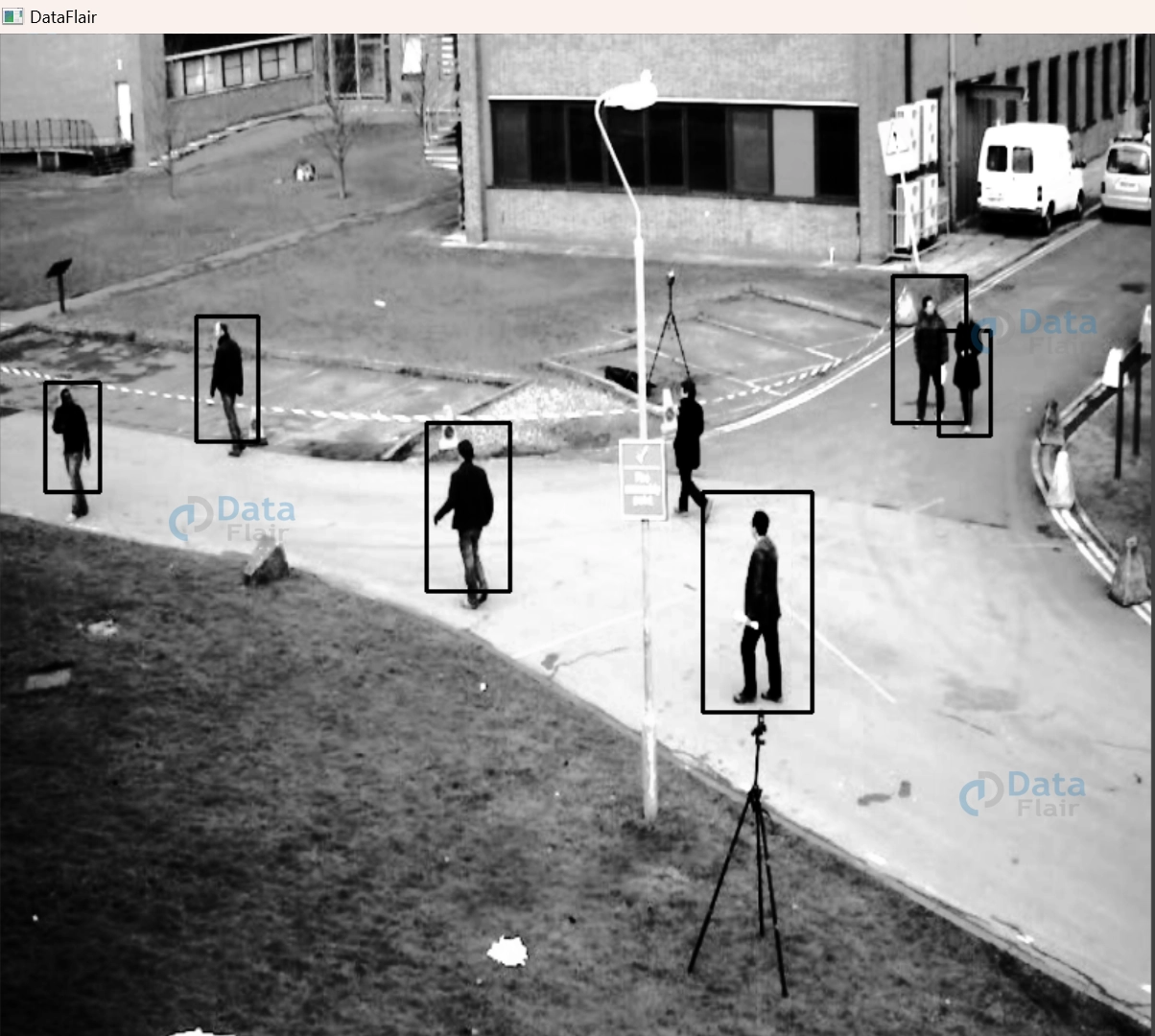
3. The function compute_distances calculates the distances between detected individuals based on their bounding boxes. It finds the centroid (center point) of each bounding box and computes the Euclidean distance between all pairs of centroids. The function returns the distances as a matrix and also provides a list of the centroids.
def compute_distances(detections):
    num_detections = len(detections)
    distances = np.zeros((num_detections, num_detections))
    centroids = []
    for i, (x1, y1, w1, h1) in enumerate(detections):
        cx1, cy1 = x1 + w1 // 2, y1 + h1 // 2
        centroids.append((cx1, cy1))
        for j, (x2, y2, w2, h2) in enumerate(detections):
            cx2, cy2 = x2 + w2 // 2, y2 + h2 // 2
            distances[i, j] = np.sqrt((cx1 - cx2)**2 + (cy1 - cy2)**2)
    return distances, centroids
Output of this step

4. The violate_social_distancing function counts violations of social distancing based on the distances between individuals. It returns the total count of violations.
def violate_social_distancing(distances, threshold=50):
    num_detections = distances.shape[0]
    violations = 0
    for i in range(num_detections):
        for j in range(i+1, num_detections):
            if distances[i, j] < threshold:
                violations += 1
    return violations
5. The code sets the file path to the Haarcascade XML file for detecting full-body patterns. It then initializes a classifier object using that XML file, which can be used to detect full-body images.
cascade_path = "C:/Users/yoges/OneDrive/Desktop/dataflair/Harcascade/opencv-master/data/haarcascades/haarcascade_fullbody.xml"
cascade_classifier = cv2.CascadeClassifier(cascade_path)
6. Pass the path of the video file in the VideoCapture function.
cap = cv2.VideoCapture("C:/Users/yoges/OneDrive/Desktop/dataflair/Social Distancing/pedestrian.avi")7. Start the While loop.
while True:
8. The code snippet reads the next frame from a video source. If no frame is successfully read or the video has ended, the code exits the loop and terminates.
ret, frame = cap.read()
    if not ret:
        break
9. In this code snippet, the frame is resized to a size of 512×512 pixels. People are then detected in the resized frame using a cascade classifier. The distances between the detected individuals are calculated, and the number of violations of social distancing is determined based on these distances.
frame = cv2.resize(frame, (512, 512))
pedestrian_detections = detect_people(frame, cascade_classifier)
distances, centroids = compute_distances(pedestrian_detections)
violations = violate_social_distancing(distances)

10. For each pedestrian detected, a green rectangle is drawn around them on the frame using their coordinates. This visually highlights the detected pedestrians.
for (x, y, w, h) in pedestrian_detections:
        cv2.rectangle(frame, (x, y), (x + w, y + h), (0, 255, 0), 2)
Output of this step

11. For each centroid representing a detected individual, a red circle is drawn on the frame at their coordinates. This provides a visual representation of the centroids of the detected individuals.
for (cx, cy) in centroids:
       cv2.circle(frame, (cx, cy), 5, (0, 0, 255), -1)
Output of this step

12. The loop iterates over each pedestrian detection in the pedestrian_detections list, allowing for individual processing or analysis of each detected pedestrian.
for i in range(len(pedestrian_detections)):
13. The code snippet compares each pair of pedestrian detections to check if their distance is less than 50. If a violation is detected, it visually highlights the violating pedestrians by drawing red rectangles around them and displaying a “Violating” label near each of them on the frame. It also displays an alert message indicating a social distancing violation.
for j in range(i+1, len(pedestrian_detections)):
            if distances[i, j] < 50:
                x1, y1, w1, h1 = pedestrian_detections[i]
                x2, y2, w2, h2 = pedestrian_detections[j]
                cv2.rectangle(frame, (x1, y1), (x1 + w1, y1 + h1), (0, 0, 255), 2)
                cv2.rectangle(frame, (x2, y2), (x2 + w2, y2 + h2), (0, 0, 255), 2)

                cv2.rectangle(frame, (x1 + w1, y1), (x1 + w1 + 150, y1 - 30), (0, 0, 255), cv2.FILLED)
                cv2.putText(frame, "Violating", (x1 + w1, y1 - 5), cv2.FONT_HERSHEY_SIMPLEX, 0.7, (255, 255, 255), 2)
                cv2.rectangle(frame, (x2 + w2, y2), (x2 + w2 + 150, y2 - 30), (0, 0, 255), cv2.FILLED)
                cv2.putText(frame, "Violating", (x2 + w2, y2 - 5), cv2.FONT_HERSHEY_SIMPLEX, 0.7, (255, 255, 255), 2)
                alert_message = "ALERT! Social Distancing Violation"
                cv2.putText(frame, alert_message, (10, 30), cv2.FONT_HERSHEY_SIMPLEX, 0.7, (0, 255, 255), 2)
Note:- write this for loop under the step 11th for loop.
14. The code displays the processed frame in a window titled “DataFlair” and waits for a key press. If the pressed key is ‘q’, the program stops running.
cv2.imshow("DataFlair", frame)
    if cv2.waitKey(1) & 0xFF == ord('q'):
        break
Note:- Write steps 8-14 under the while loop of step 7.
15. The code stops using the video capture and closes all OpenCV windows.
cap.release()
cv2.destroyAllWindows()
OpenCV Social Distancing Alert System Output

OpenCV Social Distancing Alert System Video Output
Conclusion
In summary, the Social Distancing Alert System developed with OpenCV and Haarcascade technology is an important tool for keeping people safe and healthy. It uses smart computer algorithms to identify and monitor individuals, making sure they follow social distancing rules. If someone gets too close to others, the system sends an instant alert, allowing for quick intervention to prevent the spread of viruses.
This technology has the potential to significantly reduce the transmission of contagious diseases, protect communities, and improve public health overall. By continuing to improve and widely implement these systems, we can work towards a safer and healthier future for everyone.
Did you like this article? If Yes, please give DataFlair 5 Stars on Google





