
OpenCV Project – Face Landmarks Detection
Machine Learning courses with 100+ Real-time projects Start Now!!
Face landmarks detection is a computer vision technique that locates specific points on a person’s face, enabling tasks like face recognition and emotion detection. It uses machine learning and deep learning models to accurately track these points in real time.
This technology has wide-ranging applications, including human-computer interaction, biometrics, and computer graphics. It is constantly evolving with advancements in machine learning, driving innovation in healthcare and other industries.
Background
Face landmark detection is a computer vision technique that identifies and localizes key facial landmarks on a person’s face, such as eye corners, nose tips, and mouth edges. It has applications in facial analysis, face recognition, augmented reality, and medical imaging. By accurately detecting these landmarks, we can analyze facial expressions, authenticate individuals, add virtual effects, and aid in medical diagnosis.
This technique leverages machine learning, specifically supervised learning, using annotated datasets to train models. Face landmarks detection enhances computer vision capabilities and enables detailed facial analysis across various fields.
Face Landmarks
An image showing 68 facial landmarks provides a visual representation of key points on a face used in face landmark detection. It helps in understanding facial analysis techniques, aiding the training of algorithms, and advancing face recognition and augmented reality applications.
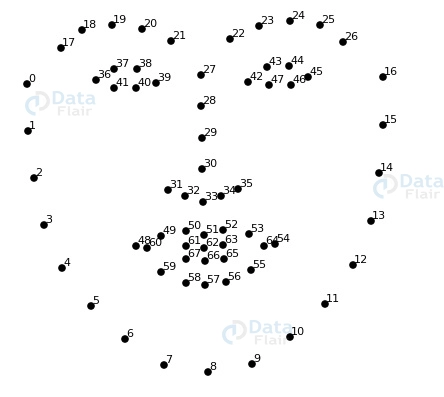
Facial Features
The program utilized advanced computer vision techniques to determine and locate various facial features. Here are the key facial features it helps in determining.
1. Eyes:- It detects and precisely marks the location of both eyes, enabling various applications such as eye blink detection, eye tracking, etc.
2. Nose:- It identifies the nose’s key points, making it beneficial for tasks like virtual nose simulations, identifying nose features, etc.
3. Jawline:- It identifies the jawline, which can be used for facial symmetry, suggesting beard styles, etc.
4. Ears:- it identifies the ear landmarks. It can be used for accessing ear size, and shape and for suggesting ear accessories.
5. Forehead:- It identifies the forehead from your face and can be used for assessing facial proportions, and forehead symmetry and also can be used for hairline adjustment.
6. Mouth and lips:- It identifies the location of mouth and lips and can be used for facial expression recognition, as well as for trying out different lipstick or lip enhancement options virtually.
7. Eyebrows:- It identifies and outlines the eyebrow, making it useful for analyzing symmetry and shape of the eyebrow, etc.
Prerequisites for Face Landmarks Detection using OpenCV
It is important to have a solid understanding of the Python programming language and the OpenCV library. Apart from this, you should have the following system requirements.
1. Python 3.7 and above
2. Any Python editor (VS code, Pycharm, etc.)
Download OpenCV Face Landmarks Detection Project
Please download the source code of the OpenCV Face Landmarks Detection Project: OpenCV Face Landmarks Detection Project Code.
Installation
Open windows cmd as administrator
1. To install the opencv library run the command from the cmd.
pip install opencv-python
2. To install the dlib library run the command from the cmd.
pip install dlib
Let’s Implement It
To implement it, follow the below steps.
1. First of all, we are importing all the necessary libraries that are required during implementation.
import dlib
import cv2
2. It initializes the pre-trained face detector in dlib. It utilizes advanced computer vision techniques to accurately identify faces, enabling the integration of facial analysis, recognition, and augmented reality functionalities into applications.
Pretrain_detector = dlib.get_frontal_face_detector()
3. It loads the pre-trained shape predictor model in dlib, which is specialized in detecting 68 facial landmarks.
Dat_file = dlib.shape_predictor('shape_predictor_68_face_landmarks.dat')4. It opens the camera.
cap = cv2.VideoCapture(0)
5. Start the while loop.
while True:
6. It captures a frame from a video source using the cap object. The Boolean variable ret indicates whether the frame was successfully read, while the variable frame holds the actual image frame.
ret, frame = cap.read()
7. It converts the BGR image to GRAY scale.
gray = cv2.cvtColor(frame, cv2.COLOR_BGR2GRAY)
Output of this step

8. It applies the pre-trained face detector from dlib to the grayscale image gray. This detects and locates faces within the image, providing the bounding box coordinates of the detected faces.
faces = Pretrain_detector(gray)
9. It iterates through each detected face and applies a pre-trained shape predictor to detect 68 facial landmarks on the grayscale image. It then draws circles at the coordinates of each landmark on the image
for face in faces:
        landmarks = Dat_file(gray, face)
        for i in range(68):
            x = landmarks.part(i).x
            y = landmarks.part(i).y
            cv2.circle(frame, (x, y), 2, (219,15,15), -1)
Output of this step
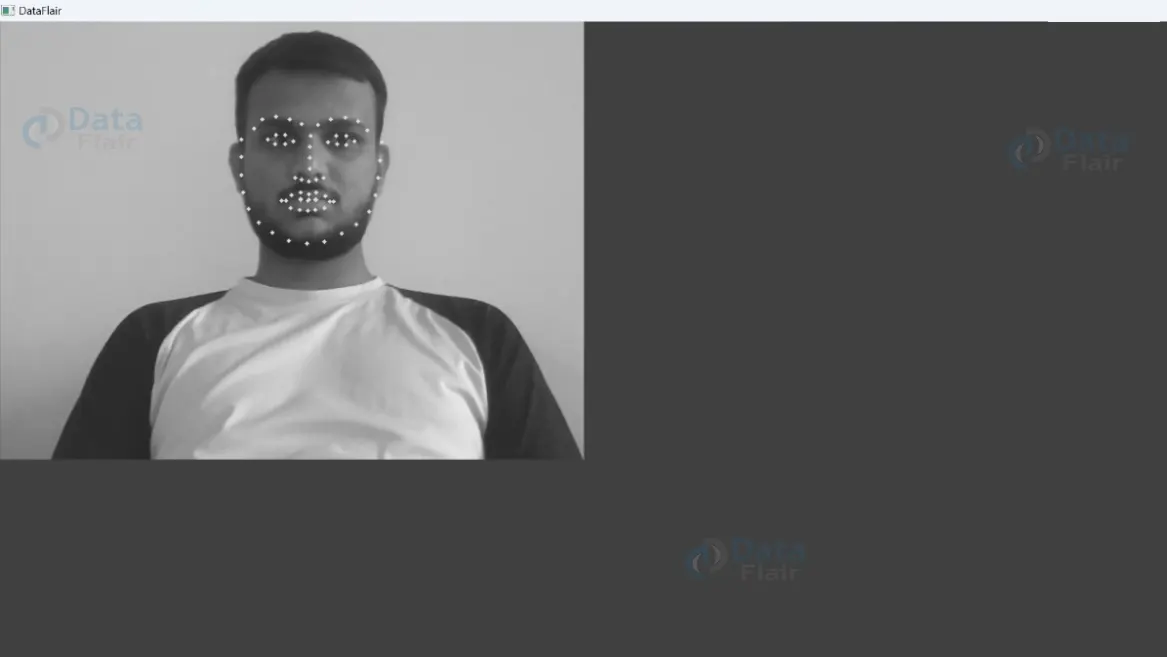
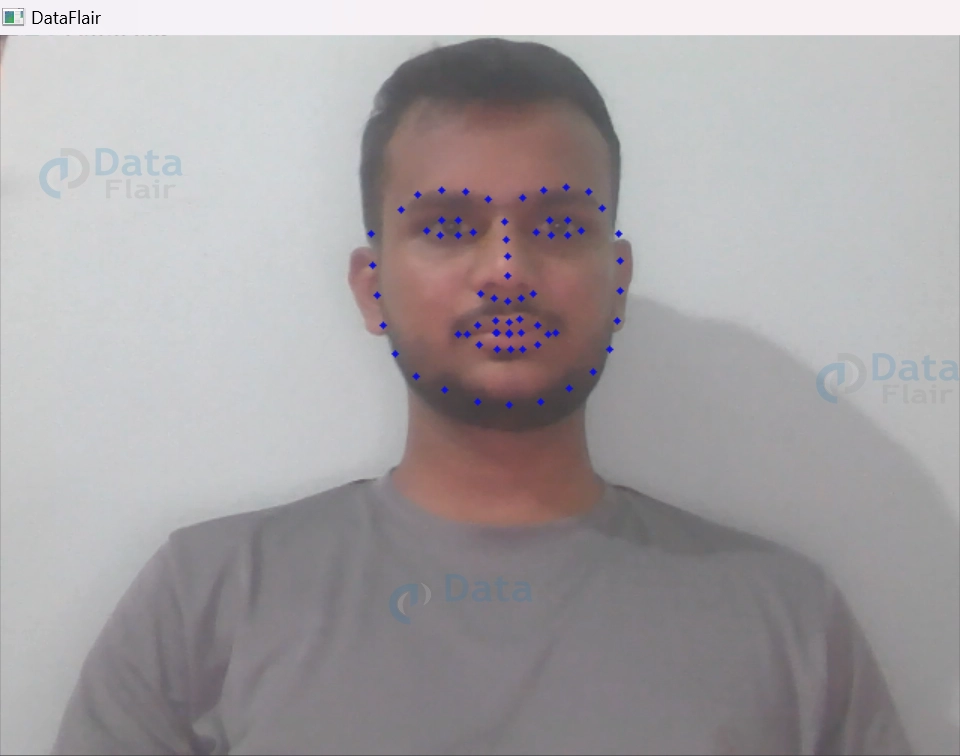
10. It displays the image frame with facial landmarks marked as red circles in a window titled ‘DataFlair’. It waits for a key press, and if the pressed key is ‘q’, the program stops, allowing you to view and close the image window by pressing ‘q’.
cv2.imshow('DataFlair', frame)
    if cv2.waitKey(1) == ord('q'):
        break
Note:- Steps 6-10 must be written under the step 5th while loop.
11. It closes all the resources occupied by your program once the program is closed.
cap.release()
cv2.destroyAllWindows()
Output
Conclusion
Face landmarks detection is a valuable computer vision technique that identifies and locates key facial landmarks. It has diverse applications in facial analysis, recognition, augmented reality, and medical imaging. With pre-trained models and libraries like dlib, it can be easily integrated into applications, enabling advanced facial analysis and interactive experiences.
As computer vision advances, face landmark detection will continue to play a vital role in understanding human faces and enhancing technology interaction.
Did we exceed your expectations?
If Yes, share your valuable feedback on Google





