
goto Statement in C
A potent yet divisive feature in the world of C programming is the Goto statement. It enables programmers to change the program’s execution flow by jumping to a certain labelled point in the code. Although Goto can be a useful tool in some circumstances, there are concerns about its use.
In this article, we will go in-depth into the topic of the Goto statement, looking at its structure, understanding how it works, evaluating its benefits and drawbacks, and providing examples to help novices quickly understand its basic ideas.
Syntax of the Goto Statement
The Goto statement’s syntax is simple to understand. It entails creating labels and giving those labels control by using the Goto keyword. A user-defined identifier is followed by a colon to form a label. For instance:
Begin:
   // Code block
goto Begin;  // Jump to the 'Begin'
This snippet showcases how the Goto statement is used to jump to the labeled section.
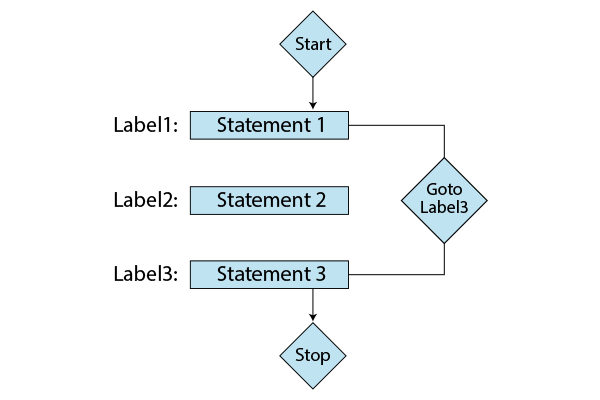
Jumping to Labels
The Goto statement’s ability to skip directly to code sections with labels on them is what makes it so useful. Normally, labels come before specific code blocks. A labelled point is where Goto will direct the program’s execution when it comes across one. For getting out of nested loops or managing failures more effectively, this can be extremely helpful.
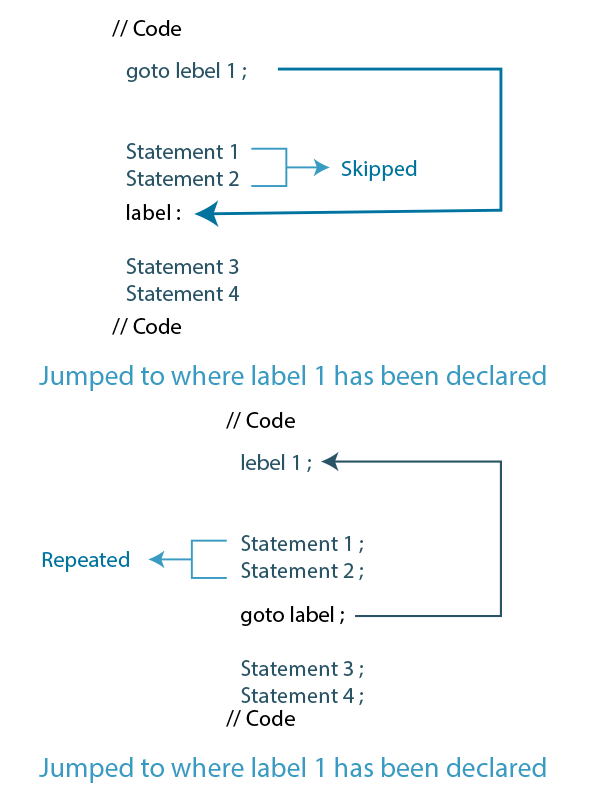
Two Styles of Using the Goto Statement
Approach 1: Shifting Control from Bottom to Top:
This style involves placing labels at the end of a block and using Goto to jump to them. It’s useful for breaking out of a loop once a certain condition is met, saving you from iterating unnecessarily.
while (condition) {
   // Loop logic
   if (exitCondition) {
      goto loop_exit;
   }
}
loop_exit:
// Cleanup code or next steps
Approach 2: Redirecting Control from Top to Bottom:
This style places labels at the start of a block, allowing Goto to jump directly into a block. This approach could be valuable for swiftly addressing specific situations. However, it has the potential to impact the readability of your code.
start:
// ...
if (condition) {
   goto start;
}
// ...
Should You Use Goto?
There has long been controversy around the use of the Goto statement in C programming. Although it may be advantageous in certain situations, it is important to consider both its advantages and disadvantages before deciding how to apply it.
When Should We Use Goto?
Simplified Error Handling
In complex functions where errors can occur at multiple points, Goto can help streamline error handling. Instead of duplicating the error-handling code, you can place the common cleanup code under a label and jump to it when an error occurs.
Complex State Transitions
Goto can be useful in situations involving complex state transitions, such as implementing a finite state machine. State transitions often involve jumping between various states, and Goto can make this process more concise.
Breaking out of Nested Loops
There are instances when you need to exit multiple nested loops early. Using Goto to jump directly to a point outside the loops can be more efficient than setting and checking flags at multiple levels.
Dangers and Pitfalls of Using Goto
- Unintended Complexity: Non-linear jumps can make code unexpectedly complex.
- Reduced Readability and Maintainability: Scattered goto statements hinder code understanding and future modifications.
- Unintended Jumps and Bugs: Incorrect label usage can cause unpredictable jumps and subtle errors.
- Difficulty in Debugging: Unpredictable control flow complicates identifying and fixing issues.
- Contradicts Structured Programming: goto goes against modern programming practices of structured code.
- Limited Readability and Comprehension: Excessive goto use hampers the ease of understanding code.
How Does the Goto Statement Work in C?
The Goto statement in C functions by treating a labeled point as a designated destination in the code. Upon encountering a Goto statement, the program instantly “jumps” to the labeled point, resuming execution from that spot. Despite this immediate redirection, the unstructured nature of such control flow can hinder code comprehension and maintenance. Understanding code becomes complex, and making changes down the line could become difficult due to the absence of a clear and structured sequence of execution. Consequently, while Goto offers swift navigation, its usage should be approached with caution to prevent code complexities and potential issues.
Examples
Example 1: Simple Loop with Goto
#include <stdio.h>

int main() {
    int i = 1;

    loop_start:
    if (i <= 5) {
        printf("%d ", i);
        i++;
        goto loop_start;
    }

    return 0;
}
Output:
1 2 3 4 5
Example 2: Error Handling with Goto
#include <stdio.h>

int main() {
    int num;

    input:
    printf("Enter a positive number: ");
    scanf("%d", &num);

    if (num <= 0) {
        printf("Invalid input. Please enter a positive number.\n");
        goto input;
    }

    printf("You entered: %d\n", num);

    return 0;
}
Output:
Enter a positive number: -5
Invalid input. Please enter a positive number.
Enter a positive number: 0
Invalid input. Please enter a positive number.
Enter a positive number: 10
You entered: 10
Example 3: Using Goto to Exit a Loop
#include <stdio.h>

int main() {
    int i;

    for (i = 1; i <= 10; i++) {
        if (i == 6) {
            goto loop_exit;
        }
        printf("%d ", i);
    }

    loop_exit:
    printf("\nLoop exited at %d\n", i);

    return 0;
}
Output:
1 2 3 4 5
Loop exited at 6
Example 4: Complex State Transitions
#include <stdio.h>

int main() {
    int state = 0;

    start:
    switch (state) {
        case 0:
            printf("State 0\n");
            state = 1;
            goto start;
        case 1:
            printf("State 1\n");
            state = 2;
            goto start;
        case 2:
            printf("State 2\n");
            break;
    }

    return 0;
}
Output:
State 0
State 1
State 2
Example 5: Breaking out of Nested Loops
#include <stdio.h>

int main() {
    int i, j;

    for (i = 1; i <= 3; ++i) {
        for (j = 1; j <= 3; ++j) {
            if (i == 2 && j == 2) {
                goto end;
            }
            printf("i = %d, j = %d\n", i, j);
        }
    }

end:
    printf("Loop ended.\n");

    return 0;
}
Output:
i = 1, j = 1
i = 1, j = 2
i = 1, j = 3
Loop ended.
Advantages of the goto Statement in C
- Flow Alteration: Goto allows jumping to different parts of the code, both forward and backward, altering the standard flow of execution.
- Loop Initiation: Goto can initiate loops without conventional loop constructs like “for” or “while,” offering flexibility in control flow.
- Conditional Skipping: Goto enables skipping certain code sections based on conditions, providing a means to control execution paths.
- Breaking Nested Loops: It simplifies the process of breaking out of multiple nested loops using a single goto statement, enhancing code efficiency.
Disadvantages of the goto Statement in C
- Readability Impact: The use of goto statements can make code complex and hard to follow, particularly when multiple goto statements are involved.
- Execution Flow Complexity: Introducing goto statements can make it challenging to understand the altered program execution sequence, leading to confusion.
- Code Maintenance: Code with numerous goto statements becomes difficult to maintain and debug, increasing the likelihood of introducing errors.
- Loss of Structure: Goto disrupts the logical structure of code, making it less organized and potentially harder to comprehend.
- Alternative Constructs: Modern programming languages offer structured control flow constructs (e.g., loops, conditionals) that promote better code readability and maintainability compared to goto.
Alternatives to the Goto Statement
Structured programming concepts like loops, conditional statements, and functions offer more controlled and readable ways to manage program flow. By using these constructs effectively, you can achieve the same goals as the Goto statement without compromising code quality.
Best Practices
If you find yourself needing to use Goto, adhere to some best practices:
- Use Goto sparingly and only when alternatives are impractical.
- Keep the scope of Goto limited to a small section of code.
- Use descriptive labels to clarify intent.
- Avoid using Goto in a way that creates a tangled web of jumps.
Real-World Scenarios: Demonstrating the Practical Use of the Goto Statement
- Resource Cleanup in Error Handling: Use goto to centralize resource cleanup in error-handling situations, like closing files or releasing memory.
- Breaking Out of Complex Loops: goto can efficiently exit multiple nested loops when a specific condition is met, improving code readability.
- Finite State Machines: Employ goto to simplify state transitions in systems like vending machines or game engines, enhancing code clarity.
Conclusion
The Goto statement, while a powerful tool, should be approached with caution and used judiciously. It offers flexibility but also carries the risk of making your code less readable and more error-prone. By understanding its strengths and limitations, developers can use the Goto statement responsibly, ensuring that their code remains maintainable and comprehensible.
We work very hard to provide you quality material
Could you take 15 seconds and share your happy experience on Google





