
Break and Continue Statements in C
The idea of control flow is crucial to programming. It describes the non-linear progression of code execution across our programs based on the specified logic. In C, control statements like break and continue let us change the loop’s execution by modifying the language’s normal sequential flow.
Mastering break and continue in C can optimize loops by prematurely exiting iterations or selectively skipping code blocks. This article will demonstrate how to harness the power of these statements for efficient loop programming.
Understanding the “break” Statement in C
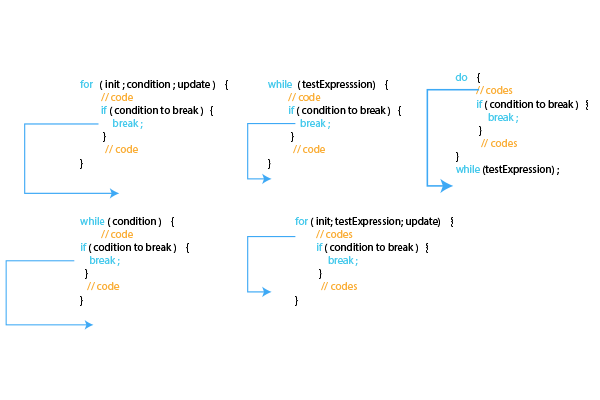
The break statement in C allows immediate exiting of the current loop, transferring execution to the code following the loop. It essentially “breaks” out of the enclosing loop early.
Syntax :
break;
Consider this for loop printing numbers:
#include <stdio.h>

int main() {

  int i;

  for(i=1; i<=5; i++) {
    printf("%d ", i);

    if(i == 3) {
      break;
    }
  }

  return 0;
}
Output:
1 2 3
The break statement after printing 3 prevents completing the remaining iterations. The loop exits immediately after encountering a break.
Break statements commonly arise in menu loops:
while (1) {
  // display menu

  // get choice
  if (choice == QUIT) {
     break;
  }

  // process choice
}
Here, the break exits the menu loop when the user selects the quit option.
How to Use Break to Exit Loops in C
The break statement allows immediately exiting the enclosing loop in C, transferring execution to the code following the loop construct.
To use the break to exit a loop prematurely:
- Include the break statement within the loop block where you want to exit
- When the break is encountered, the loop terminates without completing the remaining iterations
For example:
for (int i = 0; i < 10; i++) {

  if (i == 5) {
    break;
  }

  printf("%d ", i);
}
This loop prints values from 0 to 4. Once i becomes 5, break is triggered, which exits the loop early. The remaining iterations are not executed.
Break can exit nested loops by specifying the outer loop label:
outer: for (int i = 0; i < 3; i++) {

  for (int j = 0; j < 5; j++) {

    if (j == 3) {
      break outer;
    }
  }
}
Here, break outer quits the outer loop instead of just the inner loop.
Mastering the “continue” Statement in C
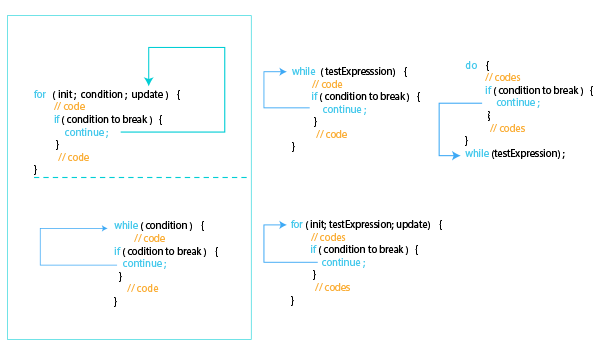
The remaining code in the current iteration is skipped by the continue statement, which forces the execution of the following iteration right away. Any code that is added after continuing is ignored.
Syntax :
continue;
This for loop uses continue to skip odd numbers:
#include <stdio.h>

int main() {

  int i;

  for(i=0; i<10; i++) {

    if(i % 2 != 0) {
      continue;
    }

    printf("%d ", i);
  }

  return 0;
}
Output:
0 2 4 6 8
Continue could also filter data based on a condition:
while (has_data) {
  // get next data item

  if (item.property == SKIP) {
    continue;
  }

  // process item
}
How to Use Continue to Skip Iterations in C
The continue statement in C skips the current iteration in a loop, proceeding directly to the next iteration in C.
To continue to selectively bypass iterations:
- Place the continue statement inside the loop where you want to skip
- When continue executes, the rest of the code in that iteration is skipped
- Execution jumps to the loop’s update and condition check for the next cycle
For example:
for (int i = 0; i < 10; i++) {

  if (i == 3) {
    continue;
  }

  printf("%d ", i);
}
Here, when I become 3, I continue skipping printing 3 and move to the next iteration.
Continuing only affects the current iteration. Any remaining iterations may still execute.
Multiple continue statements can filter iterations based on different conditions.
Combining “break” and “continue” in C
Break and continue can be combined for additional control over loop execution.
For example:
#include <stdio.h>

int main() {

  int i;

  for(i=0; i<10; i++) {

    if(i == 5) {
      break;
    }

    if(i == 3) {
      continue;
    }

    printf("%d ", i);
  }

  return 0;
}
Output:
0 1 2 4
Here, the break statement exits the loop when reaching exit_num while continuing to skip an iteration at skip_num.
Difference between Break and Continue in C
| Feature | Break Statement | Continue Statement |
| Purpose | Exits loop execution | Skips current iteration |
| Usability | Works with loops and switch | Only works with loops |
| Flow Control | Transfers control outside of a loop | Passes control to the next iteration |
| Leftover Iterations | The remaining iterations were not executed | The remaining iterations may execute |
| Syntax | break; | continue; |
| Switch Statement | It can used with a switch | It cannot be used with a switch |
| Labels | Can use labels for outer loop targeting | Labels not applicable |
Best Practices
Some tips for using break/continue:
- Don’t overuse them, as it can harm readability.
- Use comments to explain why they are needed.
- Test loops thoroughly after adding these statements.
- Ensure proper loop variable updates to avoid issues.
By judiciously using break and continue, we can create optimized loop logic flows.
Conclusion
Break and continue are invaluable for controlling loop execution flow in C. Mastering their use allows skipping unnecessary iterations or prematurely exiting loops based on conditions. This unlocks more flexibility in loop programming. Remember to use them prudently and test loops thoroughly after incorporating these statements.
Your 15 seconds will encourage us to work even harder
Please share your happy experience on Google





