
Bitwise Operators in C
In the world of programming, where every bit matters, bitwise operators stand as the architects of binary manipulation. These operators possess the extraordinary ability to manipulate individual bits, enabling optimization, encryption, and beyond. This article is a guided exploration of bitwise operators in C, their applications, and their significance in modern programming.
Bitwise Operators: Understanding the Basics
Before diving into specifics, let’s grasp the fundamental concept of bitwise operations. Think of them as the tools that allow us to tinker with individual bits, shaping data at the lowest level of representation.
Types of Bitwise Operators
| Operator | Interpretation |
| & | Performs bitwise AND operation |
| | | Executes bitwise OR operation |
| ^ | Conducts bitwise exclusive OR operation |
| ~ | Applies one’s complement (unary) operator |
| << | Initiates left shift operation |
| >> | Initiates right shift operation |
AND Operator (&): Precision in Bitwise Surgery
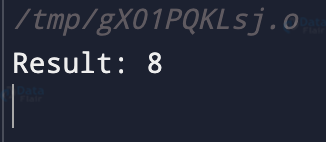
The AND operator (‘&’) acts like a surgeon’s scalpel, extracting the shared bits between two operands. Through simple truth tables and practical examples, we unveil how it clears specific bits, creates masks, and maintains data integrity.
#include <stdio.h>
int main() {
    // Define two integers
    int numA = 12;  // Binary: 1100
    int numB = 10;  // Binary: 1010
    // Perform a bitwise AND operation
    int result = numA & numB;  // Binary result: 1000 (8 in decimal)
    // Display the result
    printf("Result: %d\n", result); // Output: 8
    return 0;
}
Output:
Time Complexity: O(1)
Space Complexity: O(1)
OR Operator (|): Merging Bits, Uniting Realities
The OR operator (‘|’) serves as a bridge, merging the realities of two operands. By exploring scenarios and providing clear examples, we showcase its role in setting bits, combining patterns, and constructing versatile representations.
#include <stdio.h>
int main() {
    // Initialize two integer variables
    int valueA = 12; // Binary: 1100
    int valueB = 10; // Binary: 1010
    // Perform a bitwise OR operation on the values
    int bitwiseResult = valueA | valueB; // Binary result: 1110 (14 in decimal)
    printf("After performing a bitwise OR operation on the given values, the result is: %d\n", bitwiseResult); // Output: 14
    return 0;
}
Output

Time Complexity: O(1)
Space Complexity: O(1)
XOR Operator (^): Balancing Act of Bits
The XOR operator (‘^’) performs a bit-level balancing act, accentuating the differences between operands. With engaging examples, we showcase its value in tasks like toggling bits, identifying changes, and performing efficient parity checks.
#include <stdio.h>
int main() {
    // Initialize two integer variables
    int valueA = 12;  // Binary: 1100
    int valueB = 10;  // Binary: 1010
    int bitwiseResult = valueA ^ valueB;  // Binary result: 0110 (6 in decimal)
  printf("Result: %d\n", bitwiseResult); // Output: 6
    return 0;
}
Output

Time Complexity: O(1)
Space Complexity: O(1)
NOT Operator (~): Bits Reimagined
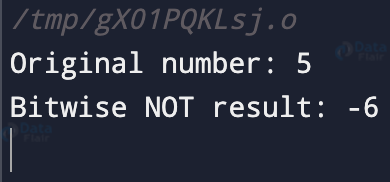
The NOT operator (‘~’) transforms bits with elegance. Through clear demonstrations, we reveal its power in flipping bits, creating complements, and serving as a sentinel for bitwise changes.
#include <stdio.h>
int main() {
    int num = 5;
    int result = ~num;
// Using the NOT operator (~) to invert the bits of 'num'
    printf("Original number: %d\n", num);
    printf("Bitwise NOT result: %d\n", result);
    return 0;
}
Output
Time Complexity: O(1)
Space Complexity: O(1)
Left Shift Operator (<<): Shifting Perspectives
The left shift operator (‘<<‘) takes centre stage, magnifying values through bit manipulation. With illustrative examples, we elucidate its role in crafting bit masks, enabling efficient multiplication by powers of 2, and altering binary perspectives.
#include <stdio.h>
int main() {
    int a = 5;  // Binary: 0101
    int result = a << 2;  // Binary result: 010100 (20 in decimal)
    printf("Result of a << 2: %d\n", result);  // Output: 20
    return 0;
}
Output

Time Complexity: O(1)
Space Complexity: O(1)
Right Shift Operator (>>): Precision in Division
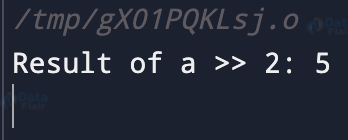
The right shift operator (‘>>’) steps forward, gracefully dividing values through bit shifting. Through intuitive examples, we uncover its significance in extracting specific bits, facilitating division by 2, and preserving data precision.
#include <stdio.h>
int main() {
    int a = 20;  // Binary: 10100
    int result = a >> 2;  // Binary result: 00101 (5 in decimal)
    printf("Result of a >> 2: %d\n", result);  // Output: 5
    return 0;
}
Output
Time Complexity: O(1)
Space Complexity: O(1)
Truth Table of Bitwise Operators
| Operand A | Operand B | A & B | A | B | A ^ B | ~A |
| 0 | 0 | 0 | 0 | 0 | 1 |
| 0 | 1 | 0 | 1 | 1 | 1 |
| 1 | 0 | 0 | 1 | 1 | 0 |
| 1 | 1 | 1 | 1 | 0 | 0 |
Real-World Examples: Applications Beyond the Code
- Image Processing: Bitwise operators find their place in image manipulation, where each pixel’s color values are represented as bits. You can use these operators to change specific color components, create filters, and blend images seamlessly.
- Networking Protocols: In networking, bitwise operations play a significant role in protocol design and data packet handling. Flags and control fields in network protocols are often encoded as individual bits, allowing for efficient communication and data interpretation.
- Hardware Interfacing: Bitwise operations are vital when interfacing with hardware devices, such as microcontrollers. Setting or clearing specific bits in hardware registers allows you to configure device settings, control peripherals, and manage interrupts.
Common Mistakes and Pitfalls: Navigating the Bit Maze
- Missing Parentheses: Ensure you use parentheses to group bitwise operations correctly, especially when mixing them with other operators. Incorrect grouping can lead to unexpected results.
- Operator Precedence: Understand operator precedence to avoid mixing up the order of operations. For example, ‘&’ has higher precedence than ‘==’, so use parentheses when needed.
- Not Understanding Data Types: Be cautious when performing bitwise operations on different data types. Unexpected results may occur if you’re not aware of type promotion and truncation.
- Shifting Beyond Data Size: When left-shifting, be careful not to shift beyond the size of the data type. Shifting more bits than available can lead to undefined behavior.
- Endianness Consideration: Keep endianness in mind, especially when working with multi-byte data. Bitwise operations might behave differently on little-endian and big-endian systems.
- Clearing vs. Setting Bits: Ensure you understand the difference between using ‘&’ and ‘|’. Mistaking one for the other can lead to unintended consequences.
Conclusion
In the symphony of programming, bitwise operators take the stage as maestros of manipulation. They empower us to sculpt binary landscapes with finesse. Armed with the knowledge of AND, OR, XOR, NOT, left shift, and right shift, you possess the keys to the realm of binary magic. So go forth, shape your code, and let the artistry of bitwise operators guide your programming endeavours.
Did you like this article? If Yes, please give DataFlair 5 Stars on Google





