
Android Kotlin Project – Roman to Decimal Converter
Hello there, Android enthusiasts! Today, we will look at and learn how to develop an Android project that is a Roman to Decimal App in Android Studio. In this article, we’ll learn about the entire project’s development.
When a user has to convert Roman numbers to decimal numbers for easier understanding, the Roman to Decimal App will be very helpful. The Roman number only needs to be entered once to be converted to its decimal equivalent.
About Android Kotlin Roman to Decimal Converter
This is a simple Roman to Decimal Converter project for those just learning the fundamentals of developing Android applications. This Android app’s user interface contains two text fields, one of which is for the user to enter the Roman number, while the other text field shows the decimal equivalent when the button is pressed by the user. Details about the User interface are as follows:
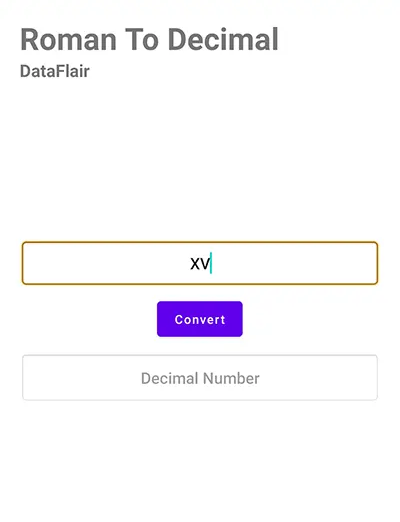
1. The user interface contains a text field where the user is required to enter the Roman number that they want to convert to a decimal number.
2. Between the two text fields, ‘Convert’ button is available for the user to press and obtain the decimal equivalent of the Roman number entered.
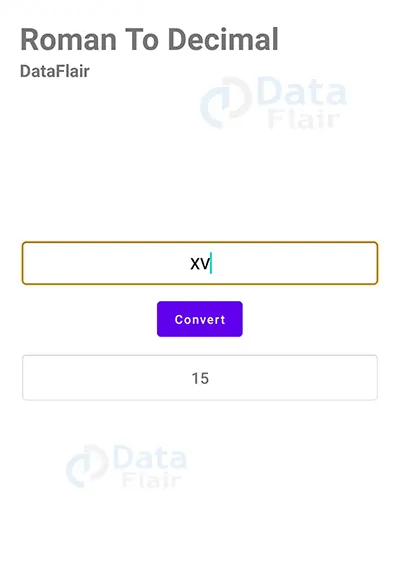
3. The user interface contains another text field where the decimal equivalent of the entered Roman number is displayed to the user when the ‘Convert’ button is clicked.
Prerequisites for Roman to Decimal Converter Using Android Kotlin
To develop this SMS Android application, the requirements and prerequisites are as follows:
1. Kotlin: You must become acquainted with Kotlin programming first. It is necessary because we’ll be writing the app’s code in the programming language Kotlin.
2. XML: XML is a further essential part of our Android application. It will be used to create the user interface for the application.
3. Android Studio: Android Studio is at the core of our application because it is how we will create it. An Android virtual device that can be used to test an application’s functionality is also available with Android Studio.
Download Android Kotlin Roman to Decimal Converter Project
Please download the source code of Android Kotlin Roman to Decimal Converter Project: Android Kotlin Roman to Decimal Converter Project Code.
Develop a Roman To Decimal Application in Android Studio
We’ll now start working on developing a Roman to Decimal Converter application. Before actually implementing and executing the code, we will learn about its working. So, let’s look at the files and functions needed to run the code:
In order to make this Android Roman To Decimal application, you must follow a set of instructions. We are here to guide you through each step of creating an app.
1. To the location of your choice, extract all the files from the downloaded zip file.
2. Launch Android Studio.
3. Open by selecting File.
4. Locate and choose the extracted folder, then select OK.
The Roman To Decimal application’s source code has been successfully opened in Android Studio.

1. The “activity_main” is an XML file that is responsible for creating the user interface of the home screen that is displayed when the Roman To Decimal app is initialized.
Code:
<?xml version="1.0" encoding="utf-8"?>
<LinearLayout
    xmlns:android="http://schemas.android.com/apk/res/android"
    xmlns:tools="http://schemas.android.com/tools"
    xmlns:app="http://schemas.android.com/apk/res-auto"
    android:layout_width="match_parent"
    android:layout_height="match_parent"
    tools:context=".MainActivity"
    android:orientation="vertical"
    android:layout_gravity="center"
    android:padding="20dp">

    <TextView
        android:layout_width="wrap_content"
        android:layout_height="wrap_content"
        android:text="Roman To Decimal "
        android:textStyle="bold"
        android:textSize="35sp"
        app:layout_constraintBottom_toBottomOf="parent"
        app:layout_constraintStart_toStartOf="parent"
        app:layout_constraintEnd_toEndOf="parent"
        app:layout_constraintTop_toTopOf="parent" />

    <TextView
      android:layout_width="wrap_content"
      android:layout_height="wrap_content"
      android:text="DataFlair"
        android:textStyle="bold"
      android:textSize="20sp"
      app:layout_constraintBottom_toBottomOf="parent"
      app:layout_constraintStart_toStartOf="parent"
      app:layout_constraintEnd_toEndOf="parent"
      app:layout_constraintTop_toTopOf="parent" />

    <EditText
        android:background="@android:drawable/editbox_background"
        android:id="@+id/romanEt"
        android:padding="15sp"
        android:gravity="center"
        android:layout_marginTop="180sp"
        android:hint="Enter Roman Number"
        android:layout_gravity="center"
        android:layout_width="match_parent"
        android:layout_height="wrap_content" />

    <Button
        android:layout_gravity="center"
        android:layout_width="wrap_content"
        android:layout_height="wrap_content"
        android:id="@+id/btnConvert"
        android:text="Convert"
        android:textAllCaps="false"
        android:layout_marginTop="10sp"/>

    <TextView
        android:layout_gravity="center"
        android:gravity="center"
        android:layout_width="match_parent"
        android:layout_height="wrap_content"
        android:id="@+id/decimalEt"
        android:padding="17sp"
        android:textSize="18sp"
        android:layout_marginTop="10dp"
        android:hint="Decimal Number"
        android:background="@android:drawable/editbox_background"
        />

  </LinearLayout>
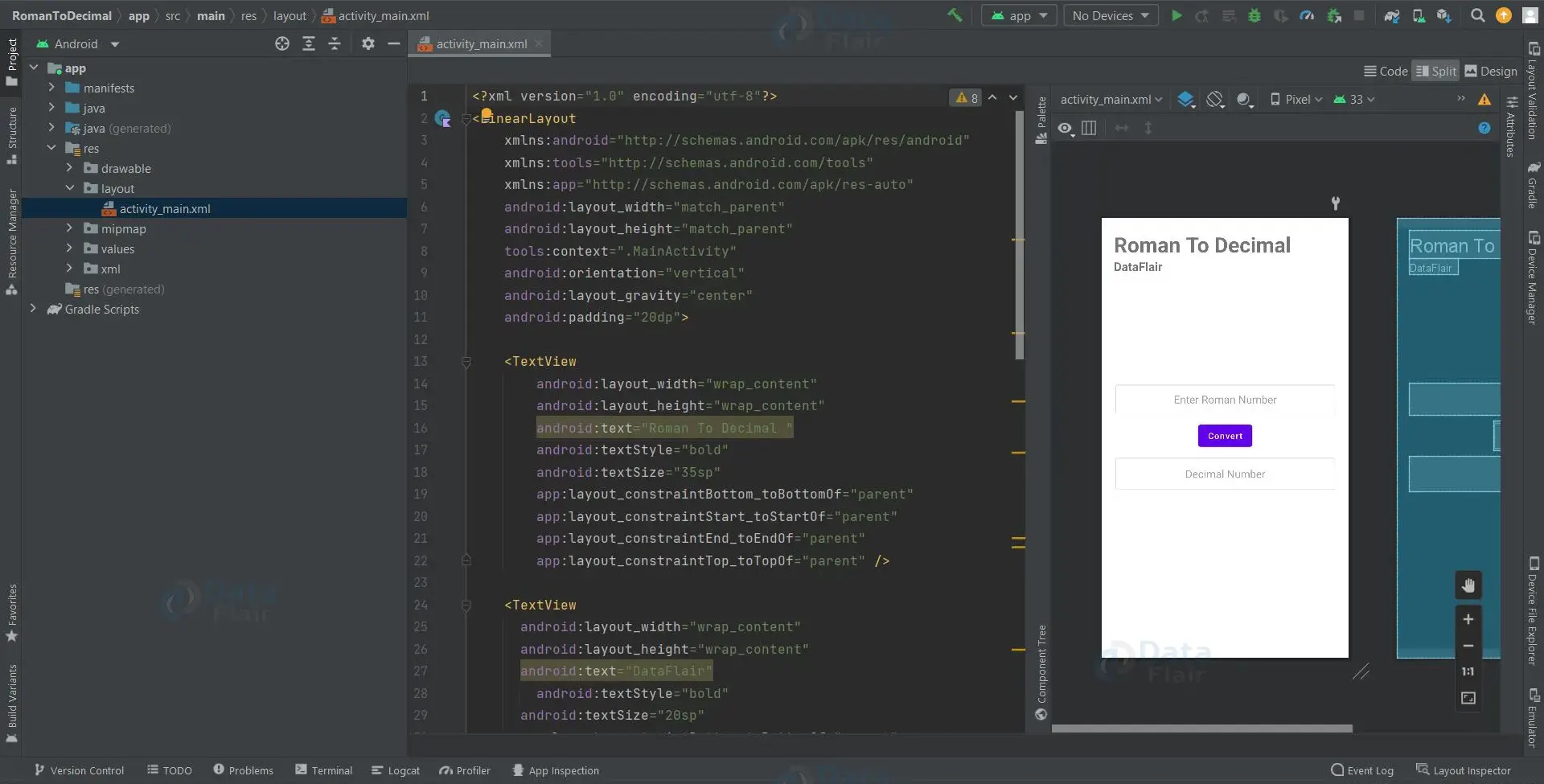
2. ‘MainActivity’ is a kotlin file, which is responsible for the functionality of the application where the user enters a Roman number, and it is converted to its decimal equivalent with just a click of a button.
Code:
class MainActivity : AppCompatActivity() {
    private lateinit var romanET:EditText
    private lateinit var decimalET:TextView
    private lateinit var convertBtn: Button
    override fun onCreate(savedInstanceState: Bundle?) {
        super.onCreate(savedInstanceState)
        setContentView(R.layout.activity_main)

        supportActionBar?.hide()
        romanET = findViewById(R.id.romanEt)
        decimalET = findViewById(R.id.decimalEt)
        convertBtn = findViewById(R.id.btnConvert)

        convertBtn.setOnClickListener {
            if(romanET.text.isNotEmpty()){
                val roman = romanET.text.toString()
                decimalET.text = RomanToDecimal(roman).toString()
            }
        }
    }
    fun value(r: Char):Int{
        if (r=='I') return 1
        if (r=='V') return 5
        if (r=='X') return 10
        if (r=='L') return 50
        if (r=='C') return 100
        if (r=='D') return 500
        return if (r=='M') return 1000 else -1
    }
    private fun RomanToDecimal(str:String):Int {
        var res=0
        var i=0
        while(i<str.length){
            val s1 = value(str[i])

            if(i+1<str.length){
                val s2 = value(str[i+1])

                if(s1>=s2){
                    res = res + s1
                }else{
                    res = res + s2 - s1
                    i++
                }
            }else{
                res = res + s1
            }
            i++
        }
        return res;
    }
}
Android Kotlin Roman To Decimal Converter Output:
1. Home Screen:

2. Roman number is entered:
3. Convert Button is clicked:
Summary
So, in this Android Kotlin Roman to Decimal Converter Project, we learned how to use Android Studio to develop an application that converts Roman numbers to decimal numbers. This Android project is suitable for beginners as it will improve your ability to design a user interface as per the application’s need and add basic functionality to your application. We hope you enjoyed it, and we are confident that you will like putting it into practice.
If you are Happy with DataFlair, do not forget to make us happy with your positive feedback on Google





