
Arrays in C Programming
One of the most fundamental and popular data structures in C programming is arrays. An array is a group of identical data-typed objects kept together in memory. Programmers can conveniently store and access numerous values using an array by using a single identifier.
This tutorial will teach us how to declare, initialise, and use arrays in C. We will discuss single- and multi-dimensional arrays as well as sorting, inserting, and deleting data from an array. The main ideas are illustrated using examples. By the conclusion, you will have a firm understanding of arrays in C, laying the groundwork for resolving a variety of practical issues.
Understanding Arrays in C
A collection of identically typed elements is kept in an array, which is a form of data structure. For example, an array can store a list of integers, characters, floating point values, or any other data type.
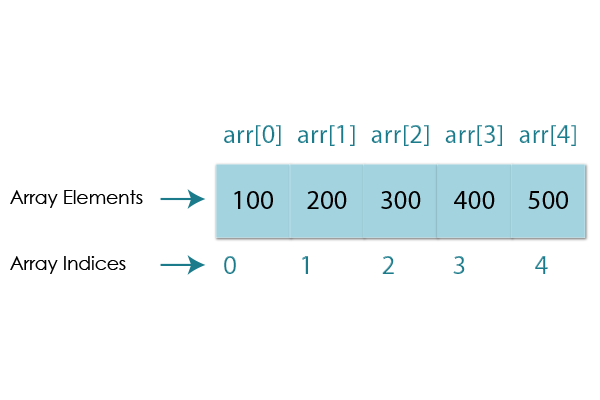
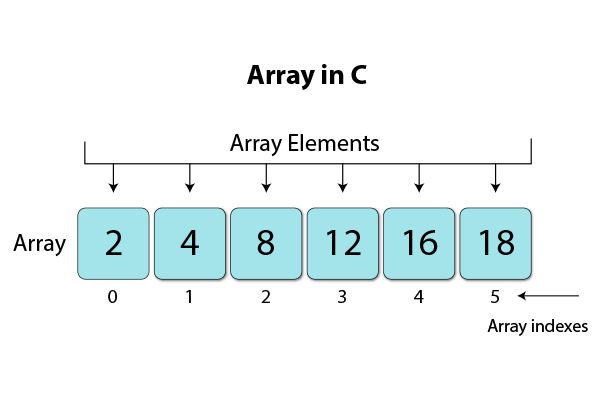
The memory used to store an array’s elements is contiguous, which means that each element is kept next to the other. The elements can be accessed using an index value that represents the position of that element in the array.
For example, consider the following array declaration:
int numbers[5];
This declares an array named numbers capable of storing 5 integer values. The elements can be accessed as numbers[0], numbers[1], numbers[2] and so on.
Arrays enable easy access and manipulation of data sets. The key benefit is that we can represent many related values using a single identifier variable instead of having to use separate variables for each value.
Properties of Array in C
- All array elements share the same data type and occupy a uniform size, such as 4 bytes for integers (e.g., int).
- Array elements are stored consecutively in memory, starting from the lowest memory address.
- Random access to array elements is possible because their addresses can be calculated using the base address and the size of the data type.
Advantages of Arrays in C
- Efficient Data Structure: Arrays provide efficient storage and access to elements of the same data type.
- Random Access: Elements can be directly accessed using their index, allowing for quick retrieval and modification.
- Memory Efficiency: Arrays allocate memory in a contiguous block, reducing memory overhead.
- Predictable Memory Allocation: Memory for arrays is allocated at compile-time, making memory management more predictable.
- Simplicity: Arrays are simple and easy to use for managing collections of data.
Disadvantages of Arrays in C
- Fixed Size: Arrays have a fixed size, making it challenging to handle dynamic data or accommodate varying data sizes.
- Inefficient Insertions/Deletions: Adding or removing elements within an array can be inefficient as it may require shifting elements.
- Wasted Memory: If an array is allocated a large size but doesn’t utilize all of it, memory can be wasted.
- Limited Flexibility: Arrays are not inherently dynamic; managing variable-sized data requires extra effort.
- No Built-in Bounds Checking: C arrays lack built-in safeguards against buffer overflows, which can lead to memory corruption.
Declaring and Initializing Arrays
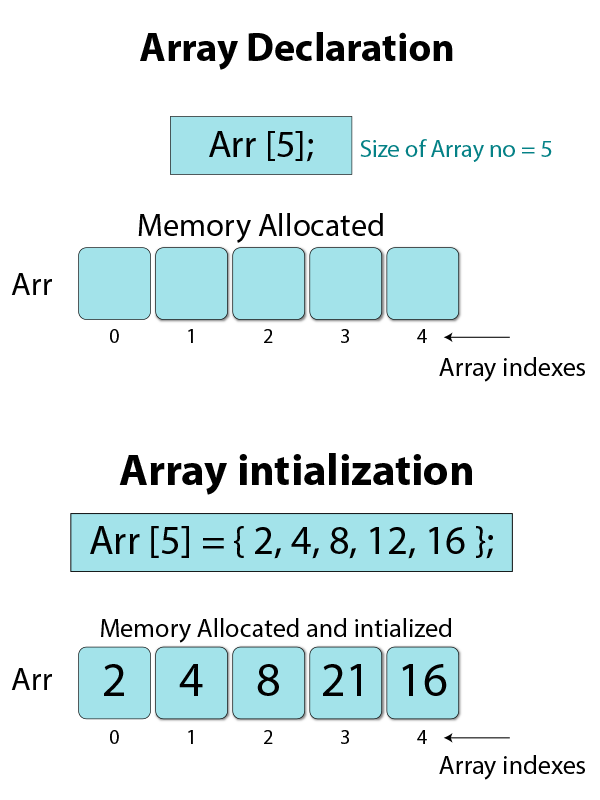
To declare an array in C, we specify the data type of elements followed by the array name and size enclosed in square brackets [].
For example:
double prices[10]; // array of 10 doubles
char letters[26]; // array of 26 chars
A positive integer constant greater than zero must define the array size. It represents the most elements an array can contain.
When an array is declared, it can be initialised by providing a list of values separated by commas and encased in curly brackets.
For instance:
int n[] = {56,23,79,82,12,43,76}; // n contains 7 elements
char vowels[] = {'a', 'e', 'i', 'o', 'u'};
If no size is specified, the size is inferred from the number of initialization values.
Some rules for array declaration:
- Array name can be any valid identifier.
- The index of an array ranges from 0 to size-1.
- Elements are stored contiguously in memory.
- Array size must be an integer constant greater than 0.
- Garbage values can be found in uninitialized arrays.
Accessing Array Elements
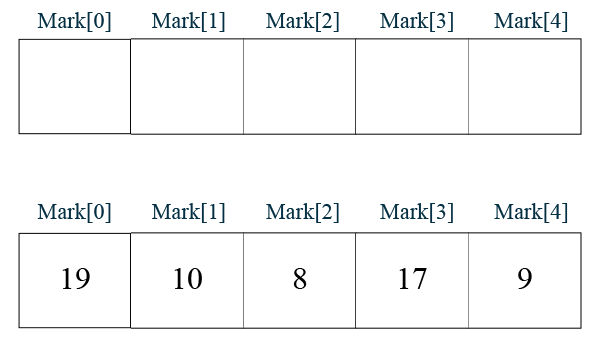
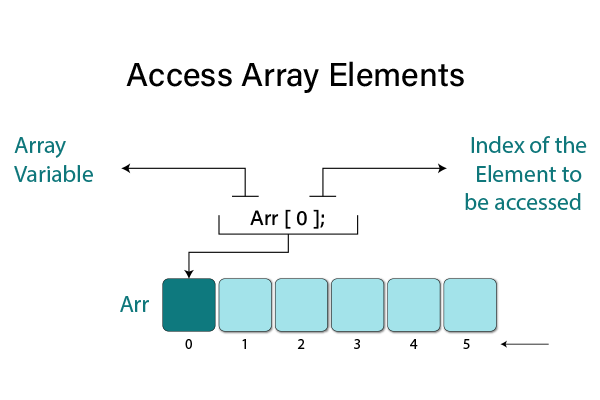
The index notation can be used to retrieve specific array elements. Following the array name are square brackets [] that specify the index.
For example:
int nums[5] = {1, 2, 3, 4, 5};

int first = nums[0]; // access first element
int second = nums[1]; // access second element

nums[3] = 10; // modify fourth element
In C, undefined behaviour results from trying to access an index that is outside the array’s boundaries (negative index or >= size).
Types of Arrays in C
Single Dimensional Arrays
Single dimensional or 1D arrays are the simplest form of arrays. 1D arrays store elements sequentially (one after another in memory).
Examples:
float temp[10]; // 1D array of 10 floats

char name[] = "John"; // 1D array of characters

int nums[] = {1, 2, 3}; // 1D array initialization
Multidimensional Arrays
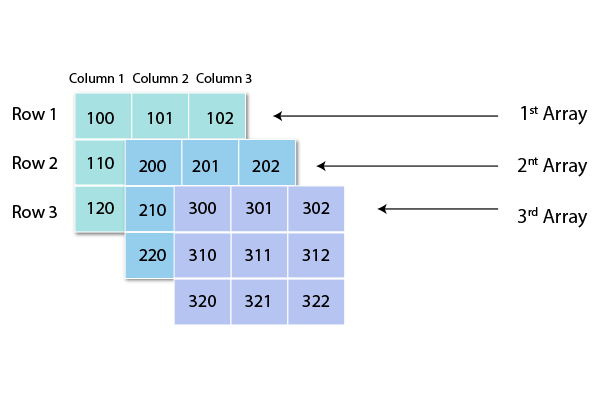
C allows declaring arrays of two or more dimensions. Such arrays are known as multidimensional arrays.
A 2D array, also known as a matrix, can be pictured as a table with rows and columns, for instance.
A 2D array arr[R][C] has R rows and C columns, with R * C elements.
Elements are stored row-wise in memory. For example:
int mat[3][3]; // 3 x 3 2D array

mat[0][0] mat[0][1] mat[0][2]
mat[1][0] mat[1][1] mat[1][2]
mat[2][0] mat[2][1] mat[2][2]
Arrays with more than 2 dimensions are possible in C but rarely used in practice.
Why Do We Need Arrays?
Arrays enable managing related data efficiently. For example, storing 50 integers separately would require 50 variable names and a lot of code. Arrays let us use a single identifier data[50].
Key reasons to use arrays:
- Arrays allow access to elements efficiently using index notation.
- Code using arrays is concise and readable since related data is together.
- Memory usage is efficient as arrays store elements contiguously.
- Operations like search, sort, insert and delete can be easily performed on arrays.
Common array use cases:
- Storing and managing large data sets like student records or product info.
- Representing real world collections like days of the week.
- Look-up tables, matrices, hash-tables.
- Used by algorithms like sorting, searching, and graph traversals.
Input and Output of C Arrays
Input
We can read values into an array using a loop. Typically for loop is used to iterate over the array indexes.
Example code to read 10 numbers from user into an array:
int nums[10];

for (int i = 0; i < 10; i++) {
  printf("Enter number: ");
  scanf("%d", &nums[i]);
}
Output
To print array elements, again for loop can be used:
for (int i = 0; i < 10; i++) {
  printf("%d ", nums[i]);
}
Output all elements in a formatted manner:
Index Value
0 2
1 4
2 7
3 5
Advantages and Disadvantages of Arrays in C
Advantages
- Contiguous memory allocation improves cache performance.
- Memory access using an index is faster than pointer dereferencing.
- Code is concise using index notation compared to separate variables.
- Useful built-in support for common data structures like stacks.
- Efficient implementations of algorithms like search and sort.
Disadvantages
- Fixed-size at declaration limits flexibility. The data size cannot change dynamically.
- Memory wastage if an array is declared very large but not fully used.
- It cannot grow or shrink in size at runtime like linked data structures.
- Insertion and deletion costs are high due to the shifting of elements.
So, arrays are best suited for relatively static data sets and provide very efficient access. For dynamic data, it is better to use pointers and dynamic memory allocation.
Examples
Insertion and Deletion
To insert an element at index pos:
- Increase array size by 1 (or reallocate memory for larger size)
- Move elements from pos onwards one step back
To delete an element at index pos:
- Move elements from pos+1 onwards one step forward
- Decrease array size by 1
#include <stdio.h>

#define SIZE 5

void printArray(int arr[], int n) {
  for(int i=0; i<n; i++) {
    printf("%d ", arr[i]);
  }
  printf("\n");
}

// Function to insert an element
void insert(int arr[], int size, int element, int pos) {

  int newArr[size+1];

  // Insert the element
  for(int i=0; i<size+1; i++) {
    if(i < pos) {
      newArr[i] = arr[i];
    }
    else if(i == pos) {
      newArr[i] = element;
    }
    else {
      newArr[i] = arr[i-1];
    }
  }

  // Copy back new array into original array
  for(int i=0; i<size+1; i++) {
    arr[i] = newArr[i];
  }
}

// Function to delete an element
void delete(int arr[], int size, int pos) {

  for(int i=pos; i<size-1; i++) {
    arr[i] = arr[i+1];
  }

}

int main() {

  int arr[SIZE] = {1, 2, 3, 4, 5};

  printf("Original Array: ");
  printArray(arr, SIZE);

  int element = 10, pos = 2;

  // Insert 10 at index 2
  insert(arr, SIZE, element, pos);

  printf("After Insertion: ");
  printArray(arr, SIZE+1);

  // Delete element at index 2
  int del_pos = 2;
  delete(arr, SIZE+1, del_pos);

  printf("After Deletion: ");
  printArray(arr, SIZE);

  return 0;
}
Output:
Original Array:
1 2 3 4 5
After Insertion:
1 2 10 3 4 5
After Deletion:
1 2 4 5
Array Declaration, Input and Output
This C program initializes an array with a size of 5. It then prompts the user to input five numbers one by one. After input, it displays the entered numbers in a list format, demonstrating basic input and output operations with arrays.
#include <stdio.h>

#define SIZE 5

int main() {
  int nums[SIZE];

  // Array input
  for (int i = 0; i < SIZE; i++) {
    printf("Enter number: ");
    scanf("%d", &nums[i]);
  }

  // Array output
  printf("Array elements: ");
  for (int i = 0; i < SIZE; i++) {
    printf("%d ", nums[i]);
  }

  return 0;
}
Output:
Enter number: 10
Enter number: 20
Enter number: 30
Enter number: 40
Enter number: 50
Array elements: 10 20 30 40 50
Sorting Array Elements in C
There are many sorting algorithms like bubble, selection and insertion sort that can be used to sort arrays in C.
The following implements a simple bubble sort on an array:
This C program demonstrates the Bubble Sort algorithm to sort an array of integers. It initializes an array, displays the original array, sorts it using the Bubble Sort function, and then displays the sorted array. Bubble Sort repeatedly compares adjacent elements and swaps them if they are in the wrong order until the entire array is sorted.
#include <stdio.h>

// Function to perform Bubble Sort
void bubbleSort(int arr[], int n) {
  int temp;
  for (int i = 0; i < n - 1; i++) {
    for (int j = 0; j < n - i - 1; j++) {
      if (arr[j] > arr[j + 1]) {
        // Swap elements
        temp = arr[j];
        arr[j] = arr[j + 1];
        arr[j + 1] = temp;
      }
    }
  }
}

int main() {
  int arr[] = {64, 34, 25, 12, 22, 11, 90};
  int n = sizeof(arr) / sizeof(arr[0]);

  printf("Original array: ");
  for (int i = 0; i < n; i++) {
    printf("%d ", arr[i]);
  }

  // Call the bubbleSort function to sort the array
  bubbleSort(arr, n);

  printf("\nSorted array: ");
  for (int i = 0; i < n; i++) {
    printf("%d ", arr[i]);
  }

  return 0;
}
Output:
Original array: 64 34 25 12 22 11 90
Sorted array: 11 12 22 25 34 64 90
Finding Largest and Smallest in Array
To find the minimum and maximum elements in a 1D array:
#include <stdio.h>

int main() {
  int arr[] = {64, 34, 25, 12, 22, 11, 90};
  int n = sizeof(arr) / sizeof(arr[0]);

  int smallest = arr[0];
  int largest = arr[0];

  for (int i = 1; i < n; i++) {
    if (arr[i] < smallest) {
      smallest = arr[i];
    }

    if (arr[i] > largest) {
      largest = arr[i];
    }
  }

  printf("Largest = %d, Smallest = %d", largest, smallest);

  return 0;
}
This C program finds and prints the largest and smallest numbers in an integer array. It initializes two variables, smallest and largest, with the first array element and then iterates through the array to update these values based on the array elements. Finally, it prints the found largest and smallest numbers.
Output:
Largest = 90, Smallest = 11
Working with 2D Arrays in C
2D arrays are commonly used to represent matrices:
#include <stdio.h>

int main() {
  int mat[3][3];
  int i, j;

  // Initialize the 2D array
  mat[0][0] = 1;
  mat[0][1] = 2;
  mat[0][2] = 3;
  mat[1][0] = 4;
  mat[1][1] = 5;
  mat[1][2] = 6;
  mat[2][0] = 7;
  mat[2][1] = 8;
  mat[2][2] = 9;

  // Input values into the 2D array
  printf("Enter elements of the 3x3 matrix:\n");
  for (i = 0; i < 3; i++) {
    for (j = 0; j < 3; j++) {
      scanf("%d", &mat[i][j]);
    }
  }

  // Output the 2D array
  printf("Matrix elements:\n");
  for (i = 0; i < 3; i++) {
    for (j = 0; j < 3; j++) {
      printf("%d ", mat[i][j]);
    }
    printf("\n");
  }

  return 0;
}
Output:
Enter elements of the 3×3 matrix:
1 2 3
4 5 6
7 8 9
Matrix elements:
1 2 3
4 5 6
7 8 9
C Array Operations
Some common operations performed on arrays:
- Traversal – Access each element sequentially using looping.
- Insertion – Add a new element at a specific index.
- Deletion – Remove element from specific index.
- Searching – Find specific elements in an array using linear or binary search.
- Sorting – Sort elements in a specific order using algorithms.
- Reversal – Reverse order of elements in place.
These operations are implemented using loops combined with conditional statements and variable assignments.
For example, to search an element key in an array arr[]:
for (i = 0; i < size; i++) {
  if (arr[i] == key) {
    // found, break out of loop
    break;
  }
}
Built-in functions like memcpy() can also be used for bulk operations like copying entire arrays.
Array Size and Memory
Sizeof Operator
We can find the total size (in bytes) allocated for an array using the sizeof operator:
int arr[100];
size_t size = sizeof(arr); // size = 100 * sizeof(int)
For 2D array arr[R][C], sizeof(arr) gives total size = R * C * sizeof(datatype).
Memory Allocation in C
Arrays are stored in continuous memory locations. The collection of all memory cells used to store array elements is called the array memory allocation.
Large arrays can cause stack overflow if declared globally or in functions. Dynamic memory allocation using malloc() is preferred for large arrays:
int *arr = (int *)malloc(100 * sizeof(int)); // allocates 400 bytes
The array size should be chosen carefully to avoid memory wastage. Accessing out of bounds array indexes can corrupt other variables and crash programs.
Arrays vs Pointers in C
In C, arrays often decay into pointers. For example, when an array is passed to a function, it decays into a pointer to its first element.
The major differences between arrays and pointers are:
- Arrays are fixed sized declared storage. Pointers are just addresses without storage.
- Array elements are accessed using []. Pointer elements are accessed using * dereference operator.
- Sizeof array provides the total allocated storage. Sizeof pointer just gives size of address.
- Arrays can be initialized; pointers need to be explicitly allocated.
- Multidimensional arrays are supported, but not pointers.
Pointers and arrays are often used together in functions to modify arrays passed as arguments.
| Pointer | Array |
| A pointer is a derived data type that can store the memory address of other variables. | An array is a homogeneous collection of data items of the same type, such as int, char, etc. |
| Pointers need to be allocated memory at runtime, usually using malloc() or calloc(). | Arrays are allocated memory at compile time based on the declared size. |
| A pointer is a single variable that stores one memory address. | An array is a contiguous collection of multiple variables of the same type. |
| Pointers are dynamic and flexible – the memory can be freed and reallocated during execution. | Arrays are static and fixed in size once declared. The size cannot be changed during runtime. |
| Pointer arithmetic can be used to traverse data. | Array elements are accessed using index notation [] for fast access. |
| Dereferencing operator * is used to access the value at a pointer address. | Array elements are accessed directly using the index. |
| The sizeof operator on pointers returns the size of the pointer variable. | The sizeof operator on arrays returns the total allocated size. |
| Multidimensional pointers are not supported in C. | C supports multidimensional arrays. |
| Pointers reduce code and improve performance in some cases. | Arrays allow easier access and operations on data sets. |
Multidimensional Arrays in C
C supports multidimensional arrays of two or more dimensions. 2D arrays are commonly used to represent matrices and grids.
For example, a 2D array:
int mat[3][3]; // 3 x 3 array

// access element at row 2, column 1
int num = mat[2][1];
Elements are stored row-wise in memory. A 2D array is actually an array of arrays.
Initialization:
int mat[3][3] = {
  {1, 2, 3},
  {4, 5, 6},
  {7, 8, 9}
};
We can declare arrays of more than 2 dimensions in a similar fashion.
Operations like traversal, search, sort, etc can be performed on multidimensional arrays by using nested loops for each dimension.
C Arrays in Functions
Arrays can be passed to functions in both C and C++. Since arrays decay into pointers, the array is not passed by value but rather by reference.
Any modifications to the array elements in the function will be reflected in the caller.
For example:
#include <stdio.h>

// Function to double array elements
void doubleElements(int arr[], int n) {
  for (int i = 0; i < n; i++) {
    arr[i] *= 2; // Doubles the existing element
  }
}

int main() {
  int nums[] = {1, 2, 3, 4};
  int n = sizeof(nums) / sizeof(nums[0]);

  // Call the doubleElements function to double the elements of the array
  doubleElements(nums, n);

  // Display the modified array
  printf("Modified array: ");
  for (int i = 0; i < n; i++) {
    printf("%d ", nums[i]);
  }
  printf("\n");

  return 0;
}
Output:
Modified array: 2 4 6 8
We can prevent modification by passing as const. Bound checking is essential for array parameters.
Multi-dimensional arrays are passed similarly by decaying into a pointer to an array of pointers.
Conclusion
Arrays allow us to represent real world collections of data efficiently in programs. Understanding how to declare, initialize, access, modify and operate on arrays is essential knowledge for any C programmer.
This article covered the array basics from single-dimensional to multidimensional arrays in C. We explored the array of properties, advantages, limitations and popular use cases. Examples were provided for common array operations like insertion, deletion, traversal, search, sort, etc.
With this array foundation, you can now apply arrays to write better C programs and algorithms for real-world problems. Remember to use arrays where fixed contiguous data storage makes sense and pointers or dynamic data structures where more flexibility is needed.
Did you like our efforts? If Yes, please give DataFlair 5 Stars on Google





