
Swift Loops
Placement-ready Courses: Enroll Now, Thank us Later!
Loops are important in programming. It helps us iterate through items and collections. It runs the same or similar code until the condition becomes false. It automates tasks. It solves complex problems. In this article, we’ll talk about swift loops, their different types, their usage and several other concepts related to them. We’ll also go through relevant examples to understand these better.
Types of Swift Loops
Swift provides three types of loops: for-in loop, while loop, and repeat-while loop. Each type helps us in different scenarios.
| Type of Loop | Description |
| for-in | Performs iterations in the given range or collection |
| while | Check for the condition first and iterate until the condition is false. |
| repeat-while | Check for a condition at last and iterate until the condition is false. |
for-in loop in Swift
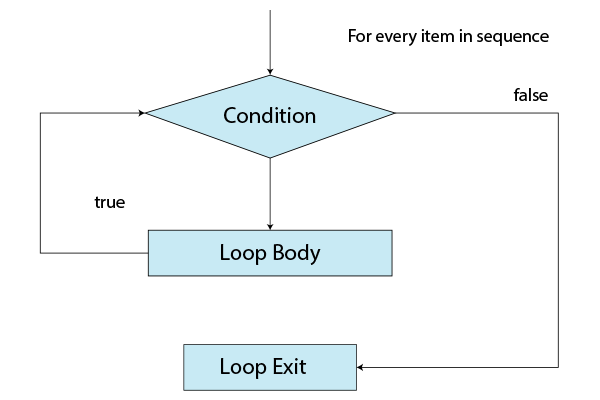
The for-in loop iterates a fixed number of times. It executes a block for the given amount of times.
Syntax for for in loop.
for item in collection{
    //code expressions
}
We can use for-in loop loop to iterate through particular data structures like arrays or dictionaries. We can also use them with a where clause or a stride function. These are explained in detail below.
for-in loop in an array
We iterate through an array using a for-in loop. It helps us access a particular element in the array. We can also
Example:
var names = ["DataFlair", "Swift", "Loops"]

for name in names{
    print(name)
}
Output:
DataFlair
Swift
Loops
for-in loop in a dictionary
We iterate through a dictionary using a for-in loop. We can access both keys and values using this.
var dictionaryExample = [1:"DataFlair", 2:"Swift", 3:"Loops"]

print("Keys:")
for key in dictionaryExample.keys{
    print(key)
}
print("\nValues:")
for value in dictionaryExample.values{
    print(value)
}
print("\nKeys and Values:")
for (key, value) in dictionaryExample{
    print(key,value)
}
Output:
Keys:
1
2
3
Values:
DataFlair
Swift
Loops
Keys and Values:
1 DataFlair
2 Swift
3 Loops
for-in loop in a range
We can iterate through a range of values using a for-in loop.
for index in 17...67{
    if (index%7 == 0){
        print(index)
    }
}
Output:
21
28
35
42
49
56
63
for-in loop with where clause
We can filter the values while iterating through a loop using the where clause. If it is a true condition, then the loop is executed.
var names = ["DataFlair", "Swift", "Loops", "Control Flow"]

for name in names where name != "Swift"{
    print(name)
}
Output:
DataFlair
Loops
Control Flow
for-in loop with stride function
If we want to iterate through a range but we want to increment it by fixed values, we use a stride function instead of a range. It increases by a fixed value in a given set of numbers.
Syntax of stride function
stride(from: val1, to: val2, by: val3)
The range starts with val1 and ends at val2. It is incremented by val3 in the given range after every iteration.
for index in stride(from: 23, to: 45, by: 5){
    print(index)
}
Output:
23
28
33
38
43
while loop in Swift
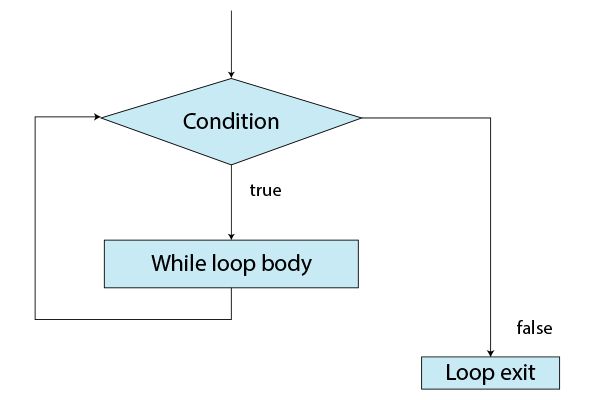
In a while loop, we execute the iterations until the given condition fails. In this type of loop, We cannot keep track of the number of iterations.
Syntax of while loop.
while (condition){
    //code expressions
}
var countdown = 4

while countdown > 0{
    print(countdown)
    countdown -= 1
}
Output:
4
3
2
1
Infinite Loop in Swift
Note that we need to provide an expression within the while loop so that the condition fails at some point. If the condition remains true for all the cases, then the loop might go into an infinite loop. This might lead to crashing, or the program may become unresponsive.
var countdown = 4

while countdown == 4{
    print(countdown)
}
Output:
It prints 4 until the whole memory block is used or the program crashes.
repeat-while loop
Repeat-while loop is a while loop, but in this, it ensures that at least the block of code within it is executed once. It then goes on until the condition becomes false. In other programming languages, it is also known as do-while loop.
Syntax of repeat-while loop.
repeat{
    //code expression
}while (condition)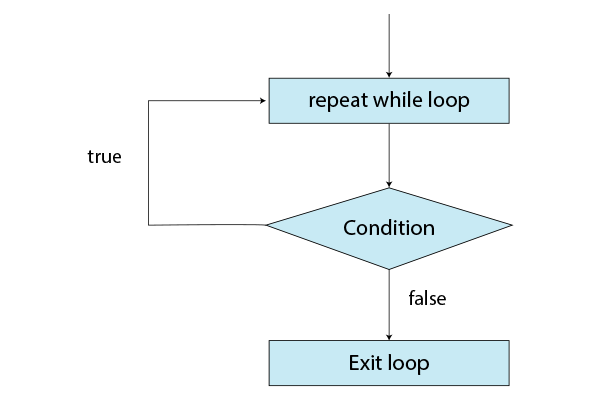
var countdown = 4
repeat{
    print(countdown)
    countdown -= 1
}while(countdown > 0)
Output:
4
3
2
1
Infinite Loop in Swift
Note that we need to provide an expression within the while loop so that condition fails at some point. If the condition remains true for all the cases, then the loop might go into an infinite loop. This might lead to crashing, or the program may become unresponsive.
var countdown = 4
repeat{
    print(countdown)
}while(countdown > 0)
Output:
It prints 4 until the whole memory block is used or the program crashes.
Nested Loops in Swift
Nested loops are loops inside another loop. Each iteration in the outer loop enables multiple iterations in the inner loop. Nested looping helps us in working with multidimensional structures.
Syntax of nested loops.
for outerLoopIndex in OuterLoop{
    For innerLoopIndex in InnerLoop{
        \\code expressions
    }
}
for outerIndex in 31...100{
for innerIndex in 25...30{
if (outerIndex%innerIndex == 0){
print(innerIndex, outerIndex)
}
}
}Output:
25 50
26 52
27 54
28 56
29 58
30 60
25 75
26 78
27 81
28 84
29 87
30 90
25 100
Control Flow Statements in Swift Loops
Control flow statements in Swift control the flow and execution of the loops. There are two control flow statements used in Swift to manage the loop execution. The two control statements break and continue. These are discussed below with the help of examples.
| Type of Loop | Description |
| continue | Stops the loop for the current iteration and goes to the next iteration. |
| break | Exits out of the loop. |
break
The break statement exits out of the loop. It doesn’t matter if the condition is met or not. It helps in reducing the unnecessary computations.
var isPrime = true
for number in 2...15{
    for i in 2..<number{

        if number%i == 0{
            isPrime = false
            print(number)
            break
        }
    }
}
Output:
4
6
8
9
10
12
14
15
continue
The continue statement skips the particular iteration and proceeds to the next one. This helps to optimize our program when we want to skip certain iterations.
print("Even numbers")
for number in 2...10{
    if number%2 != 0{
        continue
    }
    print(number)
}
Output:
Even numbers
2
4
6
8
10
Conclusion
We use loops to traverse through objects and collections. While loops in Swift execute a block of code for the specified number of times, repeat-while loops make sure the block of code is executed at least once. For-in loops iterate for a defined number of times. We use nested loops for using loops within another loop. To control the flow of our programs, Swift also provides us with break and continue statements.
Did you know we work 24x7 to provide you best tutorials
Please encourage us - write a review on Google





