
Swift Decision Making
Job-ready Online Courses: Knowledge Awaits – Click to Access!
Decision making helps us control the flow of our code based on given conditions. Swift supports various control structures for decision making. In this article, we’ll learn about control statements in Swift, their usage and their implementation with the help of relevant examples.
Conditional Statements in Swift
Conditional statements control the code flow based on certain conditions. The following are the control statements we use in Swift Programming.
| Statements | Description |
| if statement | It consists of a condition followed by code expressions |
| if-else statement | It consists of a condition along with an optional else statement, which is executed when the condition is false. |
| if…else-if…else statement | It consists of a condition along with an optional else if…else statement. It tests several conditions using single if…else statements. |
| Nested if statement | It consists of if or else if statements enclosed within another if or else if statements. |
if Statements in Swift
if statements are the condition statements that check if the condition is true. If it is true, then we execute the expression enclosed within it.
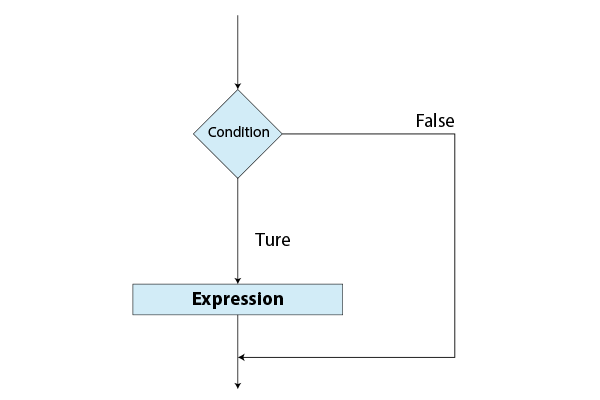
Syntax of if statements.
if(condition){
    Expression
}
For example,
let year = 2023
if(year != 2020){
    print("DataFlair")
}
Output:
DataFlair
if-else Statements in Swift
if-else statements are the condition statements that check the condition. It executes the expressions accordingly. If it is true, then the expression enclosed within it is executed. If it is false, then the expression within the else scope is executed.
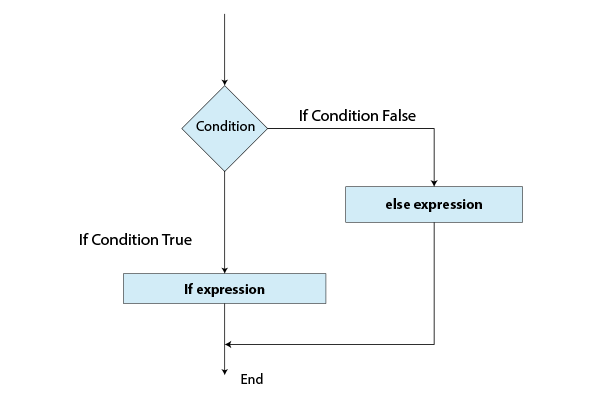
Syntax of if-else statements.
if(condition){
    Expression1
}else{
    Expression2
}
For example,
let year = 2023
if(year == 2020){
    print("Swift")
}else{
    print("DataFlair")
}
Output:
DataFlair
if…else-if…else Statements in Swift
if…else-if…else statements are the condition statements which check the condition. It executes the expressions accordingly. If it is true, then the expression enclosed within it is executed if it is false, then the expression within the next else-if or else scope is executed.
Syntax of if…else-if…else statements.
if(condition){
    Expression1
}else if(condition){
    Expression2
}else{
    Expression3
}
For example,
let year = 2023
if(year == 2020){
    print("Swift")
}else if(year == 2023){
    print("DataFlair")
}else{
    print("Decision Making")
}
Output:
DataFlair
Nested if Statements in Swift
In nested if statements, two or more if statements are enclosed inside each other. Each if statement has its condition. Based on whether the condition is true or not, further expressions are executed.
Syntax of nested if statements.
if(condition1){
    if(condition2){
        Expression
    }
}
let year = 2023
if(year != 2020){
if(year == 2023){
print("DataFlair")
}
}Output:
DataFlair
Switch Statements in Swift
Switch statements help us manage multiple values for a single variable.
Syntax of switch statements.
switch expression{
case expression 1:
    Statement 1
    fallthrough 		//optional
case expression 2:
    Statement 2
    fallthrough 		//optional
case expression 3:
    Statement 3
    fallthrough 		//optional
default:
    Statement 4
}
The keyword fallthrough in a case means the expressions/statements in the next cases should be executed irrespective of whether the condition is met. If this is not used, then the flow comes out of the switch scope when the execution of expression where conditions are met is done.
let year = 2023

switch (year){
    case 2020, 2021, 2022:
        print("Swift")
    case 2023:
        print("DataFlair")
    default:
        print("Invalid")
}
Output:
DataFlair
Ternary Operator in Swift
The ternary operator is a special conditional operator. It operates on three operands: a condition, a true result and a false result. If the condition is true, then it returns the true result. If the condition is false, it returns a false result.
let year = 2023
let trueOutput = (year == 2023) ? "DataFlair" : "Not DataFlair"
print(trueOutput)

let falseOutput = (year != 2023) ? "DataFlair" : "Not DataFlair"
print(falseOutput)
Output:
DataFlair
Not DataFlair
Conclusion
To conclude, decision making is an important part of programming. In Swift, it can be achieved using various ways mentioned above. We can use if, if-else, if…else-if…else or nested if to deal with conditional statements. We can use switch statements to manage multiple variables and conditional statements. Ternary Operator in Swift is a concise and compact way to implement decision making.
Did you like our efforts? If Yes, please give DataFlair 5 Stars on Google





