
React Fragments
Interactive Online Courses: Elevate Skills & Succeed Enroll Now!
React Fragments were introduced as a way to group a list of children elements without creating a DOM element for that group. This is especially useful when you want to render a list of items without creating unnecessary markup.
Before the introduction of React Fragments, developers had to wrap their list of children elements in a container element. This would add an extra DOM node to the rendered output, which was not always desired. With the introduction of React Fragments, developers can now group their list of children elements without creating this extra container element.
Using React Fragments
To use a React Fragment, you simply need to import it from the react package and then wrap your list of children elements with it. Here is an example:
class MyForm extends React.Component {
  constructor(props) {
    super(props);
    this.inputRef = React.createRef();
  }

  handleSubmit = (event) => {
    event.preventDefault();
    console.log(this.inputRef.current.value);
  };

  render() {
    return (
      <form onSubmit={this.handleSubmit}>
        <label>
          Name:
          <input type="text" ref={this.inputRef} />
        </label>
        <button type="submit">Submit</button>
      </form>
    );
  }
}

ReactDOM.render(<MyForm />, document.getElementById("root"));
Output:

In the example above, we are using the React.Fragment component to group our list of p elements. This will result in the expected output, but without the extra container element.
Uses of Fragments in React
Fragments are a feature in React that allow developers to group a list of children components. This can be useful in several scenarios, such as:
1. Avoiding extra markup:
In some cases, adding an additional parent element to group a list of components can result in unnecessary markup that may negatively impact performance.
Fragments help avoid this issue by allowing developers to group the components without adding extra markup.
2. Improving readability:
When working with complex components that contain multiple child components.
Using fragments can improve readability by clearly indicating which components are grouped together.
3. Avoiding layout issues:
When using certain layout components or libraries, such as CSS Grid or Flexbox, adding an additional parent element can sometimes interfere with the layout.
Fragments help avoid this issue by allowing developers to group components without affecting the layout.
Benefits of Fragments in React
1. Improved performance:
By using fragments, developers can avoid unnecessary DOM elements, resulting in faster rendering and improved performance. This is especially important when working with large or complex UIs.
2. Cleaner code:
Fragments can help make code more concise and readable by avoiding the need for additional wrapper elements. This can help reduce code bloat and make it easier to understand the structure of the component tree.
3. Better compatibility:
Fragments work seamlessly with other React features, such as portals and error boundaries. This can help ensure compatibility across different parts of a large codebase.
4. Improved accessibility:
When used appropriately, fragments can help improve accessibility by reducing the number of unnecessary elements in the DOM. This can make it easier for assistive technologies to navigate and understand the content of the page.
5. Simplified debugging:
By avoiding the need for additional wrapper elements, fragments can make it easier. This can save time and improve the efficiency of the development process.
Shorthand Syntax
There is also a shorthand syntax that can be used when using a React Fragment. Instead of using the React.Fragment component, you can use an empty tag <> and </> to wrap your list of children elements. Here is an example:
function MyComponent() {
  return (
    <>
      <p>Hi from DataFlair</p>
      <p>Hi from React</p>
      <p>Hi from the Writer</p>
    </>
  );
}

ReactDOM.render(<MyComponent />, document.getElementById('root'));
Output:

This example produces the same output as the previous example, but uses the shorthand syntax.
React Fragments with keys
React Fragments can also have keys, just like regular elements. This can be useful when rendering a list of elements that have a unique identifier. Here is an example:
import React from 'react';

function MyComponent(props) {
  return (
    <>
      {props.items.map(item => (
        <React.Fragment key={item.id}>
          <h2>{item.title}</h2>
          <p>{item.description}</p>
        </React.Fragment>
      ))}
    </>
  );
}

const items = [
  { id: 1, title: 'Item 1', description: 'This is the first item' },
  { id: 2, title: 'Item 2', description: 'This is the second item' },
  { id: 3, title: 'Item 3', description: 'This is the third item' },
];

ReactDOM.render(<MyComponent items={items} />, document.getElementById('root'));
Output:
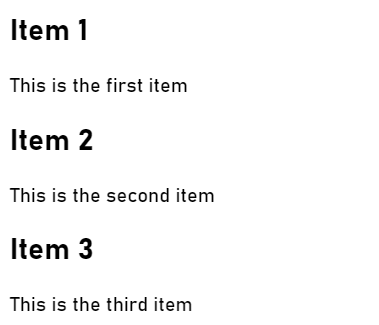
In this example, we are rendering a list of items. Each item has a unique identifier, which we use as the key for the React Fragment. This can help with performance optimizations when updating the list of items.
Conclusion:
In conclusion, React Fragments are a way to group a list of children elements without creating a container element. They can be used with the React.Fragment component or the shorthand syntax <> and </>. They can also have keys, just like regular elements. Using React Fragments can help improve the readability and performance of your React components.
If you are Happy with DataFlair, do not forget to make us happy with your positive feedback on Google





