
How to Handle File Upload in ExpressJS?
Job-ready Online Courses: Dive into Knowledge. Learn More!
Express.js is a web framework for Node.js that allows developers to easily build scalable web applications. One common feature of web applications is the ability for users to upload files, such as images or documents.
In this article, we will take a look at how to handle file uploads using Express.js.
How to Handle File Upload in ExpressJS?
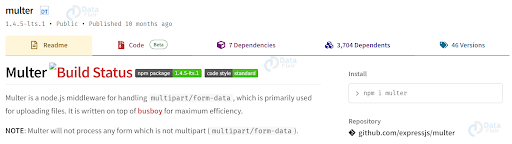
There are a few different ways to handle file uploads in Express.js, but we will be focusing on using the multer middleware. Multer is a middleware for handling form-data, which is used for uploading files. It makes it easy to handle file uploads and provides various options for configuring how the uploaded files are handled.
Multer Installation
First, let’s install multer using npm:
npm install multer
Multer Usage
To use multer in an Express.js application, we need to require it and create an instance of the multer middleware. We can then use this middleware in a route handler to handle file uploads.
const express = require('express');
const multer = require('multer');

const app = express();

// Create an instance of multer middleware
const upload = multer({ dest: 'uploads/' });

// Route handler for file upload
app.post('/upload', upload.single('file'), (req, res) => {
  // Handle the uploaded file here
});
In this example, we have created an instance of multer middleware and specified the destination folder where uploaded files will be stored. We have then defined a route handler for the /upload endpoint, which uses the upload.single() method to handle a single file upload. The name of the file input field in the HTML form is specified as the argument to the single() method.
Handling the uploaded file
Once a file has been uploaded, it will be stored in the destination folder specified in the multer configuration. We can then access the uploaded file using the req.file object in the route handler.
Running project on node
app.post('/upload', upload.single('file'), (req, res) => {
  const file = req.file;

  // Do something with the uploaded file
});
The req.file object contains various properties related to the uploaded file, such as the file name, size, and MIME type. We can use these properties to handle the uploaded file as needed.
Information that the uploaded file contains
When it comes to file uploads in an Express.js application, the req.files.foo object contains a variety of information about the uploaded file. Here’s a breakdown of the different properties available in the req.files.foo object:
- name: The original name of the uploaded file.
- data: The raw binary data of the file.
- size: The size of the file in bytes.
- encoding: The encoding type of the file.
- tempFilePath: The path to the temporary file where the uploaded file is stored.
- truncated: A Boolean value that indicates whether the file was truncated during the upload.
- mimetype: The MIME type of the file, as determined by the uploaded file’s extension.
In addition to these properties, the req.files.foo object may also contain other properties depending on the configuration of the file upload middleware used in the Express.js application. For example, if the dest property is set in the multer middleware configuration, the req.files.foo object may also contain a destination property that specifies the directory where the uploaded file should be stored.
Multiple file upload in Express JS
If we want to allow users to upload multiple files at once, we can use the upload.array() method instead of the upload.single() method. The array() method takes the name of the file input field as its argument.
app.post('/upload', upload.array('files'), (req, res) => {
  const files = req.files;

  // Handle the uploaded files here
});
In this example, we have used the upload.array() method to handle multiple file uploads. The uploaded files are stored in the req.files array, which we can then use to handle each file individually.
Express JS File validation
Multer provides various options for validating uploaded files, such as file type and size restrictions. We can specify these options in the multer configuration object.
const storage = multer.diskStorage({
  destination: (req, file, cb) => {
    cb(null, 'uploads/');
  },
  filename: (req, file, cb) => {
    const uniqueSuffix = Date.now() + '-' + Math.round(Math.random() * 1e9);
    cb(null, file.fieldname + '-' + uniqueSuffix + path.extname(file.originalname));
  },
});

const upload = multer({
  storage: storage,
  limits: {
    fileSize: 1024 * 1024 * 5, // 5 MB
  },
  fileFilter: (req, file, cb) => {
    const allowedMimeTypes = ['image/jpeg', 'image
if (allowedMimeTypes.includes(file.mimetype)) {
cb(null, true);
} else {
cb(new Error('Invalid file type.'));
}
},
});
In this example, we have specified a disk storage engine for multer using the diskStorage() method. We have also set a file name using a unique suffix and the original file extension.
We have then specified a file size limit of 5MB using the limits option, and a file type filter using the fileFilter option. The fileFilter option takes a function that is called for each uploaded file, and returns an error if the file type is not allowed.
Conclusion
Handling file upload is a common requirement in web applications and Express.js makes it easy to handle this task using the multer middleware. With multer, we can easily handle single or multiple file uploads, validate uploaded files, and store them in a destination folder.
However, it’s important to remember that file uploads can be a security risk, and we should always validate uploaded files carefully to prevent any potential security vulnerabilities.
You give me 15 seconds I promise you best tutorials
Please share your happy experience on Google





