
CSS vs CSS3 – Let’s Understand the Difference
Full Stack Web Development Courses with Real-time projects Start Now!!
Cascading Style Sheets (CSS) have been around for over two decades, and have played a crucial role in defining the look and feel of web pages. CSS is a simple styling language that allows developers to apply styles to web pages, such as colors, fonts, and layout. Over the years, CSS has evolved with the introduction of new versions, with the latest being CSS3.
CSS3 introduced several new features that have made it a popular choice among web developers. Some of these features include animations, transitions, 3D transforms, and responsive design. With these new features, developers have been able to create more engaging and interactive web pages.
However, despite the many advantages of CSS3, it is still important to understand the differences between CSS and CSS3. In this blog post, we will explore the differences between CSS and CSS3, and when to use each one. We will also discuss some of the limitations of CSS3 and how to overcome them. Whether you are a beginner or an experienced web developer, this blog post will provide you with valuable insights into the world of CSS and CSS3.
CSS
CSS is a language for describing the appearance and formatting of an HTML or XML document. It is a must-have tool for web designers and developers because it allows them to control the visual aspect of websites while separating presentation from content.
Here are some of the main features of CSS:
1. Separation of Content and Presentation: CSS allows developers to separate the content of a website from its presentation, making it easier to maintain and update the website. This also helps keep the HTML code clean and organized.
2. Cross-Browser Compatibility: CSS is supported by all major browsers, and its code can be written in a way that works consistently across different browsers, ensuring that a website looks the same no matter what browser it is viewed on.
3. Multiple Styles: CSS allows developers to use multiple styles on a single page, giving them complete control over the layout and design of their websites.
4. Responsiveness: CSS allows for responsive design, making it possible to design websites that look great on all devices, from desktop computers to smartphones and tablets.
5. Reusability: CSS makes it possible to reuse styles across multiple pages, making it easier to maintain the look and feel of a website.
6. Accessibility: CSS can be used to make websites more accessible to users with disabilities, such as visually impaired users.
7. Animation: CSS allows developers to create animations, adding an extra layer of interactivity and visual appeal to websites.
However, CSS3 has made it easy and efficient in the design of websites as compared to the older versions. For example, the new property ‘will-change’ will let the developer provide a hint to the browser about what elements are likely to change and this will improve performance of the web page. This is because web page animators can run smoother especially when displaying complex animated sequences in the web page.
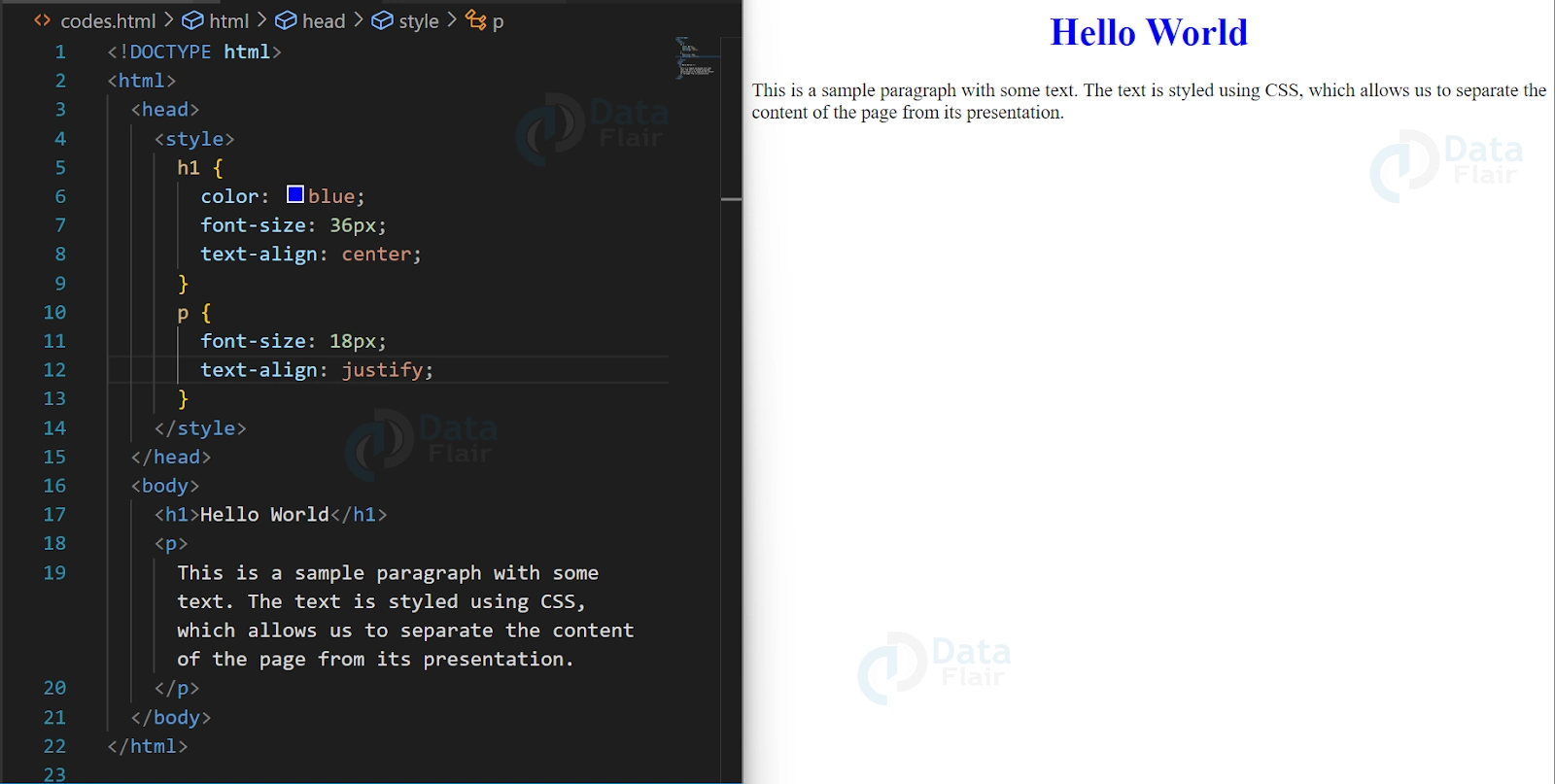
Here is a basic example of CSS syntax
CSS3
CSS3 is the most recent version of the CSS (Cascading Style Sheets) language, with a number of new and improved features that make styling and formatting web pages easier and more flexible. It is cross-browser compatible and essential for modern web design.
Here are some of the main features of CSS3:
1. Selectors: CSS3 introduces new and advanced selectors, making it easier to select elements based on their attributes, relationships, and positions within the document.
2. Box Model: CSS3 includes a new box model that offers more precise control over the sizing, spacing, and borders of elements on a page.
3. Backgrounds and Borders: CSS3 includes new background and border properties, such as multiple backgrounds, border-radius, and box-shadow, that allow designers to create more visually appealing and professional-looking designs.
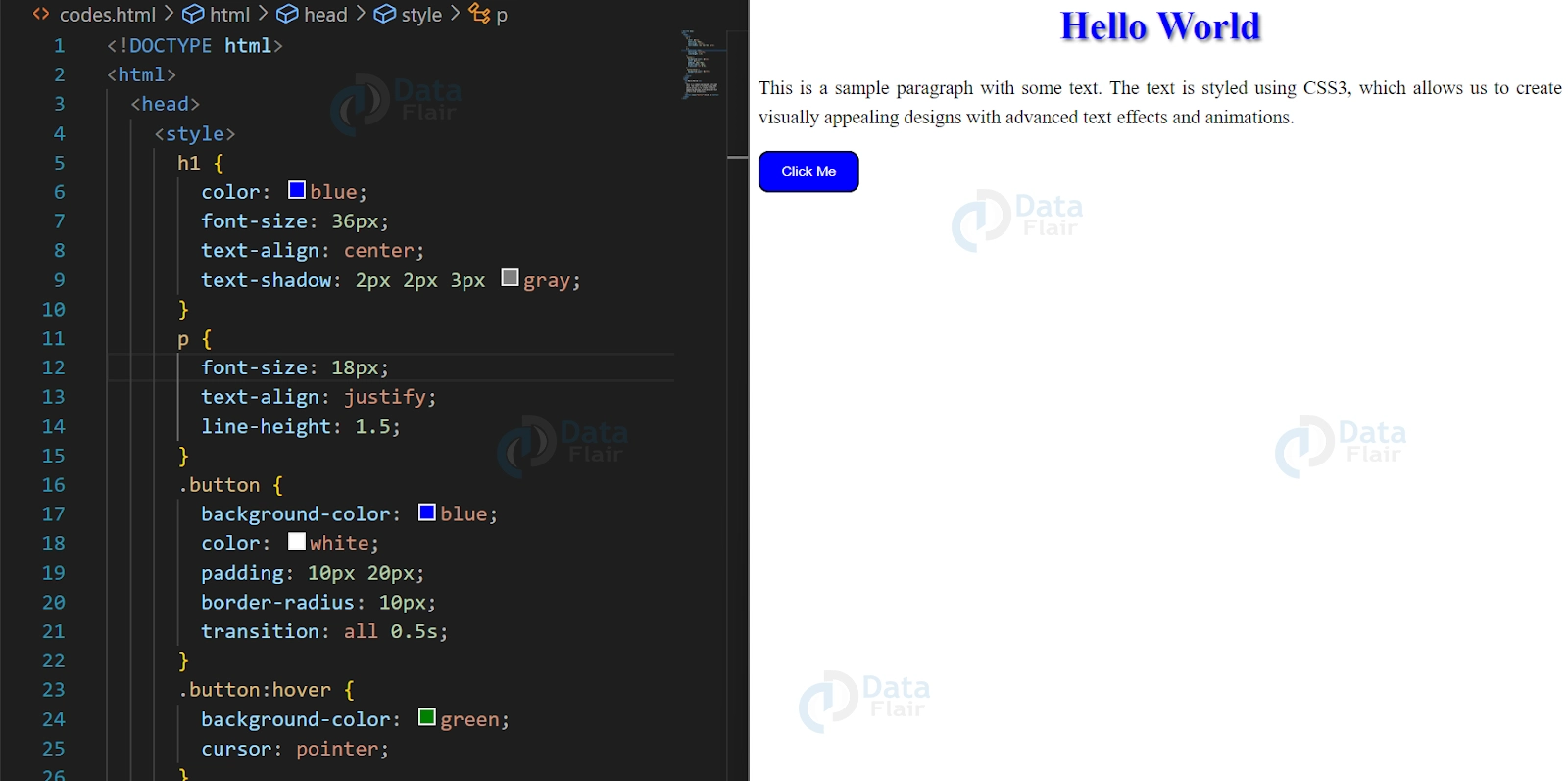
4. Text Effects: CSS3 includes new text effects, such as text-shadow, and improved text handling, such as hyphenation and improved line breaking, that make it easier to style text and improve readability.
5. Transitions and Animations: CSS3 introduces new properties for transitions and animations, allowing designers to create smooth and interactive effects, such as hover effects and slide animations, without the need for JavaScript.
6. Flexible Box Layout: CSS3 introduces a flexible box layout, allowing designers to create flexible and responsive layouts that adapt to different screen sizes and devices.
7. Media Queries: CSS3 includes media queries, which allow designers to apply different styles to different devices and screen sizes, making it easier to create responsive and mobile-friendly designs.
Here is a basic example of CSS3 syntax
Conclusion
In conclusion, CSS3 builds upon the foundation of CSS by offering a range of new and improved features that make it easier to create modern and visually appealing websites. These new features provide designers with more control over the look and feel of their designs, and make it easier to create responsive and mobile-friendly designs.
If you are Happy with DataFlair, do not forget to make us happy with your positive feedback on Google





