
Redirect and Errors in Flask
Interactive Online Courses: Elevate Skills & Succeed Enroll Now!
In this article, we will learn about errors and redirect in Flask. Let’s start with what is redirected in the flask.
Redirect in Flask
Redirect is a mechanism that redirects a user from one URL to another URL. Flask provides the redirect() function that helps to redirect the user from one page to another page. The redirect function in Flask is used in two common scenarios. The first is when a user attempts to access a web page that does not exist, and they are automatically redirected to a different page. The second scenario is when a user submits a form successfully, and they are redirected to a confirmation page to acknowledge that their submission was successful.”
Syntax of redirect function:
from flask import redirect

@app.route('/redirect_page')
def redirect_page():
    return redirect('/success_page')
In the above code, when a user tries to access the “redirect_page,” they will be redirected to the “success_page.
RedirectParameters in Flask
For specifying a resource’s location, a response’s status number, and its content, Flask offers parameters.
1. location Parameter: The URL to which a customer should be redirected is specified using the location parameter. It is frequently combined with Flask’s redirect() function, which delivers the client a redirect response.
2. status code Parameter: The HTTP status code for a redirect or error answer is specified using the status code parameter. It can be specified as the redirect() function’s code input or as the @app.errorhandler() decorator’s first argument.
3. response Parameter: When receiving a redirect or error response, the response parameter is used to define the response object. It can be used as the return value for an error handler method or as the third argument for the redirect() function.
Flask Status Codes
Three-digit HTTP status codes are used to describe the state of a response sent from a web service to a client. Using the HTTP protocol, developers can easily define and send status codes to clients using Flask, a well-liked Python web framework.
There are many standardised HTTP status codes, including:
- 200 OK: Indicates that the request was successful and the server has returned the requested data.
- 201 Created: Indicates that the request has been successful and a new resource has been created on the server.
- 204 No Content: Indicates that the request was successful but there is no data to return to the client.
- 300 Multiple Choices: Indicates that the requested resource has multiple choices and the user can select one of them.
- 301 Moved Permanently: Indicates that the requested resource has been permanently moved to a new location.
- 302 Found: Indicates that the requested resource has been temporarily moved to a new location.
- 303 See Other: Indicates that the requested resource can be found under a different URI and should be retrieved using a GET method.
- 304 Not Modified: Indicates that the requested resource has not been modified since the last time it was accessed and can be retrieved from the cache.
- 400 Bad Request: Indicates that the request was invalid or malformed and could not be processed by the server.
- 401 Unauthorised: Indicates that the client is not authorized to access the requested resource.
- 403 Forbidden: Indicates that the client is authenticated but does not have permission to access the requested resource.
- 404 Not Found: Indicates that the requested resource could not be found on the server.
- 500 Internal Server Error: This indicates that an unexpected error has occurred on the server.
- The default status code in Flask is 200, which represents a successful response. However, Flask provides developers with the flexibility to define and return any status code using the make_response() function.
Flask’s standard status number is 200, which denotes a successful response. The make response() method in Flask, however, gives programmers the freedom to define and return any status code.
In conclusion, HTTP status codes are a crucial component of web development and offer useful data regarding the state of the request/response loop. Flask makes it simpler for developers to create dependable and robust web apps by giving them a simple way to define and send status codes to clients using the HTTP protocol.
What are Flask Errors?
Errors are an inevitable part of web development, and handling errors is an important aspect of any web application. Flask provides the errorhandler() decorator to handle errors in a Flask application. It helps to return a custom error message when an error occurs in the application.
from flask import Flask, render_template

app = Flask(__name__)

@app.errorhandler(404)
def page_not_found(error):
    return render_template('404.html'), 404

if __name__ == '__main__':
    app.run(debug=True)
In the above code, the errorhandler() decorator is used to handle the 404 error, which is a page not found error. The render_template() function is used to render a custom 404 page.
Example:
Let’s consider a simple example to demonstrate the Flask Redirect and Errors.
from flask import Flask, redirect, render_template

app = Flask(__name__)

@app.route('/')
def index():
    return "Welcome to Data-Flair Training"

@app.route('/redirect_page')
def redirect_page():
    return redirect('/success_page')

@app.route('/success_page')
def success_page():
    return "Successful Redirect"

@app.errorhandler(404)
def page_not_found(error):
    return render_template('404.html'), 404

if __name__ == '__main__':
    app.run(debug=True)
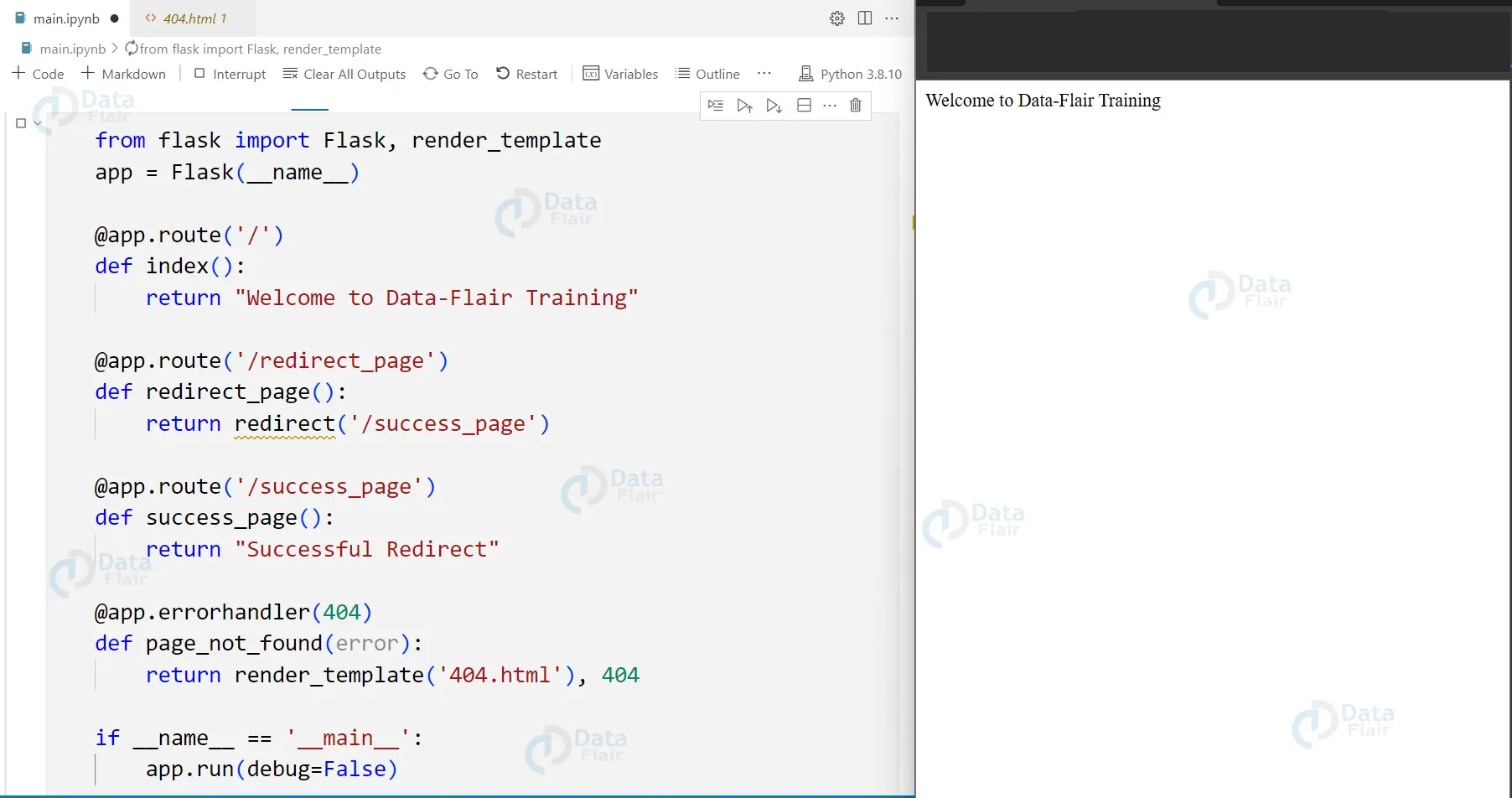

Browser Wise Error
Building web apps that users can access through web browsers is the task of web development. Even though web applications are made to offer users a seamless experience, mistakes can still happen and have an impact on the application’s usefulness and usability. Browser-specific errors and “Too Many Redirects” errors are two frequent mistakes in web programming.
When trying to access a web application, a web browser-specific error is one that occurs in the browser. Numerous things, including outdated plugins or extensions, incompatible browser versions, or problems with network access, can contribute to these errors. The “404 Not Available” errors, “500 Internal Server Error,” and “502 Bad Gateway” errors are frequently encountered browser-related errors.
Developers can use browser developer tools to examine the network requests and responses, as well as the console, for any JavaScript errors in order to identify and correct mistakes that are specific to the browser.
The “Too Many Redirects” error is another frequent mistake made in web programming. This error happens when a web page or application sends the browser on an endless loop of redirects, causing the browser to keep going until it hits a set number of redirects, typically 20. Redirection loops, improperly set redirection rules, and cache-related problems in the browser can all cause this error.
Developers should examine the server configuration and.htaccess files, look for redirection loops in the code, clear the browser’s cache and cookies, and, if required, increase the browser’s maximum allowable number of redirects to resolve this issue.
Conclusion
Flask provides a simple and easy-to-use interface for handling redirects and errors in your application. By utilising the redirect and abort functions, as well as the errorhandler decorator, you can create a robust and user-friendly application.
Did you know we work 24x7 to provide you best tutorials
Please encourage us - write a review on Google





