
CSS Counters with Examples
Full Stack Web Development Courses with Real-time projects Start Now!!
CSS counters are a useful tool for adding and manipulating numbers on a web page. They are basically variables in CSS that are used for automatic numbering. It can be incremented with the help of CSS rules. It allows one to keep track of items such as headings, list items, and images and to display these items in a specific order.
To use CSS counters, we have to use the following four properties:
1. counter-reset: It is used to create or reset the counter variable.
2. counter-increment: It is used to increment the counter variable
3. content: It is used with pseudo-elements like ::before and::after to insert the generated content.
4. counter() function: It is used to add the value of the counter variable to the element.
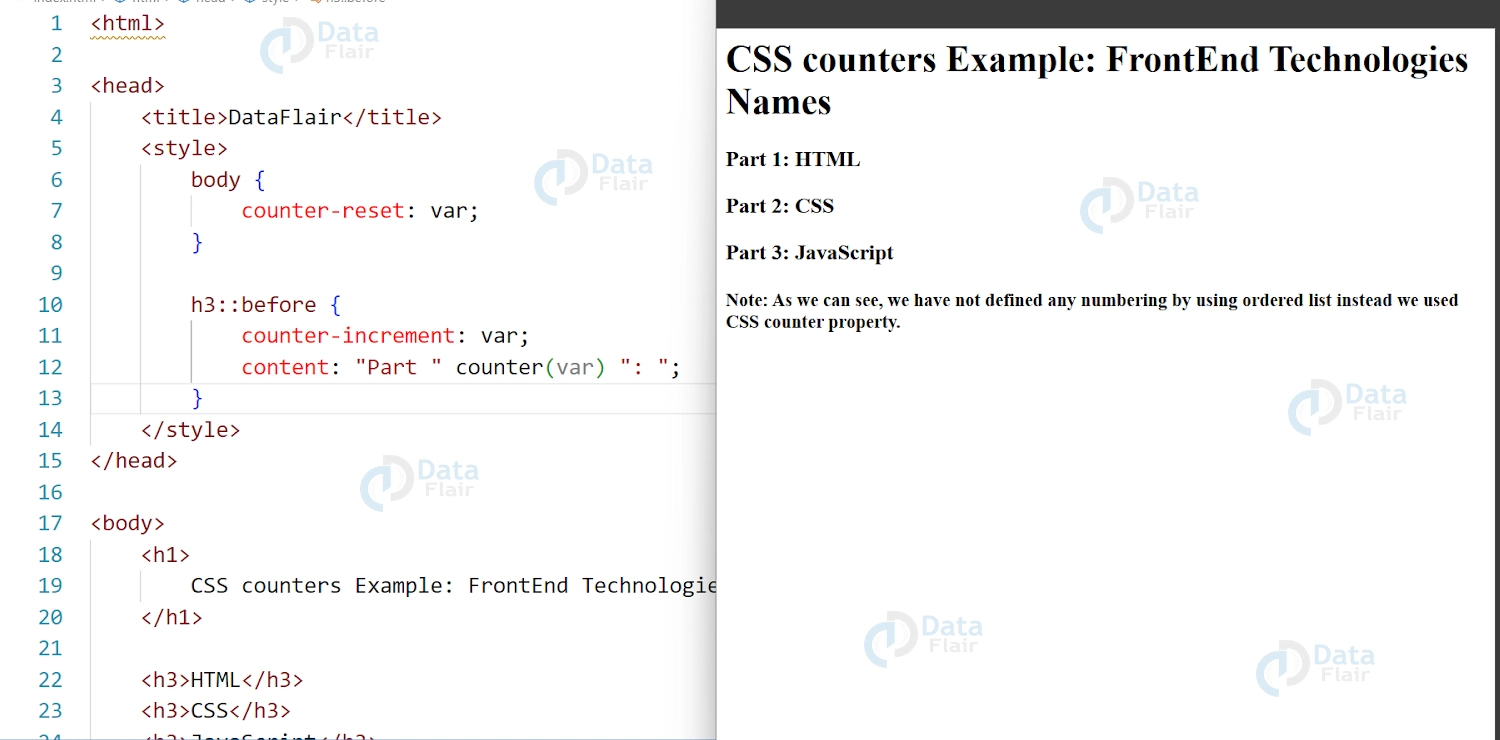
Let us understand how to use them on our webpage in good detail with examples below. Here we have declared a counter variable called “var” in the body selector using the counter-reset property. Then we increase the counter value using counter-increment property and add “Part <value of the counter>:” to the beginning of each <h3> element.
We will break down the properties after the code example and understand them one by one in more depth.
<html>
<head>
<title>DataFlair</title>
<style>
body{
counter-reset: var;
}

h3::before {
counter-increment: var;
content: "Part " counter(var) ": ";
}
</style>
</head>

<body>
<h1>
CSS counters Example: FrontEnd Technologies Names
</h1>

<h3>HTML</h3>
<h3>CSS</h3>
<h3>JavaScript</h3>

<h4>Note: As we can see, we have not defined any numbering by using ordered list instead we used CSS counter property.</h4>

</body>
</html>
Output:

1. counter-reset: number;
To start using CSS counters, we first need to define a counter by using the counter-reset property. This property sets the starting value for a counter, which can be a positive or negative number.
For example, the following code defines a counter variable called “var” and sets its initial value to 1
body{
counter-reset: var;
}
2. Counter-increment
counter-increment property is used to increase the value of the counter variable each time an element is encountered.This property takes the name of the counter as an argument and the number by which to increment the counter.
For example, in our code below, the counter variable “var” is increased by 1 each time is <h3> tag is encountered.
h3 {
counter-increment: var;
}
3. content:
content property is used to add the generated content on the webpage. It is generally used with the pseudo-elements. Here, we used the content property to insert the generated content before the <h3> element. We used the ::before pseudo element selector, along with the current counter value for element.
h3::before {
content: "Part " counter(var) ": ";
}
4. counter() or counters() function
Finally, we can use the counter() function to display the value of the counter. This code uses the counter() function to display the current value of the “var” counter before each <h3> element. The resulting output might look something like this:
h3::before {
counter-increment: var;
content: "Part " counter(var) ": ";
}
Output:
Nesting Counters in CSS
One of the most powerful features of CSS counters is the ability to nest them. This allows you to create hierarchical numbering systems, where the value of a counter depends on the value of another counter. To nest counters, you simply define a new counter inside the content property of an element that is already using a counter.
For example, to create a numbered list of nested items, you might use CSS like this:
ol {
counter-reset: section;
}
li {
counter-increment: section;
}
li:before {
content: counter(section) ".";
}
li li {
counter-reset: subsection;
}
li li:before {
content: counter(section) "." counter(subsection) ".";
}
In this example, we’re using two counters: “section” and “subsection.” The “section” counter is incremented for each list item, and the “subsection” counter is reset for each nested list item.
Reversed Counters in CSS
Another useful feature of CSS counters is the ability to reverse the order of the numbering. This is especially useful when creating numbered lists that need to be displayed in reverse order, such as a timeline. To reverse the order of a counter, you can use the counter() function with the “list-style-type” property.
For example:
ol {
counter-reset: my-counter;
list-style-type: none;
}
li {
counter-increment: my-counter;
}
li:before {
content: counter(my-counter);
margin-right: 0.5em;
}
ol.reverse {
list-style-type: none;
}
ol.reverse li {
counter-increment: my-counter;
}
ol.reverse li:before {
content: counter(my-counter);
margin-right: 0.5em;
}
In this example, we’re using a counter called “my-counter” to number the list items. We’re also using the “list-style-type” property to hide the default list markers. To reverse the order of the list, we’re using a new class called “reverse” and applying the same counter to the list items.
Supported Browsers
CSS counters are a widely supported feature, and they work in all modern browsers. However, some older browsers may not support them, so it’s important to check the browser compatibility before using CSS counters in your projects.
- Internet Explorer: Versions 7 and earlier do not support CSS counters. Support for CSS counters was added in Internet Explorer 8.
- Firefox: Versions 1 through 2 do not support CSS counters. Support for CSS counters was added in Firefox 3.
- Safari: Versions 3 and earlier do not support CSS counters. Support for CSS counters was added in Safari 3.1.
- Opera: Versions 9.2 and earlier do not support CSS counters. Support for CSS counters was added in Opera 9.5.
- Chrome: CSS counters are supported in all versions of Chrome, including version 4 and later.
- Edge: CSS counters are supported in all versions of Edge, including version 12 and later.
It’s important to note that while these older versions of the browsers do not support CSS counters, they are no longer widely used, and the vast majority of users are likely using a more modern browser that supports CSS counters.
CCounter vs <ol>
When it comes to creating numbered lists in HTML and CSS, developers have two main options: using CSS counters or using the <ol> tag. While both approaches can produce the same visual result, there are some key differences to consider.
1. Flexibility and Customization:
CSS counters offer more flexibility and customization options than the <ol> tag. With CSS counters, developers can create custom numbering styles and apply them to any HTML element, not just <ol> or <ul> tags. This can be particularly useful when creating numbered lists that need to match a specific design or branding.
On the other hand, the <ol> tag provides a simpler and more straightforward approach to creating numbered lists. By using the <ol> tag, developers can rely on the browser’s default numbering style, which can be a good option for lists that don’t require a custom style.
2. Accessibility:
Accessibility is an important consideration when creating web content, particularly when it comes to navigation and understanding page structure. When using the <ol> tag, the browser automatically applies semantic markup that helps assistive technologies understand the list’s structure. This can make it easier for users with disabilities to navigate the content.
With CSS counters, developers need to be careful to ensure that the list’s structure is still clear and understandable. This may require additional markup or labeling to help assistive technologies understand the list’s structure.
3. Performance:
CSS counters can be more performant than using the <ol> tag for large or complex lists. This is because CSS counters are calculated on the client side, which means that the browser doesn’t need to load additional HTML markup to render the list.
In contrast, the <ol> tag can add significant markup to the page, particularly for long or nested lists. This can increase page load times and affect overall site performance.
Conclusion:
We understood the CSS counters and how they can be used for creating customized automatic numbering systems in our web pages. In summary, CSS counters are useful for adding and manipulating numbers on a webpage. They allow for automatic numbering of items like headings, list items, and images. The four properties used are counter-reset, counter-increment, content, and counter() function. Nested counters and reversed counters are also possible. CSS counters are widely supported by modern web browsers.
We work very hard to provide you quality material
Could you take 15 seconds and share your happy experience on Google






thank you…it was really helpful for me.