
React Portal
Job-ready Online Courses: Click, Learn, Succeed, Start Now!
React Portal is an advanced feature in React that enables a component to render its children into a different DOM.
This can be useful when rendering a modal tooltip outside the current component tree without affecting the CSS styles.
What are React Portals?
React Portals are a way to render a child component into a different part of the DOM tree that is outside of the parent component hierarchy. Normally, when you render a component, it is added to the DOM as a child of the parent component. However, with portals, you can specify a different DOM node for the component to render into.
This can be especially useful when you need to render a modal or tooltip outside of the current component tree. For example, if you have a long list of items and you want to show a tooltip when the user hovers over one of the items, you could render the tooltip.
When to use React Portals?
Modals: You can render modals outside the current component tree to avoid z-index conflicts with other elements on the page.
Tooltips: You can render tooltips outside the current component tree to avoid layout issues.
Custom Dropdowns: You can render dropdown menus outside the current component tree to avoid issues with overflow and positioning.
Parent CSS Conflicts: You can render a component outside the parent component hierarchy to avoid conflicts with the parent component’s CSS styles.
How to Implement React Portals?
To create a React Portal, you need to first create a new DOM node that will act as the container for the portal. This can be done using the createPortal() function provided by React. The createPortal() function takes two arguments: a child component to render and a DOM node to render the component into.
import React, { useState } from 'react';
import ReactDOM from 'react-dom';

const Modal = ({ onClose, children }) => {
  const [modalContainer] = useState(() => {
    const el = document.createElement('div');
    el.className = 'modal';
    return el;
  });

  React.useEffect(() => {
    const modalRoot = document.getElementById('modal-root');
    modalRoot.appendChild(modalContainer);
    return () => {
      modalRoot.removeChild(modalContainer);
    };
  }, [modalContainer]);

  return ReactDOM.createPortal(
    <div className="modal-overlay">
      <div className="modal-content">
        <button onClick={onClose}>Close</button>
        {children}
      </div>
    </div>,
    modalContainer
  );
};

const App = () => {
  const [showModal, setShowModal] = useState(false);

  const handleCloseModal = () => {
    setShowModal(false);
  };

  return (
    <div>
      <h1>React Portals Demo</h1>
      <button onClick={() => setShowModal(true)}>Show Modal</button>
      {showModal && (
        <Modal onClose={handleCloseModal}>
          <p>This is a modal dialog.</p>
        </Modal>
      )}
    </div>
  );
};

ReactDOM.render(<App />, document.getElementById('app'));
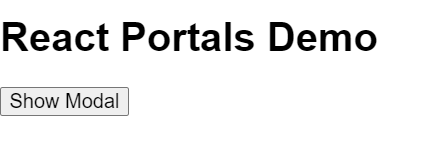
Output
Benefits of Portals in React
1. Improved Structure and Readability
One of the main benefits of using portals is the improved structure and readability of your code. When you use a portal to render a component in a specific location in the DOM, your code is more readable.
2. Separation of Concerns
Portals also enable you to separate the concerns of your components. For example, you may have a component that is responsible for rendering a specific UI element, such as a tooltip or drop-down menu. By using a portal to render this UI element, you can separate the rendering logic from the main component logic.
This separation of concerns makes your components more modular and easier to maintain. If you need to change the rendering logic for the UI element, you can simply update the portal.
3. Flexibility
Portals also give you more flexibility in how you structure your components. With portals, you can render a component at a specific location in the DOM, regardless of its position in the component hierarchy.
Event Bubbling through portals in React
Portals in React are a way to render a child component outside of its parent DOM hierarchy. This is useful when you need to render a component in a different part of the DOM tree, such as a modal or a dropdown menu. Portals are created using the ReactDOM.createPortal() method, which takes two arguments: the child component to render, and a DOM node where to render it.
When you use portals, event bubbling can behave differently from regular React components. By default, events that originate from a portal child will not bubble up to the parent component, since the portal child is rendered outside of its parent’s DOM hierarchy. This can be problematic when you need to handle events that occur inside a portal component.
class PortalChild extends React.Component {
  handleClick = (event) => {
    this.props.forwardedRef.current.dispatchEvent(
      new MouseEvent('click', {
        view: window,
        bubbles: true,
        cancelable: true,
      })
    );
  };

  render() {
    return (
      <div onClick={this.handleClick}>Portal Child</div>
    );
  }
}

const PortalParent = () => {
  const portalNode = document.getElementById('portal');
  const ref = React.useRef(null);

  return ReactDOM.createPortal(
    <PortalChild forwardedRef={ref} />,
    portalNode,
  );
};

const App = () => (
  <>
    <div id="parent">
      Parent Component
    </div>
    <div id="portal" />
    <PortalParent />
  </>
);
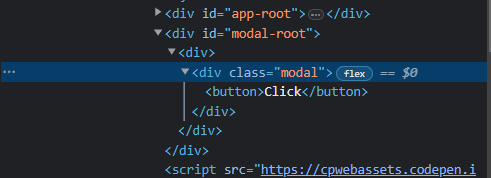
Output
Conclusion
React portals are a powerful tool that enables you to render a component in a specific location in the DOM. Portals offer several benefits, including improved structure and readability, the separation of concerns, and flexibility in how you structure your components.
By using portals in your React applications, you can create more modular, maintainable, and flexible components that are easier to read and understand.
Your 15 seconds will encourage us to work even harder
Please share your happy experience on Google





