
Opacity in CSS
Full Stack Web Development Courses with Real-time projects Start Now!!
CSS opacity is a property that allows you to control the transparency of an element. It can be used to make an element more or less transparent, or completely transparent.The element and each of its child elements are affected by the property.
The opacity property is set using a value between 0 and 1, where 0 is completely transparent and 1 is completely opaque. For instance, you would set an element’s opacity to 0.5 to make it 50% transparent.
Syntax
The syntax for the CSS opacity property is as follows:
element {
    opacity: value;
}
Where “value” is the value of the opacity you want to set and “element” denotes the HTML element for which you want to set the opacity. The value may be one of the keywords “inherit,” “initial,” or “unset,” or it may be a number between 0 and 1.
Various Values of Opacity in CSS
The opacity property is set using a value between 0 and 1, where 0 is completely transparent and 1 is completely opaque. For instance, you would set an element’s opacity to 0.5 to make it 50% transparent.
In addition to using a number between 0 and 1, the opacity property can also take other values. These include:
- A number expressed as a percentage, such as “50%,” which causes the opacity to be adjusted to 0.5.
- The keyword “inherit” indicates that the element will inherit its parent element’s opacity value.
- The keyword “initial”, which sets the opacity to its default value (1).
- The “unset” keyword, which returns the opacity value to its starting point.
- For instance, the following code would be used to set a div element’s opacity to 50%:
div {
    opacity: 0.5;
}
or
div {
    opacity: 50%;
}
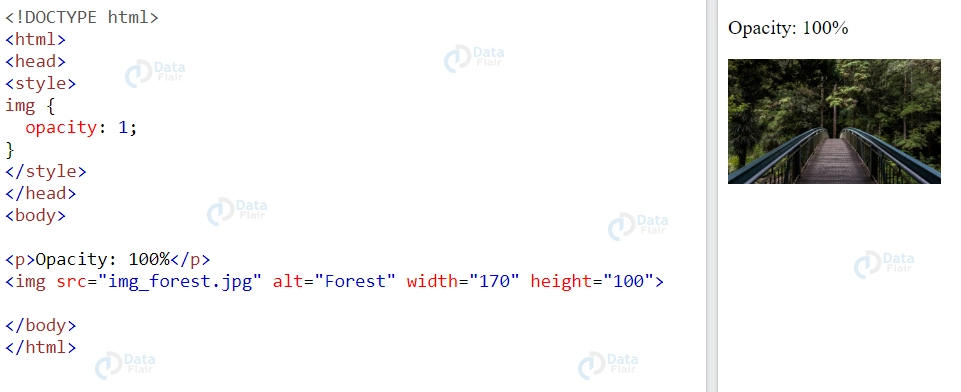
This is the image with opacity value 1, which is the original image:
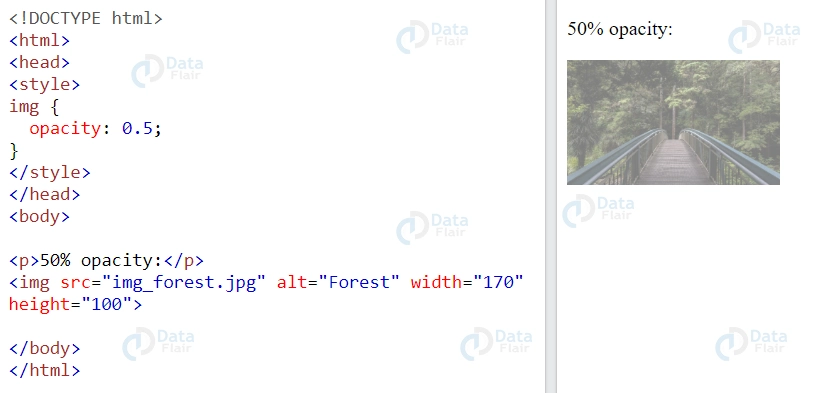
This is the image with opacity value 0.5, which is 50% of the original transparency of the image:
The :hover selector is frequently used in conjunction with the opacity property to modify the opacity on mouse-over:
<style>
img {
  opacity: 0.5;
}

img:hover {
  opacity: 1.0;
}
</style>
This would produce the following results:
Image without hovering on it (here the image is with 0.5 opacity value):

Image when hovering on it (here the image is visible completely with opacity value as 1):

Applying Opacity using RGBA
All of an element’s child elements acquire the same transparency when the opacity property is used to make an element’s background transparent. This can make it challenging to read text inside of a fully transparent element.
For example, here in the image we can see how the text in the box also got an opacity value of 0.2, making the text hard to read:
<!DOCTYPE html>
<html>
<head>
<style>
div {
  background-color: skyblue;
  padding: 10px;
}

div.first {
  opacity: 0.2;
}

</style>
</head>
<body>

<div class="first"><p>0.2</p></div>
<div><p>default</p></div>

</body>
</html>
Instead of using the opacity property, you can use the background-color property with a rgba() value to change an element’s opacity without impacting its child elements.
You can define a color’s red, green, blue, and alpha (transparency) values by using the rgba() value. The alpha value ranges from 0 to 1, with 0 being totally transparent and 1 being entirely opaque.
When you use a rgba() value to set the background-color attribute of an element, just that element’s background colour is changed; the background colours of any child elements are unaffected.
<!DOCTYPE html>
<html>
<head>
<style>
div {
  background: rgb(135, 206, 235);
  padding: 10px;
}

div.first {
  background: rgba(135, 206, 235, 0.1);
}
</style>
</head>
<body>

<div class="first"><p>10% opacity</p></div>
<div><p>default</p></div>

</body>
</html>

Here we can see how only the background opacity changed and the text was just fine. Concerning the background opacity, rgba() is better as compared to other opacity settings because it provides better control on individual elements within a container and helps to avoid invisibility of content. This method is particularly useful in cases where you need to layer elements and maintain readability, such as in overlays and modals.
Other properties that are also offered by CSS and which can be used in combination with the opacity include; For instance when focusing on using opacity with css transitions, it is possible to achieve smooth fading of elements when they are made to appear or disappear.
In conclusion, you can utilize the background-color property with a rgba() value rather than the opacity property to change an element’s opacity without impacting its child elements. The red, green, blue, and alpha (transparency) values of a colour can be specified using the rgba() value. This value solely affects the element’s background colour and visibility; it has no bearing on the layout or its child elements.
Browser Compatibilty
The opacity property in CSS sets the transparency of an element. It is a widely used property in modern web design, as it allows for creating visually appealing effects such as fade-ins, overlays, and transparency.
In terms of browser compatibility, the opacity property is generally well-supported by modern browsers, including Google Chrome, Mozilla Firefox, Safari, and Microsoft Edge. However, there may be some differences in the way that different browsers handle the opacity property.
For example, older versions of Internet Explorer (IE8 and below) do not support the opacity property. Instead, they use a proprietary filter property to achieve similar effects. Additionally, some older browsers may require vendor prefixes for the opacity property, such as -webkit-opacity for older versions of Safari and Chrome.
When it comes to browser support, one should employ feature detection while offering fallbacks in the process to enhance compatibility with multiple devices and browsers. Every CSS property tends to change from time to time to reflect current standards and browser updates means frequently refreshing the CSS.
Overall, the opacity property is a widely used and well-supported feature in modern browsers, and it is generally safe to use in most web design projects. However, it is always a good idea to test your designs on a range of browsers and devices to ensure optimal compatibility and user experience.
Conclusion
The transparency of an element on a web page is managed using the CSS opacity attribute. It can accept percentages, numbers between 0 and 1, or words like “inherit,” “initial,” and “unset.” It has an impact on all of the element’s children in addition to the element itself. To adjust the opacity of an element without impacting its sibling components, use the background-color attribute with a rgba() value instead. This is helpful if you want to modify an element’s background colour and opacity at the same time. Understanding how to use the opacity property can provide your web pages an added degree of versatility and aesthetic intrigue.
Did you know we work 24x7 to provide you best tutorials
Please encourage us - write a review on Google





