

Job-ready Online Courses: Knowledge Awaits – Click to Access!
1. Salesforce Static Resource
Today, in this Salesforce Tutorial, we are going to learn what does the term static Resource in Salesforce means. Also, we will see its function of creating and uploading a Static Resource in Salesforce. Moreover, we will see Visualforce Static Resource.
So, let’s start Static Resource in Salesforce.
Static Resource in Salesforce | Static Resource in Visualforce
2. What is a Static Resource in Salesforce?
Static resources enable you to upload content that you just will reference in an exceedingly Visualforce page. Resources may be archives (such as .zip and .jar files), images, stylesheets, JavaScript, and alternative files.
Have a look at Salesforce Schema Builder
Resources that are distributed to program Lightning Platform are Static Resources. These Static Resources acts as a Content Distribution Network (CDN) for the files. To catch and distribute both can be handled automatically.
3. How To Create & Upload Static Resources?
When your static asset isn’t associated with alternative assets—that is, not a part of a set of comparable assets like a group of icons—it’s best to make a stand-alone static resource.
- Download the latest version of the jQuery JavaScript library. At this writing, it’s jQuery 3.1.0.
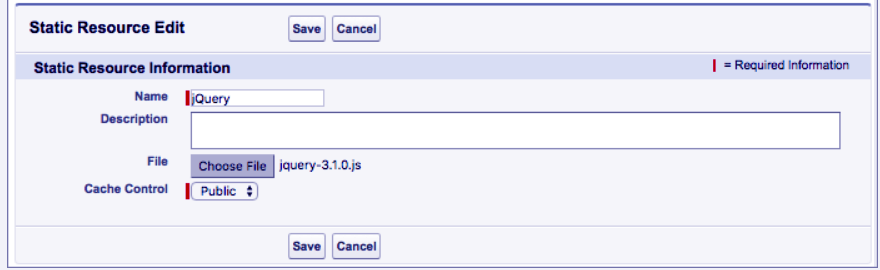
- Under Setup, go for Static Resources within the Quick Find Box, select Static Resources, then click on ‘New’.
- Enter jQuery for the Name.
- Click opt for File, then opt for the jQuery JavaScript file you downloaded previously.
Create & Upload Static Resources
- If you see the Cache-control menu, opt for Public.
- This item isn’t visible in all organizations.
- Click Save.
Do you know about Salesforce Export Data
4. Use Static Resource in Visualforce Page
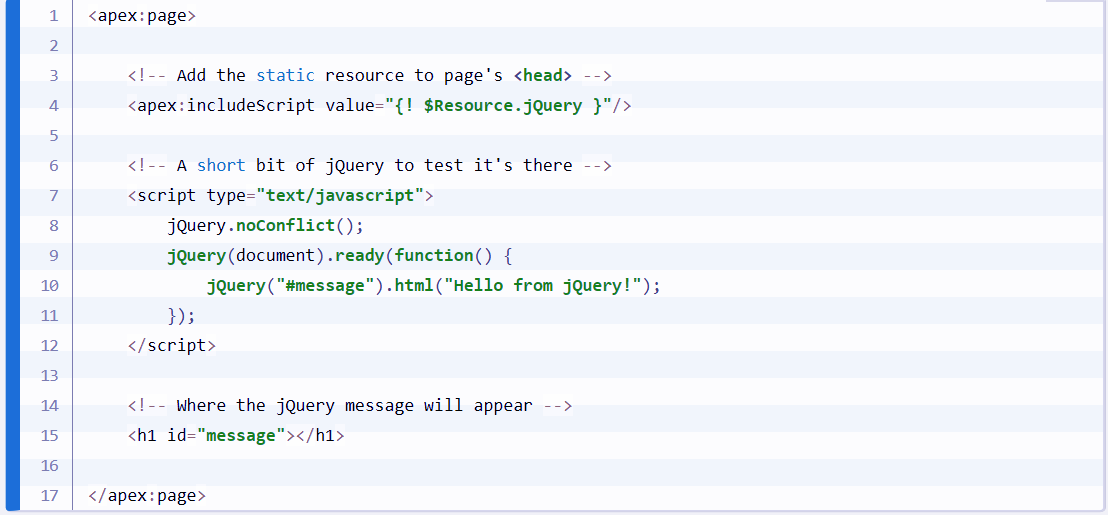
- Open the Developer Console and click on File | New | Visualforce Page to make a brand new Visualforce page. Enter HelloJQuery for the page name.
- In the editor, replace any markup with the subsequent.
Add a Static Resource to a Visualforce Page
- Click Preview to open a preview of your page that you just can explore whereas you make changes.
This opens a new window with the standard Salesforce page header, sidebar parts, and a brief jQuery message on display.
5. Create and Upload a Zipped Static Resource
Create zipped static resources to cluster along connected files that are sometimes updated together.
Have a look at Salesforce Data Security Model
When your static assets are a group of related items—for example, a group of application icons, or a fancy JavaScript library—it’s best to make a zipped static resource. Produce a zip file containing all of the weather you would like to group along, and transfer solely the one zip file to Lightning Platform.
- Download the current version of the jQuery Mobile JavaScript library, within the zip format. At this writing, it’s jQuery Mobile 1.4.5.
If the link doesn’t work, or if you would like to form sure you’re downloading the very latest version, attend http://jquerymobile.com/download/ and download the most recent version of the zip file accessible there.
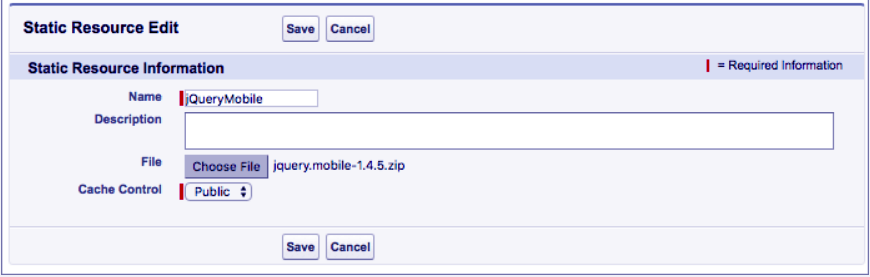
- Under Setup, get into Static Resources within the Quick Find Box; finally select Static Resources, then click on ‘New’.
- Enter jQueryMobile for the Name.
- Under the drop-down menu, choose File, then select the jQuery Moblie ZIP file you have downloaded.
Create and upload a Zipped Static Resource
- From the Cache-Control menu, select ‘Public’
This item isn’t visible altogether organizations.
- Click Save.
Let’s revise Salesforce Role Hierarchy
So, this was all in Static Resource in Salesforce. Hope you understand our explanation.
6. Conclusion: Static Resource in Salesforce
Hence, in this Salesforce Static Resource tutorial, we learned what does the term Static Resource in Salesforce mean. Moreover, we discussed how to create and upload Static Resource. Along with this, we also discussed how to add Static Resource in Visualforce. Still, if any doubt occurs regarding Static Resource in Salesforce, ask in the comment tab.
See also –
Salesforce List Controller
For reference