


Full Stack Web Development Courses with Real-time projects Start Now!!
CSS (Cascading Style Sheets) is an essential part of web development as it helps to design and style web pages. However, there are certain situations where using CSS may not be ideal or practical. In this article, we will explore some alternatives to CSS.
CSS Alternatives
1. Table-based Layouts
Before CSS, the most common way to design web pages was to use HTML tables. Table-based layouts are still a viable option for designing web pages, especially for emails or newsletters. It is easy to create multi-column layouts and adjust the height and width of table cells. However, table-based layouts can be inflexible and can make it difficult to maintain and update code.
Here is an example of a table-based layout:
<table>
<tr>
<td>Header 1</td>
<td>Header 2</td>
</tr>
<tr>
<td>Row 1, Column 1</td>
<td>Row 1, Column 2</td>
</tr>
<tr>
<td>Row 2, Column 1</td>
<td>Row 2, Column 2</td>
</tr>
</table>
CSS
table {
border-collapse: collapse;
width: 100%;
}

td, th {
border: 1px solid black;
padding: 8px;
text-align: left;
}
Output

Moreover, it can be said that the usage of tables to construct the site’s layout makes the vertical and the horizontal alignment of the page content quite easy to organize. This can be especially helpful for creating assembly line emails and other factors where the structure of the layout must be closely controlled.
Nevertheless, because of applied structures that contain limitations, table-based layouts have become unpopular and developers look for a more flexible and maintainable approach.
2. JavaScript
JavaScript can be used to manipulate the appearance of web pages dynamically. With JavaScript, you can create animations, change the color of elements, and modify the layout of a page. However, using JavaScript to style a web page can be more complex than using CSS, and it can also affect the performance of the page.
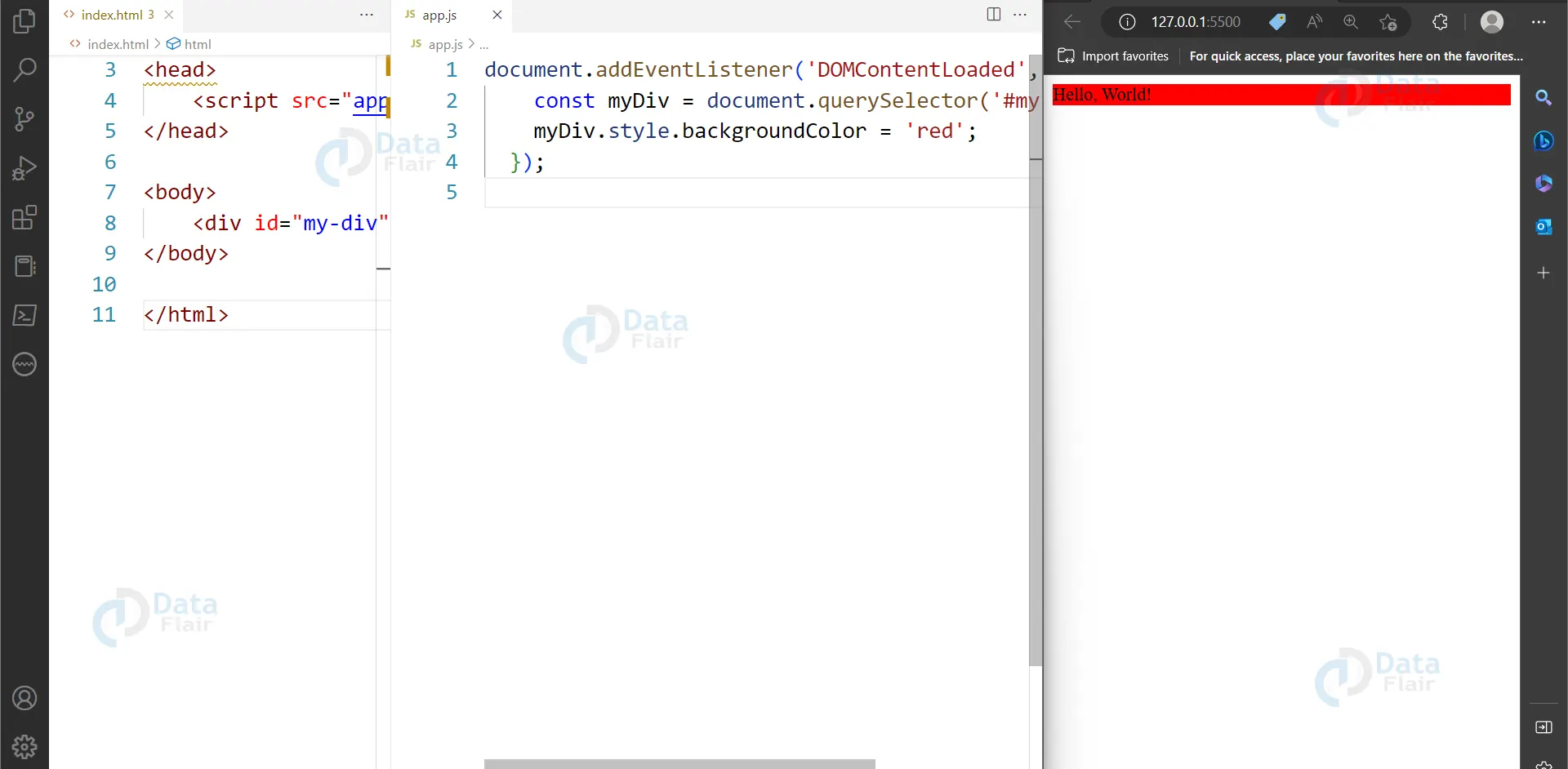
Here is an example of how to change the background color of an element using JavaScript:
HTML
<div id="my-div">Hello, World!</div>
JS
const myDiv = document.querySelector('#my-div');
myDiv.style.backgroundColor = 'red';
Output
3. Inline Styles
When utilizing the “style” property, inline CSS styles are applied straight to an HTML element. Inline styles are easy to use and can be useful for making small changes to individual elements. However, they can become difficult to manage and maintain in larger projects.
Here is an illustration of inline styles in action:
<div style="background-color: yellow; font-size: 24px;">Hello, World!</div>
Output

4. Server-side Styling
Server-side styling involves generating CSS styles on the server-side and sending them to the client as part of the HTML response. This can be useful for creating customized styles for individual users or for optimizing page load times. However, it can also be more complex to implement and may require additional server resources.
Here is an example of server-side styling using PHP:
<?php
$color = '#FF0000';
echo "<style>body { background-color: $color; }</style>";
?>
Output

A strong and positive aspect presented by the server-side styling is the ability to style the users’ experiences in manners that are dictated by the server-side information. This approach can change the styles on the fly and does not necessarily have to process anything in the client-side thus can improve the loading time of the page.
Nevertheless, due to the complexity and the need for resources on the server side, the construction of server-side styling may become unattractive for some projects.
Here are a few more alternatives to CSS:
5. SVG (Scalable Vector Graphics)
This is a vector image format that can be used to create scalable graphics and animations. SVG images can be easily styled using XML, and they can be embedded directly into HTML code. SVG can be useful for creating complex graphics and animations that may not be possible with CSS.
Here is an example of an SVG image:
<svg width="100" height="100">
<circle cx="50" cy="50" r="40" stroke="black" stroke-width="3" fill="red" />
</svg>
Output

6. Canvas
The HTML canvas element is a drawing surface to create dynamic graphics and animations. Canvas uses JavaScript to manipulate pixels on the screen, allowing for complex animations and interactions. Canvas can be useful for creating games or interactive experiences that may not be possible with CSS.
Here is an example of drawing a rectangle on a canvas:
HTML
<canvas id="my-canvas" width="200" height="200"></canvas>
JS
const canvas = document.getElementById('my-canvas');
const context = canvas.getContext('2d');
context.fillStyle = 'red';
context.fillRect(50, 50, 100, 100);
Output

7. Preprocessors
With the use of CSS preprocessors, programmers may write CSS more quickly and logically. Preprocessors like Sass and Less can make it easier to manage large CSS projects and provide additional features like variables and functions. Preprocessors can be useful for creating more maintainable CSS code.
Here is an example of using Sass to define a variable:
$primary-color: #FF0000;

button {
background-color: $primary-color;
}
Conclusion
Hence we can say that while CSS is the standard for styling web pages, there are alternative options that can be useful in certain situations. Table-based layouts, JavaScript, inline styles, and server-side styling are all viable alternatives to CSS. As with any programming tool, it is important to choose the right option for your specific needs and goals.