


Get Job-ready: Java Course with 45+ Real-time Projects! - Learn Java
If you have been following the articles, you would know what we would be doing before we progress into the details of the subject.
Yes, we would look at a real-life example.
Imagine you are in charge of writing code for a huge MNC where there is not one, not two, but 60 ways that a program’s execution can change based on the user’s input. Now, you as a programmer would have to write 60 if-else statements and write the flow of the program accordingly for each case. Right? Well, yes, you would have to if you did not know about the “Switch” statement in Java.
You would be a very bad programmer if you did not know about switch statements in the first place, but for the sake of the example, let’s say that you are not familiar with the concept.
Well, Java’s switch statement can save you from writing redundant lines of code.
Let us dive in!
What is a Switch Case in Java?
Switch case in Java is essential for avoiding redundant if-else statements in a program.
You can branch into multiple ways by using this statement.
Think of this as a road intersection where you can branch off into three different directions from a single point.
Syntax of Java Switch Case:
switch(variable_name)
{
    case value1:
    //code to be executed if variable_name=value1
    break;
    case value2:
    //code to be executed if variable_name=value2
    break;

    default:
    //code to be executed if variable_name=value3
}
It works with Java Enums, Wrapper classes, and the String class as well.
Points to note while using switch statements in Java:
- You cannot have duplicate case values.
- The datatype of the case must be the same as the data type of the switch.
- The limiting value of a case should either be a constant or a literal. You cannot add variables to the case.
- The break is useful for terminating the flow of the program after a particular case has been executed.
- If you do not use the break statement, the flow of the control progresses to the next case.
- The default case can appear anywhere inside the switch block. However, if it contains case blocks after it, a break statement should be added after the default block; otherwise, the control would slip into the next layers of the block.
Java example to illustrate the use of Switch Case:
package com.dataflair.switchcase;
import java.util.*;

public class SwitchStatement {

    public static void main(String[] args) {

        Scanner sc = new Scanner(System.in);

        int variable;
        System.out.println("Please enter the variable value");

        variable=sc.nextInt();

        switch(variable)
        {
            case 1:
            System.out.println("The value of the variable = "+variable);
            break;
            case 2:
            System.out.println("The value of the variable ="+variable);
            break;
            case 3:
            System.out.println("The value of the variable ="+variable);
            break;
            default:
            System.out.println("The value of the variable is neither 1 nor 2 nor 3");
        }

    }
}
Output:
5
The value of the variable is neither 1 nor 2 nor 3
Java program to illustrate what the break statement is useful for:
We can also try to see what happens if we remove the break statement
package com.dataflair.switchcase;
import java.util.*;

public class SwitchStatement {

    public static void main(String[] args) {

        Scanner sc = new Scanner(System.in);

        int variable;
        System.out.println("Please enter the variable value");

        variable=sc.nextInt();

        switch(variable)
        {
            case 1:
            System.out.println("The value of the variable = "+variable);
            case 2:
            System.out.println("The value of the variable = "+variable);
            case 3:
            System.out.println("Value of the variable = "+variable);
            default:
            System.out.println("The value of the variable is neither 1 nor 2 nor 3");
        }

    }
}
Output:
1The value of the variable = 1
The value of the variable = 1
Value of the variable = 1
The value of the variable is neither 1 nor 2 nor 3
Java program to illustrate the use of switch statements with strings:
package com.dataflair.java.switchcase;
public class SwitchStrings
{
    public static void main(String[] args) {
        String course="java";
        switch(course)
        {
            case "python":
                System.out.println("Python was made by Guido Van Rossum");
                break;
            case "java":
                System.out.println("Java was made by James Gosling! It is one of Shraman's favourites!");
                break;
            case "c++":
                System.out.println("C ++ was made by Bjarne Stroustrup");
                break;

        }
    }
}
Output:
Java program to illustrate the nested switch case:
package com.dataflair.switchcase;
import java.util.*;

public class NestedSwitch
{
    public static void main(String[] args) {
        Scanner sc = new Scanner(System.in);

        String course="java";
        switch(course)
        {
            case "python":
                System.out.println("Python was made by Guido Van Rossum");
                break;
            case "java":
                System.out.println("What version of Java are you using?");
                int version=sc.nextInt();
                switch(version)
                {
                    case 6:
                        System.out.println("That is old school!");
                        break;
                    case 8:
                        System.out.println("Wow, that’s great! Tons of new features!");
                        break;

                }
                break;
            case "c++":
                System.out.println("C ++ was made by Bjarne Stroustrup");
                break;

        }
    }
}
Output:
8
Wow, that’s great! Tons of new features!
Java program to illustrate the use of switch case with enum:
package com.dataflair.switchcase;

import java.util.*;

public class SwitchEnum
{

        enum course
        {
            AI,ML,WD

        }
    public static void main(String[] args) {
        Scanner sc = new Scanner(System.in);

        course[] presentcourse = course.values();

       for(course c:presentcourse)
       {
           switch(c)
           {
               case AI:
                    System.out.println("The full form of AI is Artificial Intelligence");
                    break;
               case ML:
                   System.out.println("Full form of ML is Machine Learning");
                   break;
                case WD:
                    System.out.println("The full form of WD is Web Development");
                    break;

           }

       }
    }
}
Output:
Full form of ML is Machine Learning
The full form of WD is Web Development
Java program to illustrate the use of switch case with Wrapper classes:
package com.dataflair.javaswitch;

import java.util.*;

public class WrapperSwitch
{
    public static void main(String[] args) {
        Integer choice;
        System.out.println("1. Java\n 2. Python\n 3.C++\n");
        Scanner sc = new Scanner(System.in);
        choice=sc.nextInt();

        switch(choice)
        {
            case 1:
                System.out.println("Java requires a good knowledge of Object Oriented Programming");
                break;
            case 2:
                System.out.println("Easiest language to learn. Known as executable pseudocode");
                break;
            case 3:
                System.out.println("Best language for competitive programming");
                break;
            default:
                System.out.println("Wrong choice");

        }
    }
}
Output:
2. Python
3.C++2
Easiest language to learn. Known as executable pseudocode
Rules of Switch Case Statement in Java
There are a few rules that have to be understood while using switch case statements in Java.
- You can only use integers, strings, and enums as the case values in a switch case statement.
- There is no limit to the number of cases in a switch case block. You can have as many as you want. Each case block is followed by the value of the case and a colon. Then comes the code to be executed when the case is true.
- You have to keep in mind that the value and the data type of the value must be the same as the variable in the switch block.
- You cannot have expressions in cases. The value must either be literal or constant.
- Once a case evaluates to true, the compiler will execute all the statements line by line until it reads a break statement.
- As soon as the compiler goes through a break statement, the control shifts to the lines after the switch block.
- In Java, the switch case is fall-through in nature. This means that the control of the program will continue to go through all the cases if no break statement is present in a case block.
- If no case evaluates to true, the default case(if present) gets executed.
- All of the case values must be unique.
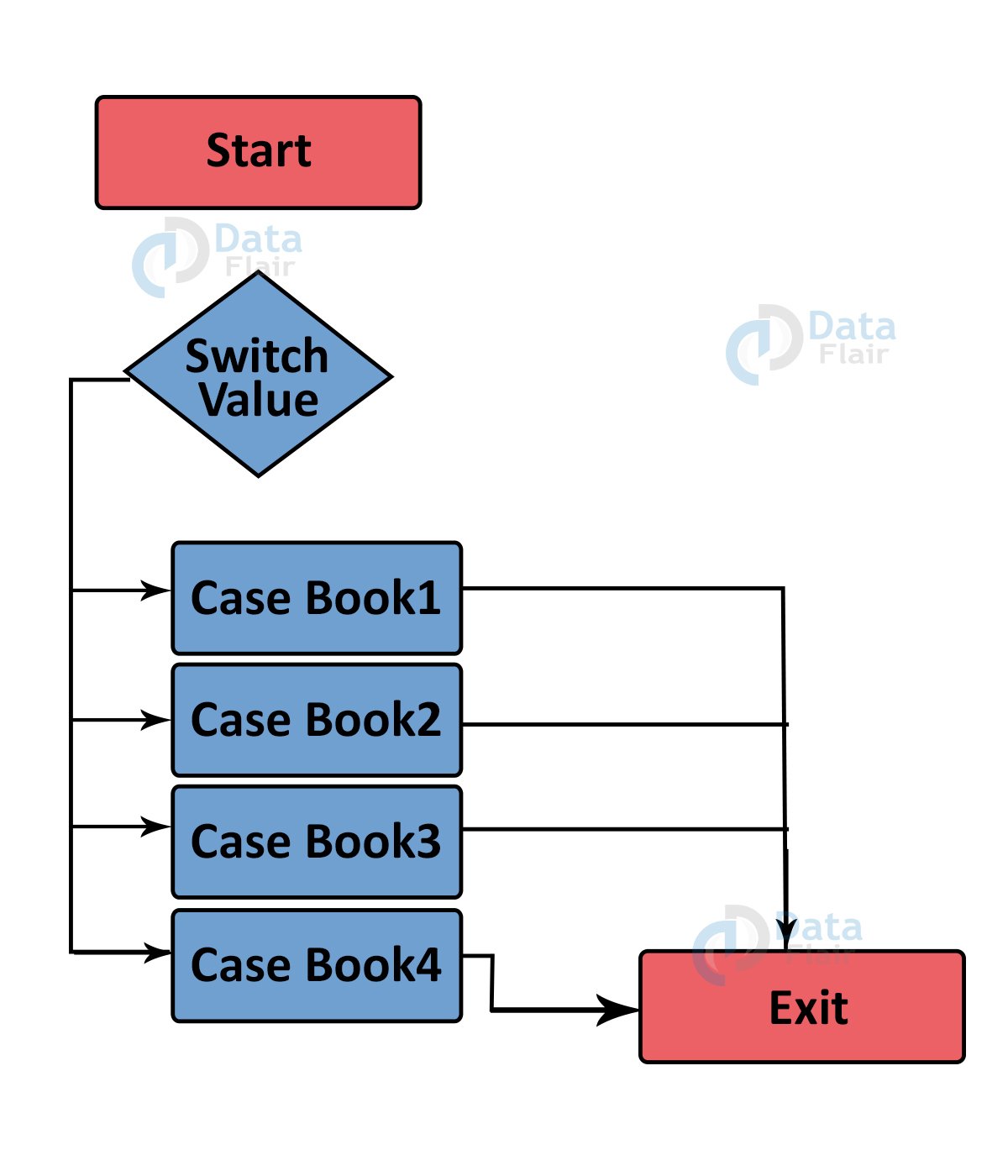
Flow Diagram for Java Switch Case
Benefits of Java Switch Statement
1. Improved Readability: Switch statements consolidate multiple conditions into a single block, making code easier to understand and follow.
2. Enhanced Efficiency: In certain situations, compilers can optimize switch statements for faster execution compared to complex if-else chains.
3. Reduced Errors: By explicitly listing every possible scenario within the switch statement, the chance of accidentally omitting a condition is minimized.
4. Easier maintenance: As the statements are separated in a hierarchical structure, it simplifies the changes in the code.
5. Flexibility: It provides flexibility to the code by providing break and continue statements.
6. For Multitasking: Useful when multiple tasks are required to be performed differently.
Summary
In this article, we learned about the various applications of switch statements in Java.
Java Switch case is extremely useful when we want to avoid if-else ladders.