


Job-ready Online Courses: Click, Learn, Succeed, Start Now!
React Flux is a popular architecture that provides a unidirectional flow of data between components in a React application Makes it easier to manage and update the state of an application. In this article, we will discuss the basics of React Flux and how it can be used to build efficient and scalable applications.
What is Flux in React?
Flux is an architecture developed by Facebook for building client-side web applications. It is based on the idea of unidirectional data flow. This pattern helps to maintain a consistent state across the entire application, making it easier to manage the complexity of large-scale applications.
Components of React Flux architecture
1. Actions:
Actions are the events triggered by the user or the system. They provide a way to communicate with the store, which is responsible for updating the application state. Actions are simple objects that contain information about what happened, like the user clicking a button, and any data associated with the event.
2. Dispatcher:
The Dispatcher is the central hub of the Flux architecture. It receives actions from the components and then dispatches them to the appropriate store. The Dispatcher ensures that actions are processed in the correct order and that there is only one instance of the store.
3. Store:
The Store is responsible for handling the state. It receives actions from the Dispatcher and updates the state accordingly. The Store is a singleton object that contains all the application state and provides methods to access and update the state.
4. Views:
The Views are the React components that render the application’s UI. They receive data from the Store and pass it down to their child components as props. When the user interacts, the Views dispatch actions to the Dispatcher, which updates the Store,
How does React Flux work?
The data flow in Flux follows a strict unidirectional pattern, which helps to maintain the consistency of the application state. Here’s a step-by-step overview of how Flux works:
1. User interacts with the UI, triggering an action.
2. The action is dispatched to the Dispatcher.
3. Dispatcher sends the action to the appropriate Store.
4. Store updates the application state based on the action.
5. Store emits a change event, indicating that the state has been updated.
6. Views receive the updated data from the Store and re-render the UI.
7. When the user interacts with the UI again, the process repeats from step 1.
Advantages of Flux in React
Flux architecture has several benefits that make it a popular choice for building large-scale applications. Here are some of the main benefits:
1. Predictable state management:
Flux’s unidirectional data flow pattern makes it easier to manage the state of an application. With a single source of truth, it’s easy to see how the data flows and where it’s being updated. This helps to prevent unexpected behavior and bugs in the application.
2. Improved scalability:
Since Flux provides a clear separation between the UI and the application state, it’s easier to manage the complexity of large-scale applications. By breaking the application into small, reusable components, it’s possible to scale the application without introducing unnecessary complexity.
3. Easy debugging:
Flux’s strict data flow pattern makes it easier to debug the application. Since the state is updated in a single place (the Store), it’s easier to trace the flow of data and identify issues in the application.
4. Reusability:
By breaking the application into small, reusable components, it’s possible to reuse components across different parts of the application. This reduces the amount of code that needs to be written and makes
How to use Flux in a React application
Step 1: Install Flux
The first step is to install Flux using npm. Run the following command in your project directory:
npm install flux --save
Step 2: Create Actions
Create an Actions file that will contain all the actions for your application. In this file, you will define functions that will be called when the user interacts with the application. These functions will dispatch actions to the stores.
Here’s an example of an Actions file:
import { Dispatcher } from 'flux';

const AppDispatcher = new Dispatcher();

export function addTodoItem(text) {
  AppDispatcher.dispatch({
    type: 'ADD_TODO',
    text,
  });
}
Step 3: Create Stores
Create a Store file that will contain all the data and logic for managing the application state. In this file, you will define a store that will listen for actions and update its state accordingly. When the state is updated, the store will emit a change event.
Here’s an example of a Store file:
import { EventEmitter } from 'events';
import { AppDispatcher } from './AppDispatcher';

const TodoStore = Object.assign({}, EventEmitter.prototype, {
  todos: [],

  getAll() {
    return this.todos;
  },

  addChangeListener(callback) {
    this.on('change', callback);
  },

  removeChangeListener(callback) {
    this.removeListener('change', callback);
  },

  emitChange() {
    this.emit('change');
  },
});

AppDispatcher.register((action) => {
  switch (action.type) {
    case 'ADD_TODO':
      TodoStore.todos.push({ text: action.text });
      TodoStore.emitChange();
      break;
    default:
      // no op
  }
});

export default TodoStore;
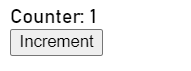
Output
Conclusion:
React Flux is a design pattern that provides a unidirectional data flow architecture for building web applications with React. It helps developers manage application state in a predictable and scalable way by separating the concerns of managing data and updating the UI. Flux has become popular as it allows for more maintainable and testable code.