



Master Python with 70+ Hands-on Projects and Get Job-ready - Learn Python
Everybody loves listening music wouldn’t it be cool to have our very own mp3 music player. So, in this python project, we are going to create an mp3 player with the help of python and its libraries. Let’s start the python mp3 player project.
Python MP3 Music Player
We will create an mp3 music player in which we can play the song, pause it, resume it, and navigate from the current song to the next song as well as previous songs.
We will be using Python and its libraries. The first library that we will be using is Tkinter which is a widely used GUI library offered by python, we do not have to install it separately, as it comes with python itself.
Next, we will be using the mixer module of a very famous python library called Pygame.
Pygame is basically used to create video games, it includes computer graphics and sound libraries. Mixer is one such sound library. Then, we will use the os library of python to interact with the Operating system.
Project Prerequisites
To work on python mp3 player basic understanding of python programming language, tkinter, and mixer module of pygame would be helpful.
A basic understanding of Tkinter widgets would also be required, but don’t worry as we will be explaining every line of code as we go developing this mp3 player project.
Unlike the Tkinter library, we are required to install the Pygame library.
Please run following command in your command prompt or terminal to install pygame.
pip install pygame
Download Python MP3 Player Project
Please download the source code of Python mp3 player: MP3 Music Player Python Code
After doing this we are all set to start this Python project, you can use any IDE of your choice.
Steps to develop this project
- Import important libraries
- Create the project layout
- Define play, pause, and other music player functions
1. Import important libraries
#importing libraries
from pygame import mixer
from tkinter import *
import tkinter.font as font
from tkinter import filedialog
Explanation:
- First line imports the mixer module from pygame, then we import tkinter.
- Next, we import the font module from the tkinter library. At last filedialog is imported which has many applications like opening a file, a directory, etc.
2. Create the overall layout of python mp3 player
#add many songs to the playlist
def addsongs():
    #a list of songs is returned
    temp_song=filedialog.askopenfilenames(initialdir="Music/",title="Choose a song", filetypes=(("mp3 Files","*.mp3"),))
    #loop through everyitem in the list
    for s in temp_song:
        s=s.replace("C:/Users/lenovo/Desktop/DataFlair/Notepad/Music/","")
        songs_list.insert(END,s)


def deletesong():
    curr_song=songs_list.curselection()
    songs_list.delete(curr_song[0])


def Play():
    song=songs_list.get(ACTIVE)
    song=f'C:/Users/lenovo/Desktop/DataFlair/Notepad/Music/{song}'
    mixer.music.load(song)
    mixer.music.play()

#to pause the song
def Pause():
    mixer.music.pause()

#to stop the  song
def Stop():
    mixer.music.stop()
    songs_list.selection_clear(ACTIVE)

#to resume the song

def Resume():
    mixer.music.unpause()

#Function to navigate from the current song
def Previous():
    #to get the selected song index
    previous_one=songs_list.curselection()
    #to get the previous song index
    previous_one=previous_one[0]-1
    #to get the previous song
    temp2=songs_list.get(previous_one)
    temp2=f'C:/Users/lenovo/Desktop/DataFlair/Notepad/Music/{temp2}'
    mixer.music.load(temp2)
    mixer.music.play()
    songs_list.selection_clear(0,END)
    #activate new song
    songs_list.activate(previous_one)
    #set the next song
    songs_list.selection_set(previous_one)

def Next():
    #to get the selected song index
    next_one=songs_list.curselection()
    #to get the next song index
    next_one=next_one[0]+1
    #to get the next song
    temp=songs_list.get(next_one)
    temp=f'C:/Users/lenovo/Desktop/DataFlair/Notepad/Music/{temp}'
    mixer.music.load(temp)
    mixer.music.play()
    songs_list.selection_clear(0,END)
    #activate newsong
    songs_list.activate(next_one)
     #set the next song
    songs_list.selection_set(next_one)
Explanation
- Tk() is a top level widget that is used to create the main application window in which we will be building our python project.
- The title() method is used to give a name to python mp3 player application which is displayed at the top.
- mixer.init() is used to initialize the mixer module so that we can use it’s various functions in our application.
- Listbox() widget is used to create a listbox in which we will store our songs.
- We have passed various parameters, first is the root specifying that the widget should be placed in the python mp3 player window.
- Then, bg is for background color, fg is for foreground color.
- selectbackground and selectforeground basically change the background and the foreground color of a particular item upon selecting it.
- grid() widget is a geometry manager which organizes the widgets properly in a grid-based fashion before placing it in the root window. columnspan=9 gives a space of 9 columns to our listbox widget.
- Button() widget is used to create a button. We want the buttons in our main window so the input root is given. Then the text which will be displayed on the button is specified and at last in the command input a function is given which will be called when the button is clicked.
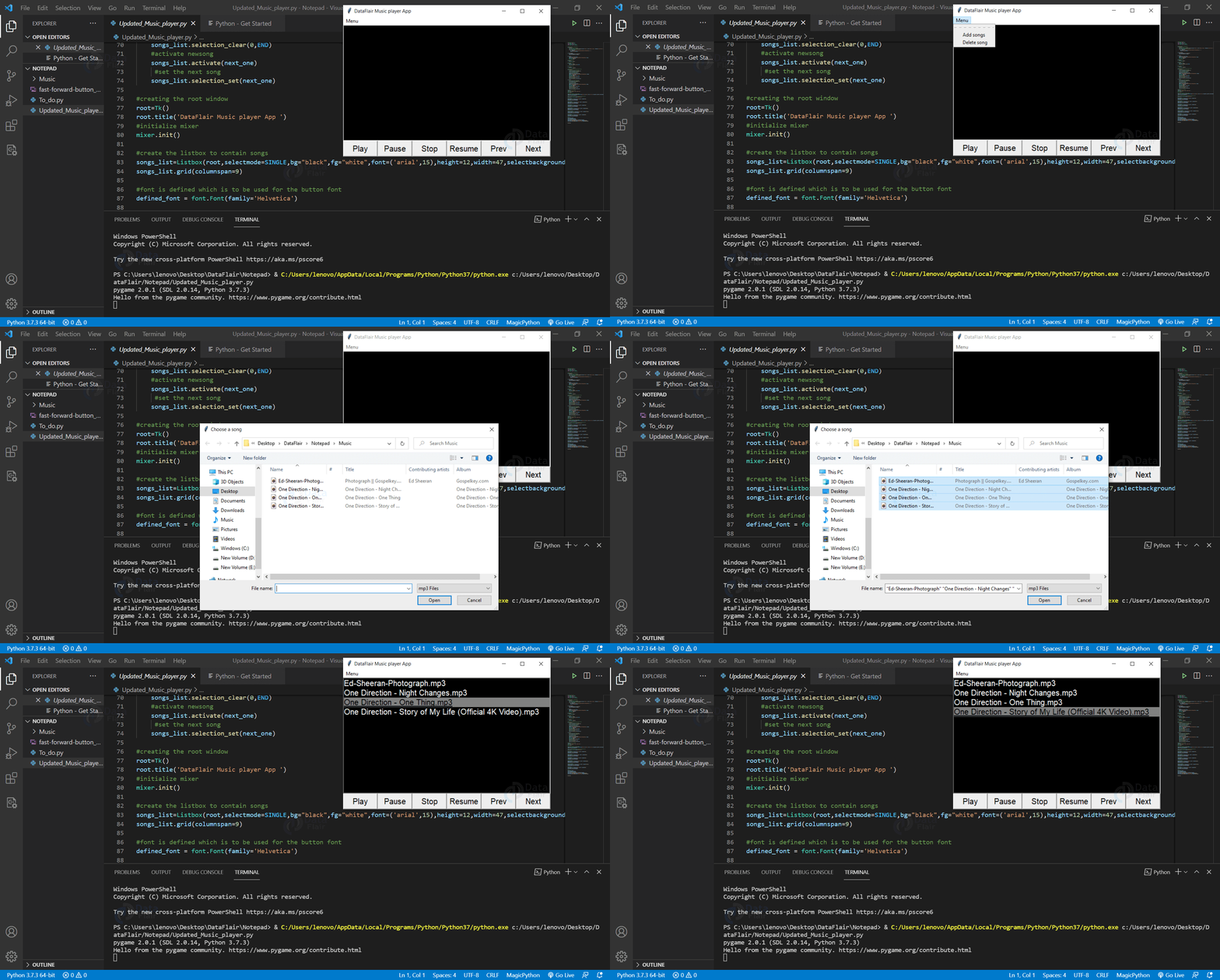
- Menu() widget is displayed just under the title bar, it is used to conveniently access various operations. We are going to access Add songs and Delete songs for our playlist, upon clicking addsongs and deletesong functions are called respectively.
3. Create music player functions
#creating the root window
root=Tk()
root.title('DataFlair Music player App ')
#initialize mixer
mixer.init()

#create the listbox to contain songs
songs_list=Listbox(root,selectmode=SINGLE,bg="black",fg="white",font=('arial',15),height=12,width=47,selectbackground="gray",selectforeground="black")
songs_list.grid(columnspan=9)

#font is defined which is to be used for the button font
defined_font = font.Font(family='Helvetica')

#play button
play_button=Button(root,text="Play",width =7,command=Play)
play_button['font']=defined_font
play_button.grid(row=1,column=0)

#pause button
pause_button=Button(root,text="Pause",width =7,command=Pause)
pause_button['font']=defined_font
pause_button.grid(row=1,column=1)

#stop button
stop_button=Button(root,text="Stop",width =7,command=Stop)
stop_button['font']=defined_font
stop_button.grid(row=1,column=2)

#resume button
Resume_button=Button(root,text="Resume",width =7,command=Resume)
Resume_button['font']=defined_font
Resume_button.grid(row=1,column=3)

#previous button
previous_button=Button(root,text="Prev",width =7,command=Previous)
previous_button['font']=defined_font
previous_button.grid(row=1,column=4)

#nextbutton
next_button=Button(root,text="Next",width =7,command=Next)
next_button['font']=defined_font
next_button.grid(row=1,column=5)

#menu
my_menu=Menu(root)
root.config(menu=my_menu)
add_song_menu=Menu(my_menu)
my_menu.add_cascade(label="Menu",menu=add_song_menu)
add_song_menu.add_command(label="Add songs",command=addsongs)
add_song_menu.add_command(label="Delete song",command=deletesong)


mainloop()
Explanation
- addsongs() is used to add songs in our listbox, filedialog.askopenfilenames() opens a dialog box corresponding to the folder whose path is provided. Then, we can select songs and store them in temp_song variable, after this we loop through the list to insert every item in the listbox.
- deletesong() is used to delete a selected song, songs_list.curselection() function returns a tuple in which the first element is the index of the selected song. Then, .delete() function is used to delete the song corresponding to the index which is passed.
- Play() function is used to play the selected song , we use the .get() method to get the selected song, then we load the song and play it using the next two lines.
- Pause() function is used to pause the song, we do not need to pass any argument to the mixer.music.pause() function.
- Stop() function is used to stop the song, we use mixer.music.stop() function to stop the song.
songs_list.selection_clear(ACTIVE) is used to unselect the selected song from the listbox - Resume() function is used to resume the song using mixer.music.unpause() function.
- Previous() function is used to play the previous song in the listbox, songs_list.curselection() function returns a tuple in which the first element is the index of the selected song in python mp3 music player project. We store it in a variable called previous_one, then we update its value to get the previous index by subtracting 1. Next, songs_list.get(previous_one) returns the previous song, we store this value in temp2 after that we load this song and play it.
We would face a problem here, although the previous song would start playing but the selected song would not change. So, we rectify that with the help of the next three lines of code. - Next() function is implemented in a similar way as the previous function. Here, instead of subtracting 1, we add 1 apart from this step every other step is the same.
Python MP3 Music Player Output
Summary
Congratulations! We have successfully created python mp3 music player, now we don’t have to rely on any other app.
Through this python project we learned a lot of things about python and its libraries, the first one being the Tkinter library, a widely-used GUI library and various widgets that it offers, then the important mixer module of the pygame library which is used to manipulate the music.