



Loops allow us to repeatedly execute code in an efficient manner. They form an integral part of programming across languages. In C, we have tools like the humble for loop to perform repetitive tasks. But what if we need more complexity? This is where nested loops come in.
Nested loops involve placing one loop within another loop. This provides an avenue to add more advanced logic by combining multiple iterative processes. Nesting two or more for loops can be extremely useful for solving certain categories of problems. This article will demonstrate how to implement nested for loops in C through simple, beginner-friendly examples.
Understanding Nested For Loops in C
A nested for loop is a loop nested inside another for loop. The inner loop runs in its entirety during each iteration of the outer loop. This means the inner loop cycle controls the total number of times the inner loop body runs.
The syntax will look like:
for (init; condition; increment) {
   for (init; condition; increment) {
      // inner loop
   }

   // outer loop
}
The outer and inner loops will each have their own control variables and conditions. The key point is that the inner loop falls inside the outer loop’s body.
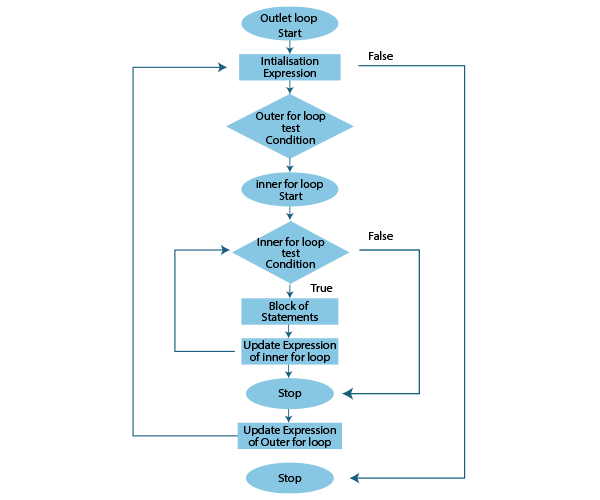
Working of Nested for Loops in C
To understand how nested for loops work, let’s break down their execution flow:
- The outer loop initializes and begins iterating.
- Inner loop initialization occurs after each iteration of the outer loop.
- The inner loop executes its iterations completely.
- Control returns to the outer loop for its next iteration.
- Steps 2-4 repeat until outer loop condition becomes false.
- When outer loop terminates, nested loop execution ends.
So essentially, the outer loop controls the overall number of times the inner loop repeats. The inner loop runs all its iterations for each single iteration of the outer loop.
We can think of it as nested Matryoshka dolls – the largest doll contains smaller dolls nested within it. Similarly, the outer loop contains the inner loop.
Understanding this top-down execution flow is crucial to designing effective nested loops. The outer loop governs the overall process, while the inner loop focuses on its own iterative task.
Advantages of C Nested For Loops
Nested loops provide advantages like:
- Ability to address complex problems by adding loop layers
- Simplifying complex repetitive tasks through hierarchical loops
- Enhanced multi-dimensional iteration capabilities
Examples and Walkthroughs
Example 1: Printing a Rectangle
#include <stdio.h>

int main() {

  int i, j;

  for (i=1; i<=5; i++) {
    for (j=1; j<=10; j++) {
      printf("*");
    }
    printf("\n");
  }
  return 0;
}
Output:
*********
*********
*********
*********
*********
Example 1 – Printing a Rectangle:
- This code uses nested for loops to print a solid rectangle pattern.
- By iterating over variable i, the outer loop regulates the number of rows.
- The inner loop handles columns by iterating j and printing asterisks.
- Printing a newline after the inner loop completes each row.
Example 2: Counting Coins
#include <stdio.h>

int main() {

  int quarters, dimes, nickels, pennies, total;

  for (quarters = 0; quarters <= 2; quarters++) {
    for (dimes = 0; dimes <= 4; dimes++) {
      for (nickels = 0; nickels <= 10; nickels++) {
        for (pennies = 0; pennies <= 20; pennies++) {

          total = quarters * 25 + dimes * 10 + nickels * 5 + pennies;

          printf("Quarters: %d Dimes: %d Nickels: %d Pennies: %d Total: %d\n", quarters, dimes, nickels, pennies, total);
        }
      }
    }
  }

  return 0;
}
Output:
Quarters: 0 Dimes: 0 Nickels: 0 Pennies: 0 Total: 0
Quarters: 0 Dimes: 0 Nickels: 0 Pennies: 1 Total: 1
…
Quarters: 2 Dimes: 4 Nickels: 10 Pennies: 20 Total: 215
Example 2 – Counting Coins:
- This code tallies the total coin value using 4 nested for loops.
- Each loop iterates through a range of values for quarters, dimes, nickels, and pennies.
- The total variable computes the running total for each combination.
- Print statement displays the breakdown of coins counted and their total value.
Example 3: Temperature Conversion Table
#include <stdio.h>

int main() {

  int celsius, fahrenheit;

  for (celsius = 0; celsius <= 100; celsius += 10) {

    fahrenheit = (celsius * 9/5) + 32;

    printf("%d Celsius = %d Fahrenheit\n", celsius, fahrenheit);

  }

  return 0;

}
Output:
0 Celsius = 32 Fahrenheit
10 Celsius = 50 Fahrenheit
20 Celsius = 68 Fahrenheit
…
100 Celsius = 212 Fahrenheit
Example 3 – Temperature Conversion Table:
- The outer loop steps through a range of Celsius values.
- The formula converts each Celsius to Fahrenheit in the inner loop.
- Fahrenheit value is printed alongside the corresponding Celsius.
- Table is built by iterating through Celsius range and converting each value.
Example 4 – Printing a Right Triangle Pattern:
// C program to print a right triangle pattern

#include <stdio.h>

int main() {
  int rows, i, j;

  printf("Enter number of rows: ");
  scanf("%d", &rows);

  for(i=1; i<=rows; ++i) {
    for(j=1; j<=i; ++j) {
      printf("*");
    }
    printf("\n");
  }

  return 0;
}
Output:
Enter number of rows: 5
*
**
***
****
*****
Example 5 – Finding Prime Numbers:
// C program to print prime numbers between 1 to n

#include <stdio.h>

int main() {
  int n, i, j, isPrime;

  printf("Enter a positive integer: ");
  scanf("%d", &n);

  for(i=2; i<=n; i++) {
    isPrime = 1;

    for(j=2; j<=i/2; j++) {
      if(i%j == 0) {
        isPrime = 0;
        break;
      }
    }

    if(isPrime == 1) {
      printf("%d ", i);
    }
  }

  return 0;
}
Output:
Enter a positive integer: 10
2 3 5 7
Example 6 – Multiplication Table:
// Print multiplication table of a given number

#include <stdio.h>

int main() {
  int num, i;

  printf("Enter a number: ");
  scanf("%d", &num);

  for(i=1; i<=10; ++i) {
     printf("%d * %d = %d \n", num, i, num*i);
  }

  return 0;
}
Output:
Enter a number: 5
5 * 1 = 5
5 * 2 = 10
5 * 3 = 15
5 * 4 = 20
5 * 5 = 25
5 * 6 = 30
5 * 7 = 35
5 * 8 = 40
5 * 9 = 45
5 * 10 = 50
Example 7 – Factorial Program:
// Program to find factorial of a number

#include <stdio.h>

int main() {
  int num, i;
  unsigned long long fact = 1;

  printf("Enter a number: ");
  scanf("%d", &num);

  for(i=1; i<=num; i++) {
    fact = fact * i;
  }

  printf("Factorial of %d = %llu", num, fact);

  return 0;
}
Output:
Enter a number: 5
Factorial of 5 = 120
Avoiding Common Mistakes
Watch out for errors like:
- Mismatched bracket pairs lead to incorrect nesting
- Infinite loops if dependencies between loops are not handled properly
- Faulty logic from overlooking the nested loop flow
Tips for Efficient-Nested Loops
Some best practices include:
- Proper indentation to visualize loop hierarchy
- Meaningful variable names for loops
- Printing values during execution to debug tricky cases
- Modularizing nested logic into functions where possible
Conclusion
Nested for loops allows us to add complexity to our iterative C programs. We can combine multiple layers of looping to efficiently solve certain categories of problems. The examples illustrate their utility for repetitive tasks involving multi-dimensional data. With some practice, nested loops can become a valuable addition to any C coder’s toolkit.