


User engagement plays a role in programming as it helps create captivating user applications. A popular approach to facilitate navigation through options and functionalities is by using a menu-driven program. The switch case construct, a feature of the C programming language, serves as a tool for developing such programs. This article aims to shed light on the process of constructing and implementing a menu-driven program utilizing the switch case statement in C, allowing for user interaction within your projects.
Understanding the Menu-Driven Approach
The menu-driven strategy is a technique that focuses on the needs of users when developing programs. It involves presenting users with a menu-based interface that offers options. This method can be applied in scenarios ranging from command line tools to graphical user interfaces. By simplifying decision-making and improving the usability of applications, the menu-driven approach provides users with a curated list of choices to navigate through.
Switch Case Statement
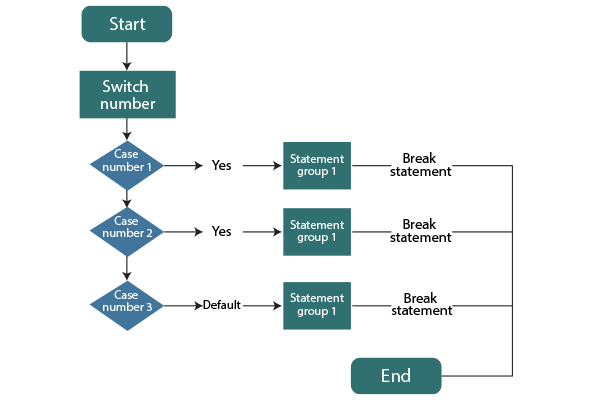
You can compare the value of an expression to a collection of constant values in C by using the switch-case statement, which is a conditional construct. When dealing with many possibilities, it offers an elegant and effective substitute for lengthy chains of if-else expressions.
The switch-case statement’s fundamental grammar is as follows:
switch (expression) {
    case constant_value1:
        // Code to execute if expression matches constant_value1
        break;
    case constant_value2:
        // Code to execute if expression matches constant_value2
        break;
    // ... additional cases ...
    default:
        // Code to execute if no case matches the expression
}
Building the Menu
An essential first step in developing a menu-driven programme is menu design. Depending on the program’s context, you can offer options in various formats, such as numeric choices or character-based selections. The menu should be clear, concise, and relevant to the program’s functionality.
Implementation Steps
Here’s a step-by-step guide to implementing a menu-driven program using the switch-case statement:
- Initialize Variables and Display Menu: Declare variables for user choice and other program-related data. Present the available choices on the menu to the user.
- Accept User’s Choice: Prompt the user to enter their choice and capture it using input functions like scanf().
- Utilize Switch-Case to Process Choice: Use the switch-case statement to compare the user’s choice against the available options.
- Perform Actions Accordingly: Write code within each case to perform the specific action associated with the user’s choice.
- Display Outputs: Provide meaningful outputs or messages based on the user’s choice.
- Handle Invalid Choices or Default Cases: Use the default case to handle situations where the user’s choice doesn’t match any predefined cases.
Complexity Analysis
Time Complexity: O(1)
Auxiliary Space: O(1)
Examples and Use Cases
Example 1: Library Management System
#include <stdio.h>

int main() {
    int choice;

    printf("Library Management System\n");
    printf("1. Add Book\n");
    printf("2. Borrow Book\n");
    printf("3. Return Book\n");
    printf("Enter your choice: ");
    scanf("%d", &choice);

    switch (choice) {
        case 1:
            printf("Book added to the library.\n");
            break;
        case 2:
            printf("Book borrowed successfully.\n");
            break;
        case 3:
            printf("Book returned. Thank you!\n");
            break;
        default:
            printf("Invalid choice.\n");
    }

    return 0;
}
Output:
Library Management System
1. Add Book
2. Borrow Book
3. Return Book
Enter your choice: 2
Book borrowed successfully.
Example 2: Coffee Shop Order System
#include <stdio.h>

int main() {
    int choice;

    printf("Coffee Shop Order System\n");
    printf("1. Espresso\n");
    printf("2. Latte\n");
    printf("3. Cappuccino\n");
    printf("Enter your choice: ");
    scanf("%d", &choice);

    switch (choice) {
        case 1:
            printf("Enjoy your Espresso!\n");
            break;
        case 2:
            printf("Here's your Latte. Enjoy!\n");
            break;
        case 3:
            printf("Cappuccino is ready. Enjoy!\n");
            break;
        default:
            printf("Invalid choice.\n");
    }

    return 0;
}
Output:
Coffee Shop Order System
1. Espresso
2. Latte
3. Cappuccino
Enter your choice: 3
Cappuccino is ready. Enjoy!
Example 3: File Management Utility
#include <stdio.h>

int main() {
    int choice;

    printf("File Management Utility\n");
    printf("1. Create File\n");
    printf("2. Read File\n");
    printf("3. Write to File\n");
    printf("Enter your choice: ");
    scanf("%d", &choice);

    switch (choice) {
        case 1:
            printf("File created successfully.\n");
            break;
        case 2:
            printf("File content: This is some data.\n");
            break;
        case 3:
            printf("Data written to the file.\n");
            break;
        default:
            printf("Invalid choice.\n");
    }

    return 0;
}
Output:
File Management Utility
1. Create File
2. Read File
3. Write to File
Enter your choice: 2
File content: This is some data.
Best Practices
- Keep the menu options straightforward and well-labelled.
- Include a default case to handle unexpected inputs.
- Avoid overly complex logic within each case for maintainability.
Advantages
- Improved Readability: Switch-case simplifies understanding by clearly associating actions with specific choices.
- Reduced Nesting: It avoids deep nesting, keeping code organized and preventing readability issues.
- Efficient Decision-Making: Directly jumps to the correct case for faster execution and better performance.
- Cleaner Code: Encourages modular design, aiding maintenance and debugging efforts.
- Compilation Optimization: Modern compilers optimize switch cases, leading to optimized runtime performance.
Limitations
- Lack of Ranges: Inability to handle value ranges better suited for specific values.
- No Complex Conditions: Struggles with complex conditions involving logical operators or intricate comparisons.
- No Non-Integer Types: Works only well with integers and characters, not suitable for other types.
- Fallthrough Risk: Missing break statements can cause unexpected behavior and bugs.
- Constant Values Only: Requires constant values defined at compile-time, limiting dynamic cases.
Comparison with Other Approaches
Switch-case is often preferred over long if-else chains due to its cleaner structure and better performance for multiple options. If-else chains might be better suited for scenarios with complex conditions or ranges.
Conclusion
In conclusion, menu-driven programming’s switch-case method is a powerful tool for creating appealing apps. Using the switch-case construct of the C programming language, developers can create dynamic interfaces that enable effective decision-making by subtly presenting options to users. This method optimises efficiency, simplifies the code structure, and improves user engagement. With this knowledge, programmers may create programs that appeal to consumers through user-friendly menus while yet meeting their functional needs. The switch-case technique enables the development of applications that excel in usability and engagement by bridging the gap between user intent and program functionality.