


Get Job-ready: Java Course with 45+ Real-time Projects! - Learn Java
Literals are an integral part of a Java programmer’s day-to-day life. This is a concept that every programmer must know before beginning their journey into the world of Java programming. In this article, we will take a look at literals and their types, and also a few rules that we need to follow while writing and declaring a literal.
What are Literals in Java?
Literals have a constant value and a fixed data type and are often known as constants in Java. Generally, Literals are assigned to a variable to provide a value to the variable.
Let’s see, an example of assigning a literal to a variable is:
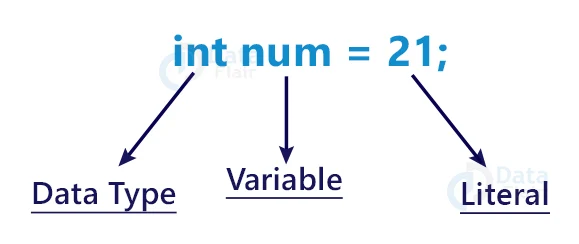
int age = 21;
In the above code snippet, int is the datatype, age is the variable name, and 21 is the literal. Hence, we can say that the literal is providing the variable with a value of 21.
Types of Literals in Java
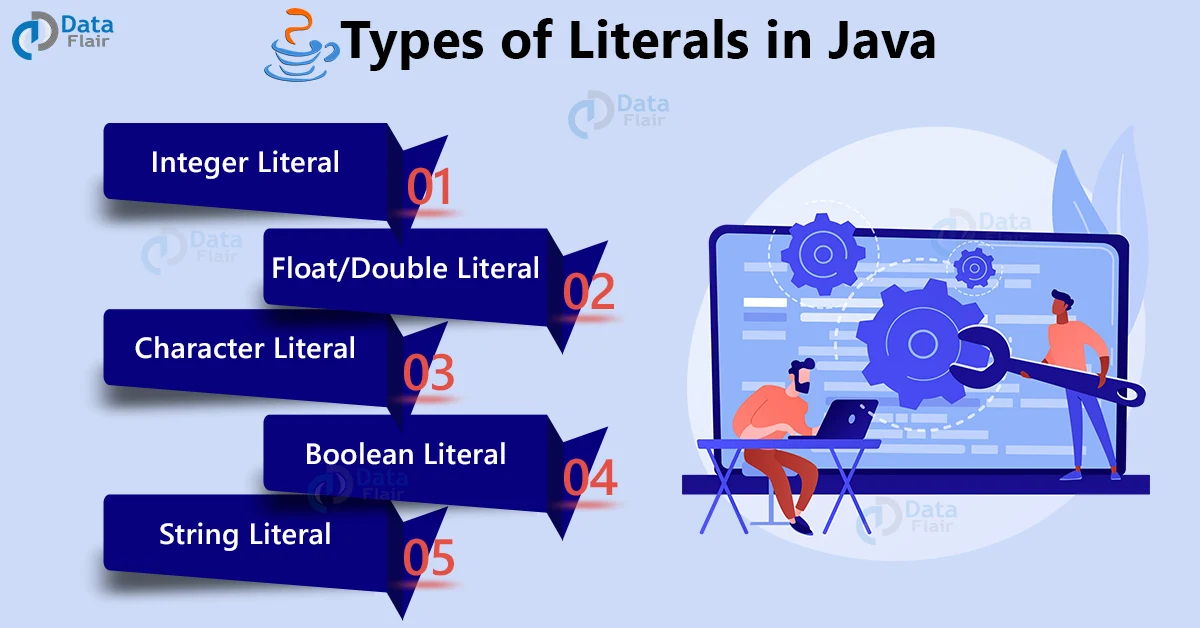
Generally, 5 types of literals can be further expanded into various other literals. Hence, we will take a look at them vividly in this section.
The five main types of Literals in Java are:
- Integer Literal
- Float/Double Literal
- Character Literal
- Boolean Literal
- String Literal
Integer Literal in Java
Integer literals are basically a number sequence that doesn’t contain any decimal point in between them.
There are four types of Integer Literals:
1. Decimal Integer
They are integers having a base value of 10; i.e, containing values between 0 to 9. Therefore, it can be a positive value(+) or a negative value(-) but it cannot contain any point in between them. Example: 1000, 1234, +78, -82, etc.
int decimal_int=1234;
2. Octal Integer
They are integers having a base value of 8; i.e, containing values between 0 to 7. Therefore, all octal numbers must start with a 0. Example: 012, 077,075, etc.
int octal_int=077;
3. Hexadecimal Integer
They are integers having a base value of 16; i.e, containing values between 0 to 15. It is a special type of integer that contains both digits as well as characters. Thus, the digits range from 0 to 9, and the numbers 10 to 15 are replaced by characters a to f. However, any integer starting with 0x or 0X is considered to be a hexadecimal integer. Example: 0xff, 0x2a, 0xf1f2, etc.
int hexadec_int=0x1ff2;
4. Binary Integer
They are integers with a base value of 2; i.e; contains only two digits, 0 and 1. However, Binary integers start with a 0b indicating that it is a binary digit. Example: 0b100101, 0b1010101, etc.
int binary_int=0b1010101;
Note: Binary literals can be created only on Java SE 7 and above.
Program Showing all the integer literals:
package com.DataFlair.Literals;
public class Literals_Integers
{
    public void main()
    {
        int decimal_int=1234;
        int octal_int=077;
        int hexadec_int=0x1ff2;
        int binary_int=0b1010101;
        System.out.println("This is a Decimal Literal: "+decimal_int);
        System.out.println("This is an Octal Literal: "+octal_int);
        System.out.println("This is a Hexa Decimal Literal: "+hexadec_int);
        System.out.println("This is a Binary Literal: "+binary_int);
    }
}
The output of the above code:
This is an Octal Literal: 63
This is a Hexa Decimal Literal: 8178
This is a Binary Literal: 85
Floating Point Literals in Java
Floating-point literals are values that contain a decimal point between them. Floating-point literals are generally of the double data type by default. Also, we can assign them to float data types by adding an f at the end of the value.
Example of declaring a float literal in Java:
float val_float=1.7732f;
Example of declaring a double literal:
float val_double=1.7732; //By default the compiler assigns double datatype.
float val_double=1.7732d;
double val_double=1.7732;
Floating-point Literals can also have an exponent part. This exponential part can be declared as follows:
123E-45f
A few points to remember while declaring floating-point literals are:
1. If no suffix is present, the default data type is double.
2. F or f suffix represents a floating data type.
3. D or d suffix represents a double data type.
Few legal and illegal floating literals:
- 123.45//Legal
- 122.32E5//Legal
- 231.12F//Legal
- 1/4 // Illegal Symbol Used “/”
- 1.7.5 //Illegal, as two decimal points are used.
- 1,234.56// Illegal, as commas are not allowed
- 123.E4//Illegal, as E cannot precede the point.
- 321E//Illegal, as the exponent part is incomplete.
Also, floating-point literals cannot have commas in between the digits.
Program Showing all the floating literals:
package com.DataFlair.Literals;
public class Literals_Float
{
    public void main()
    {
        float val_float=1.7732f;
        double val_double=1.7732d;
        float val_exponent=123E4f;
        System.out.println("This is a Floating Point Literal"+val_float);
        System.out.println("This is a Decimal Literal"+val_double);
        System.out.println("This is an Exponential Literal"+val_exponent);
    }
}
The output of the above code:
This is a Decimal Literal1.7732
This is an Exponential Literal1230000.0
Boolean Literal in Java
A boolean literal is a literal that contains only two values, true and false. It is declared using the keyword boolean. Although it is a very useful literal to declare flag variables in different programs to terminate a looping sequence.
Program showing the Boolean Literals:
package com.DataFlair.Literals;
public class Literals_boolean
{
    public void main()
    {
        boolean flag1=true;
        boolean flag2=false;
        System.out.println("This is a boolean true flag variable"+flag1);
        System.out.println("This is a boolean false flag variable"+flag2);
    }
}
The output of the above code:
This is a boolean false flag variablefalse
String Literals in Java
A string is basically an array of characters. In Java, we have a special class for strings that allows users to implement strings in a program very easily. As a result, Anything written inside a double quote (“ ”) is a string.
Example of Java String Literal:
String Company = “DataFlair”;//Valid String Literal
String Company = DataFlair;//Invalid as there is no double quote.
Null Literal in Java
Strings in Java can also be declared void with a special literal known as a null literal. Moreover, it is basically equivalent to an integer value of 0.
Program showing implementation of String Literal:
package com.DataFlair.Literals;
public class Literals_string
{
    public void main()
    {
    String company="DataFlair";
    String null_Literal=null;
    System.out.println("This is a String Literal: "+company);
    System.out.println("This is a null Literal: "+null_Literal);
   }
}
The output of the above code:
This is a null Literal: null
Character Literals in Java
Character Literals in Java are represented with a single quote. Therefore, the general difference between a string literal and a character literal is that a character literal contains only one character, whereas a string literal contains a set of characters.
A character literal can be represented in four ways:
1. Single quote character
In this, a single character is represented by being enclosed in a pair of single quotes (‘ ’).
Example of single quote character in Java:
char ch = ‘A’;
2. Character Literal as an Integer Literal
In Java, each character has a numeric value assigned to it. By using those integer values, as a result, we can display the characters. Let’s see with an example given below.
Example of character literal as integral literal in Java:
char number = 0065;
3. Unicode representation of character Literal
We can also represent the character literals using Unicode. Hence, Unicode is a special code assigned to the character, usually represented by ‘/u’ with a hexadecimal digit.
Example of the Unicode representation of a character literal in Java:
char uni = ‘\u0065’;
4. Escape Sequence in Java
It is a special kind of character literal which is preceded by a \. Also, every escape sequence has a special feature. Some of the most used escape sequences are:
| Escape Sequence | Functionality |
| \n | Used to insert a new line. |
| \t | Used to insert a horizontal tab. |
| \b | Used to insert a blank space. |
| \v | Used to insert a Vertical tab. |
| \a | Used to add a small beep sound. |
| \’ | Used to add a single quote inside a string. |
| \” | Used to add double quotes inside a String. |
| \\ | Used to add a backslash |
| \r | Used for carriage return. |
| \? | Used to add a Question mark |
| \0n | Used to represent an octal number |
| \xHn | Used to represent a hexadecimal number |
| \uHn | Used to represent a Unicode character through its hex code. |
| \0 | Null Character |
| \f | Used to represent formfeed |
Few Valid Character Literals:
char ch = ‘A’;
char ch =’\u0065’
char ch= 0065
char ch=’\\’
char ch=’%’
Program implementing Character Literal
package com.DataFlair.Literals;
public class Literal_Char
{
    public void main()
    {
        char ch='A';
        char number= 0065;
        char uni='\u0065';
        System.out.print("\nThis is a character Literal:\b"+ch);
        System.out.print("\nThis is a character Literal as Integer:\b"+number);
        System.out.print("\nThis is a character Literal as Unicode:\b"+uni);
    }
}
The output of the above code:
This is a character Literal as Integer:5
This is a character Literal as Unicode:e
Class literals in Java
There’s also a special kind of literal called a class literal, which is formed by taking a type name and appending “.class” to it; for example, String.class.Therefore, this refers to the object (of type Class) that represents the type itself.
Example of a class literal in Java:
Class<String> c = String.class;
Rules to Use Underscore in Literals
- In the beginning, end, or in between the numbers.
- Adjacent to a decimal point in a floating-point literal.
- Prior to an F or L suffix.
- At positions where a string of digits is expected
Some invalid use of Underscore
- 1_.234
- 1._234
- 65_
- 12_34_56_78_90_L
- 0_x77
- 0x_77
- 0x77_
Why Use Literals?
Literal is very useful for implementation in the code as it reduces declaring constants and adding labels by doing it on the same line. Additionally, Literals in Java are a way of representing text, characters, and numerical values.
How to use Literals in Java?
As we saw earlier, as well in the discussed topics, a literal is declared along with a data type and a variable name. Also, a literal has an = sign before it, which assigns the value of the literal to the variable.
Conclusion
In addition, Literals are the basic foundation of programming, and grasping their concept is essential for implementation. Therefore, without literals, creating a program is next to impossible. Also, we have talked about different literals and their uses, and how to implement them in our code.