


Loops are a fundamental concept in programming that allows us to repeatedly execute blocks of code for iterative tasks. Without loops, coding anything that requires repetition would be painfully tedious.
C provides several looping constructs, with the humble for loop in C being one of the most ubiquitous. For loops are used extensively in C programming for everything from simple counting and summing to iterating through arrays and complex nested loop structures. Mastering the for loop provides a vital tool for any C coder’s toolkit.
Understanding the For Loop in C
The for loop in C enables iterating through a code block a predetermined number of times. The basic syntax is:
for (initialization; condition; increment/decrement) {
// statements
}
Let’s break this down:
- Initialization: Used to initialize a counter or loop control variable, typically before entering the loop.
- Condition: Evaluated each iteration to check if looping should continue.
- Increment/Decrement: Updates the loop control variable, usually incrementing or decrementing it.
- Statements: The code to execute in each iteration as long as the condition remains true.
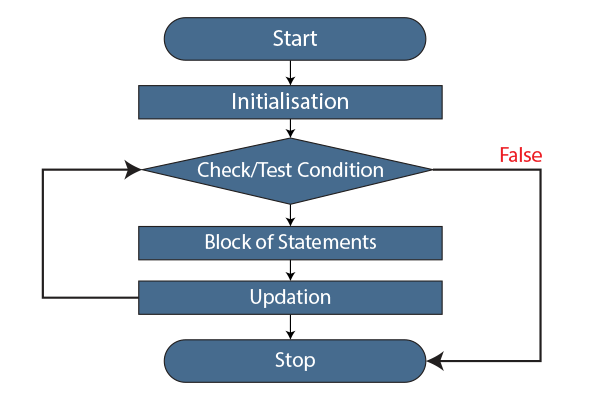
Compared to while and do-while loops, for loops in C, are ideal when you know ahead of time the exact number of iterations needed. The structure ensures control variables are initialized, checked, and updated in an organized manner.
C For Loop Flow
The for loop sequence is:
1. Initialization runs once before the loop starts.
2. The condition is evaluated.
3. If true, the loop body executes.
4. The update statement updates variables like the counter.
5. The condition is evaluated again.
6. Steps 3-5 repeat until the condition becomes false.
7. When the condition is false, the loop terminates.
This controlled flow makes for loops perfect for predetermined iteration counts.
C For Loop Structure
A for loop in C contains four components that control the iterative process:
- Initialization: Typically initializes a counter variable starting from a desired value. Can initialize multiple variables, too, if required.
- Condition: Evaluated each iteration to determine if the loop body should execute. The loop terminates when this becomes false.
- Increment/Decrement: Increments or decrements control variables, usually the counter, after each iteration. Updates their state for the next condition check.
- Body Execution: Executes the target code block repeatedly as long as the condition remains true.
How for Loop in C work?
- Initialization: This first step executes only once at the start of the loop, declaring and initializing any variables needed inside the loop.
- Condition Check: The loop condition is evaluated next. If the condition holds true, the loop body will be executed. If false, the loop terminates.
- Body Execution: If the condition passed, the code inside the loop body is executed. This contains the main logic to repeat each iteration.
- Increment/Update: Variables like counters often need updating after each iteration. The increment section updates its state before the next condition check.
- Repeat: After completing the body execution and increment step, the condition is evaluated again. This process repeats, with the body executing each time the condition is true.
- Loop Exit: When the condition becomes false, the loop terminates, skipping body execution and picking up from code after the loop.
Example Code Walkthrough
Printing Numbers:
#include <stdio.h>

int main() {
  int i;

  for (i = 1; i <= 5; i++) {
    printf("%d ", i);
  }

  return 0;
}
// Output: 1 2 3 4 5
The initialization sets i to 1. The test condition checks if i <= 5. Inside the loop body, i is printed and incremented by 1. This repeats until i becomes 6, making the condition false.
Multiplication Table:
#include <stdio.h>

int main() {

  int i, num;

  num = 5;

  for(i = 1; i <= 10; i++) {
    printf("%d x %d = %d\n", num, i, num*i);
  }

  return 0;
}
// Output:
// 5 x 1 = 5
// 5 x 2 = 10
// 5 x 3 = 15
// …
// 5 x 10 = 50
The initialization sets i to 1. The test condition checks if i <= 10. Inside the loop body, i is printed and incremented by 1. This repeats until i become 11, making the condition false.
Sum of Numbers:
#include <stdio.h>

int main() {

  int i, sum = 0;

  for(i = 1; i <= 10; i++) {
    sum += i;
  }

  printf("Sum = %d", sum);

  return 0;
}
// Output: Sum = 55
This accumulates the sum of numbers from 1 to 10 by incrementing i and adding it to sum each iteration. The loop exits once i is 11.
These examples demonstrate simple yet powerful ways to put for loops to work.
Multiple Initialization:
#include <stdio.h>

int main() {

  int a, b, c;

  for(a=0, b=10, c=20; a<5; a++) {
    printf("%d %d %d\n", a, b, c);
  }

  return 0;
}
Output:
0 10 20
1 10 20
2 10 20
3 10 20
4 10 20
Factorial Program:
#include <stdio.h>

int main() {
  int num, factorial = 1;

  printf("Enter a number: ");
  scanf("%d", &num);

  for(int i=1; i<=num; i++) {
    factorial *= i;
  }

  printf("Factorial of %d is %d", num, factorial);

  return 0;
}
Output:
Enter a number: 5
Factorial of 5 is 120
Prime Number Program:
#include <stdio.h>

int main() {

  int num, flag=0;

  printf("Enter a number: ");
  scanf("%d", &num);

  for(int i=2; i<=num/2; i++) {
    if(num%i == 0) {
      flag = 1;
      break;
    }
  }

  if (flag==0) {
    printf("%d is a prime number.", num);
  } else {
    printf("%d is not a prime number.", num);
  }

  return 0;
}
Enter a number: 13
13 is a prime number.
Fibonacci Series:
#include <stdio.h>

int main() {

  int n, t1 = 0, t2 = 1, nextTerm;

  printf("Enter the number of terms: ");
  scanf("%d", &n);

  for (int i = 1; i <= n; ++i) {
    printf("%d, ", t1);
    nextTerm = t1 + t2;
    t1 = t2;
    t2 = nextTerm;
  }

  return 0;
}
Enter the number of terms: 10
0, 1, 1, 2, 3, 5, 8, 13, 21, 34,
Advanced Usages
For loops can execute more complex tasks through nested loops, loop control statements, and by iterating through arrays.
Nested Loops: A for loop inside another for loop enables advanced iteration logic.
for( .. ; .. ; .. ){
    for( .. ; .. ; .. ){
        ....
    }
}
Loop Control: continue skips current iteration, while break exits the loop immediately.
Arrays: for loops, can sequentially process array elements.
Overall, loops provide a versatile way to implement all kinds of iteration scenarios.
Special Cases
For loops can be constructed in some unique ways to alter their usual flow and behavior. Let’s explore two interesting special cases for for loops in C.
1) Single Statement Loop Body
For loop bodies are generally defined inside braces, but if the body simply contains one statement, the braces can be skipped:
#include <stdio.h>

int main() {

  int i;

  for (i = 1; i <= 5; i++)
    printf("DataFlair provides great C programming tutorials! \n");

  return 0;
}
// Output:
// DataFlair provides great C programming tutorials!
// DataFlair provides great C programming tutorials!
// DataFlair provides great C programming tutorials!
// DataFlair provides great C programming tutorials!
// DataFlair provides great C programming tutorials!
Here, the printf statement will execute 5 times. This can make simple loops more concise. However, caution is required, as forgetting the braces when you add more statements can cause unexpected behavior.
2) Infinite Loop
It is possible to intentionally create an infinite for loop by omitting all three components – initialization, condition, and increment:
#include <stdio.h>
int main() {
  int count = 0;

  for ( ; ; ) {
    printf("In infinite loop\n");

    count++;
    if(count == 5) {
      break;
    }
  }

  return 0;
}
// Output:
// In infinite loop
// In infinite loop
// In infinite loop
// In infinite loop
// In infinite loop
……
This can be useful when you have termination logic, like break statements within the loop, and want it to run continuously otherwise. But use with caution to avoid freezes!
Common Mistakes
Watch out for these common C for loop pitfalls:
- Forgetting to update conditions causes infinite loops.
- Using = instead of == in condition checking.
- Initializing variables in the wrong scope.
Use print debugging and IDE debugging features to identify issues. Start simple and slowly add complexity.
Pros of Using For Loops in C
C For loops offer several benefits:
- Reusable Code – The structured for loop syntax lends itself well to creating reusable code blocks for repetitive tasks.
- Compact Size – Handling the loop variable and iteration inside the for statement keeps the overall code compact.
- Data Structure Traversal – For loops make iterating through arrays, strings, and other data structures simpler and more readable.
Cons of Using For Loops in C
However, C for loops also come with a few disadvantages:
- No Element Skipping – For loops in C do not provide an easy way to skip iterations or access non-contiguous elements like some while loops.
- Single Condition – Complex conditional logic inside for loop bodies can get unwieldy compared to implementing in while or do-while loops.
Comparing For and While Loops in C
| Feature | For Loop | While Loop |
| Structure | More structured syntax with initialization, condition, and increment/decrement handled in one line | Syntax only includes a condition with the loop body code in braces |
| Readability | Clear separation of initialization, condition, and iteration control makes logic easy to read. | Requires reading code in loop body to understand initialization and iteration |
| Iteration Control | Initialization, condition check, and iteration are handled automatically by the for loop syntax. | The programmer must handle all initialization, conditional checking, and iteration control in loop body. |
| Loop Count | Designed for loops with a predetermined number of iterations | It is better for loops where exit condition depends on factors inside the loop |
| Performance | The overhead of checking conditions each iteration | Condition check only when required inside loop body |
Conclusion
For loops are an essential and versatile construct in the C programming language. Their inherent structure promotes organized, readable code by handling initialization, conditional checking, and iteration in a single line. By mastering the for loop, C programmers gain precise control over iterating through code blocks a predetermined number of times. Used properly, for loops in C can simplify repetitive tasks, process arrays, and create complex nested looping systems. Though simple in syntax, the utility of the for loop within C code is immense. Equipped with this fundamental tool, C coders can build efficient solutions to tackle all kinds of programming challenges.