



Loops are an indispensable tool in programming, enabling us to repeatedly execute blocks of code for iterative tasks.
In C, we have several loop constructs at our disposal, including the versatile do-while loop. Unlike the for and while loops, the do-while loop ensures the loop body is executed at least once before checking the loop condition. This unique structure makes do-while loops ideal for situations that require one guaranteed run of the loop before potentially breaking out of the iteration.
Understanding the Do While Loop in C
The do-while loop in C executes a code block once initially and then repeats the loop body continuously while a condition remains true.
Its syntax follows:
do {
// code block
} while (condition);
Notice that the loop condition is evaluated after the loop body, unlike the while loop. This means the code block will run at least once regardless of the condition’s value. The condition is still critical since it determines if the looping continues beyond the initial execution.
#include <stdio.h>

int main() {
  int count = 1;

  do {
    printf("Dataflair\n");
    count++;
  } while(count <= 4);

  return 0;
}
Output:
Dataflair
Dataflair
Dataflair
Dataflair
How the C Do While Loop Works?
We can visualize the operation of a do-while loop in C by thinking of it as a rollercoaster ride. You get strapped into your seat on the rollercoaster (the initial unavoidable execution), and only after completing the ride do you get to decide if you want to go again based on whether you met your thrill quota (the loop condition). If you’re still thirsty for adrenaline, you strap yourself in for another round. You keep reading until you’ve had your fill of excitement.
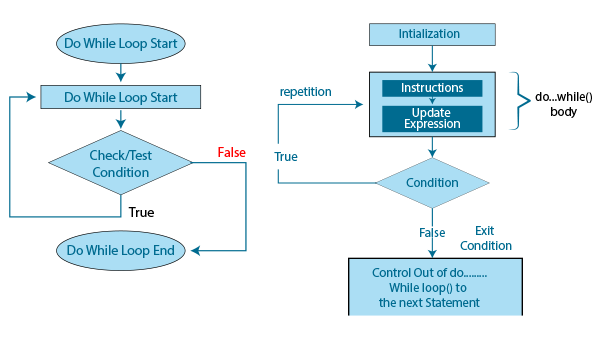
The do-while loop follows a similar predefined sequence:
- Initialize variables needed in the loop
- Execute the loop body (ride the rollercoaster)
- Evaluate the loop condition to decide whether to repeat the body
- If the condition is true, go back to step 2. Otherwise, exit the loop.
- Optionally update variables for the next iteration at the end of the loop body.
Do While Loop Structure in C
Let’s explore the anatomy of a do-while loop in more detail:
- Initialization: Before entering the loop, variables used in the code and condition need initialization.
- Body Execution: This first and mandatory execution of the loop body is what sets the do-while loop apart. The program always runs the code inside the loop once before checking the condition.
- Condition Evaluation: After completing the loop body, the condition is evaluated. If it is true, the flow jumps back to execute the loop body again.
- Updation: An update expression can be added at the end of the loop body to prepare variables for the next iteration.
Properties of the C Do While Loop
- The loop condition is compulsory and must eventually be evaluated to false to avoid infinite looping.
- The body can be empty, but that would result in an infinite loop if no condition exists.
- Multiple conditions can be checked using logical operators before determining whether to repeat the loop execution.
Common Use Cases
Menu-Driven Programs
Do-while loops shine in interactive, menu-driven programs that require displaying a menu, accepting user input, processing the input, and repeating continuously. The menu choices are always shown at least once before checking if the user wants to quit.
Input Validation
When accepting input like age, we can use a do-while loop to validate if the input is sensible before using it programmatically. The validation code executes at least once, preventing progression until the input has been verified.
Data Processing
In applications like data logging that need to run until a specific event occurs, a do-while loop runs continuously until the terminating condition is met. The data is processed in each iteration until logging should stop.
Best Practices
- Include a loop counter or progress indicator so the user knows the application is not frozen.
- Use descriptive conditional variables like validInput to make the purpose clear.
- Indent the loop body neatly and include comments where helpful.
Example Code Walkthrough
Let’s look at some do-while loop examples to demonstrate their usage.
Counting Down
- Initializes count to 5 to set up the starting point for the countdown.
- The do-while loop prints count first before checking the condition. This ensures that 5 is printed even though the condition fails on the first iteration.
- The count is decremented by 1 each iteration with count–. This progresses the countdown.
- The condition check count > 0 stops the loop once the count hits 0.
- do-while is ideal since we want the print-decrement steps to execute at least once before checking the condition.
int count = 5;
do {
  printf("%d\n", count);
  count--;
} while (count > 0);
Output:
5
4
3
2
1
Factorial Calculation
- num starts at 5 since we want to calculate a factorial of 5. factorial is initialized to 1.
- The do-while loop first multiplies factorial by num, then decrements num by 1.
- This computes the factorial by successive multiplication as num counts down to 1.
- When num reaches 1, the condition fails, and the loop stops.
- Do-while ensures the multiplication happens once before checking against 1.
int num = 5, factorial = 1;

do {
  factorial *= num;
  num--;
} while (num > 1);

printf("Factorial of 5 is %d", factorial);
Output:
A factorial of 5 is 120
Menu-Driven Program
- The loop displays the menu options and retrieves user input.
- It validates the choice is between 1 and 3, but it prints an error.
- If the choice is 3, the break statement exits the loop.
- For other valid choices, it prints a message and loops back.
- The while(1) condition keeps looping indefinitely until a break occurs.
- Do-while allows validating input before the condition check.
int choice;

do {
  printf("Menu \n");
  printf("1. Option 1\n");
  printf("2. Option 2\n");
  printf("3. Quit\n");

  printf("Enter your choice: ");
  scanf("%d", &choice);

  if(choice >=1 && choice <= 3) {
    if(choice == 3)
      break;
    else
      printf("Perform option %d tasks\n", choice);
  }
  else {
    printf("Invalid choice. Try again.\n");
  }
} while(1);

printf("Exiting program...");
Output:
Menu
1. Option 1
2. Option 2
3. Quit
Enter your choice: 4
Invalid choice. Try again.
Menu
1. Option 1
2. Option 2
3. Quit
Enter your choice: 2
Perform option 2 tasks
Menu
1. Option 1
2. Option 2
3. Quit
Enter your choice: 3
Exiting program…
This showcases how a do-while loop can create a reusable menu with input validation.
Nested Do-While Loops in C
Like other loop statements in C, do-while loops can also be nested to create complex iterative logic. A nested do-while places one do-while loop within the body of another do-while loop.
The inner loop executes to completion for every single iteration of the outer loop. This allows you to add layers of processing logic.
Let’s look at examples to understand this better.
Printing a Pattern
Every time the outer loop iterates in this nested loop, a pattern of increasing size is printed.
int rows = 5;
int i = 1;

do {
  int j = 1;
  do {
    printf("*");
    j++;
  } while(j <= i);

  printf("\n");
  i++;

} while(i <= rows);
Output:
*
**
***
****
*****
The inner loop handles printing the stars and increments j. The outer loop increments i to control the number of rows.
Debugging and Common Mistakes
Like any loop, do-while loops can cause headaches if not structured properly. Follow these debugging tips:
- Add print statements to check variable values in each iteration.
- Use a debugger tool to step through the loop execution.
- Check for endless loops caused by a faulty condition that never becomes false.
- Ensure the variables used in the condition get updated within the loop body.
Difference between while and Do while Loop in C
| Feature | while loop | do…while loop |
| The test condition is checked | Before the loop body is executed | After the loop body is executed |
| Execution of loop body | Not executed if the condition is false | Executed at least once, even if the condition is false |
| Type of loop | Pre-tested or entry-controlled loop | Post-tested or exit-controlled loop |
| Semicolon | Not required | Required at the end |
Conclusion
The C do-while loop is a versatile tool for writing conditional loops requiring one assured pass before potentially breaking out of the iteration. Its unique structure opens up possibilities for creating menu-driven programs, validating input, and other use cases benefiting from an initial loop execution. By learning how and when to leverage the do-while loop, you expand your ability to craft efficient C programs.