



Bitwise manipulation is a powerful technique in programming that involves manipulating individual bits of data rather than entire data units like bytes or words. One fundamental operator in this realm is the Bitwise NOT operator (~), which plays a pivotal role in toggling the bits of integers. This article will delve into the Bitwise NOT operator’s mechanics, use cases, and its importance in low-level programming.
Understanding Bitwise Not Operator
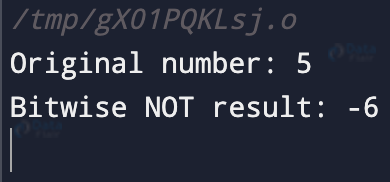
Before we dive into the operator’s specifics, let’s briefly revisit how computers represent integers. Computers store integers in binary format, composed of 0s and 1s. The Bitwise NOT operator works by flipping each bit of an integer: turning 0s to 1s and vice versa. For instance, applying the Bitwise NOT operator to the binary number 00101010 would result in 11010101. Let’s illustrate this with an example:
#include <stdio.h>
int main() {
    int num = 5;
    int result = ~num;
// Using the NOT operator (~) to invert the bits of 'num'
    printf("Original number: %d\n", num);
    printf("Bitwise NOT result: %d\n", result);
    return 0;
}
Output:
Time Complexity: O(1)
Space Complexity: O(1)
Truth Table
| Operand A | Operand B | ~A |
| 0 | 0 | 1 |
| 0 | 1 | 1 |
| 1 | 0 | 0 |
| 1 | 1 | 0 |
Bitwise Not and Two’s Complement
In C, integers are often represented using a method called two’s complement. In this representation, the most significant bit (leftmost) indicates the sign of the number (0 for positive, 1 for negative). Applying the Bitwise NOT operator to a negative number will yield a positive number, and vice versa, due to the nature of two’s complement.
#include <stdio.h>

int main() {
    int negativeNum = -5; // Binary: 11111011 (8-bit representation)
    int result = ~negativeNum;

    printf("Original: %d\n", negativeNum);
    printf("Bitwise NOT: %d\n", result); // Binary: 00000100

    return 0;
}
Output:
Original: -5
Bitwise NOT: 4
Common Use Cases
One common use of the Bitwise NOT operator is in creating bit masks for other bitwise operations like AND, OR, and XOR. It’s also useful for toggling specific bits in a number, allowing you to turn certain flags on or off.
#include <stdio.h>

int main() {
    unsigned int flags = 0b10101010;
    unsigned int mask = 0b00110011;
    unsigned int result = flags ^ mask; // XOR to toggle specific bits

    printf("Result: %u\n", result); // Binary: 10011001

    return 0;
}
Output:
Result: 153
Bitwise Not vs Logical Not
It’s important to distinguish between the Bitwise NOT operator (~) and the Logical NOT operator (!). The former inverts all bits, whereas the latter negates the truth value of a condition. Be cautious not to confuse the two.
Bitwise Not and Bitwise Operations
The Bitwise NOT operator often complements other bitwise operators. When used in combination, these operators can accomplish intricate tasks. For example, masking specific bits using the AND operator before applying the Bitwise NOT operator can lead to powerful outcomes.
#include <stdio.h>

int main() {
    unsigned int num = 0b11001100;
    unsigned int mask = 0b00110011;
    unsigned int result = ~(num & mask);

    printf("Result: %u\n", result); // Binary: 11001100

    return 0;
}
Output:
Result: 204
Precautions and Considerations
While the Bitwise NOT operator is a valuable tool, remember that it inverts all bits without regard to the underlying data type’s interpretation. When working with signed integers, the Bitwise NOT operator can result in unexpected outcomes due to sign extension.
Performance and Optimization
From a performance standpoint, the Bitwise NOT operator is highly efficient since it simply flips the bits. It’s a low-level operation that doesn’t require complex computations.
Conclusion
In the realm of low-level programming, the Bitwise NOT operator (~) is an essential tool for manipulating individual bits within integers. Its ability to invert all bits plays a key role in various tasks, from creating bit masks to toggling flags. Understanding its mechanics empowers programmers to wield this operator effectively, contributing to efficient and optimized code.