



Interactive Online Courses: Elevate Skills & Succeed Enroll Now!
Child safety is a top priority for parents, and with the increasing use of smartphones, it’s important to have an app that can help keep track of your child’s location. In this project, we’ll show you how to create an Android Child Safety app that allows parents to track their child’s location using their phone.
About Android Child Safety App
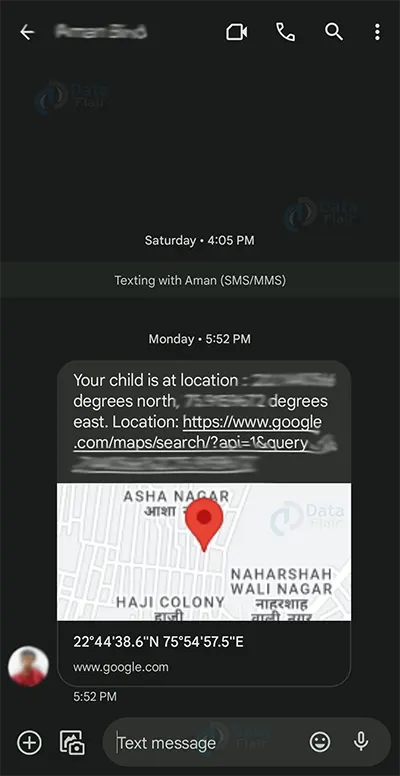
The objective of this project is to create a Child Safety app that allows parents to track their child’s location using their phone. The app will send the location of the child after every given delay time by the user.
Prerequisites for Child Safety App using Android
Before we begin, you’ll need to have the following:
- Android Studio installed on your computer
- Basic knowledge of Java programming language
- Basic knowledge of Android app development
Download Android Child Safety App Project
Please download the source code of Android Child Safety App Project from the following link: Android Child Safety App Project Code
Steps to Create Child Safety App Project using Android
Following are the steps for developing the Android Child Safety App Project:
Step 1: Creating Main Activity layout and its activity
Step 2: Creating Track Activity layout and its activity:
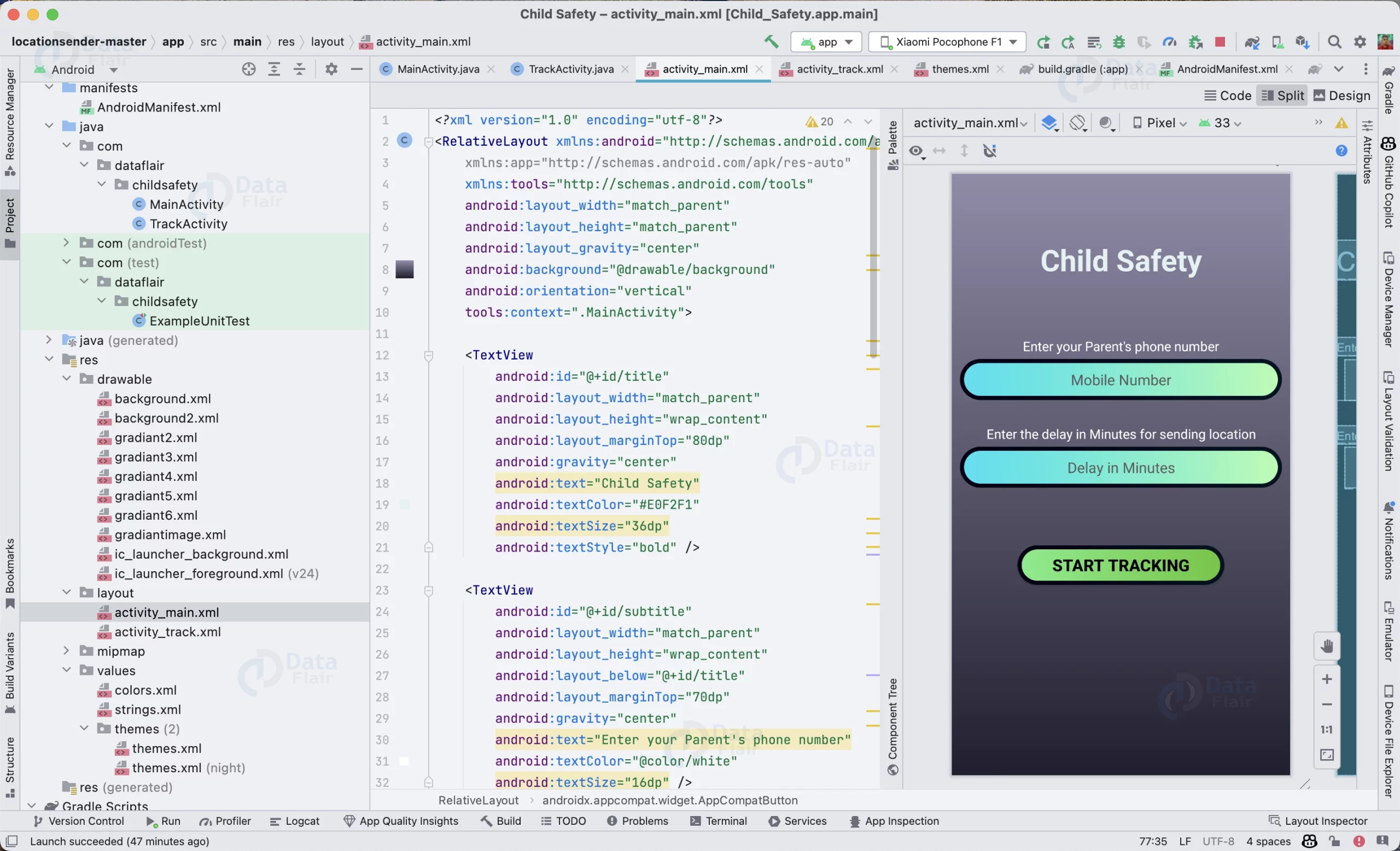
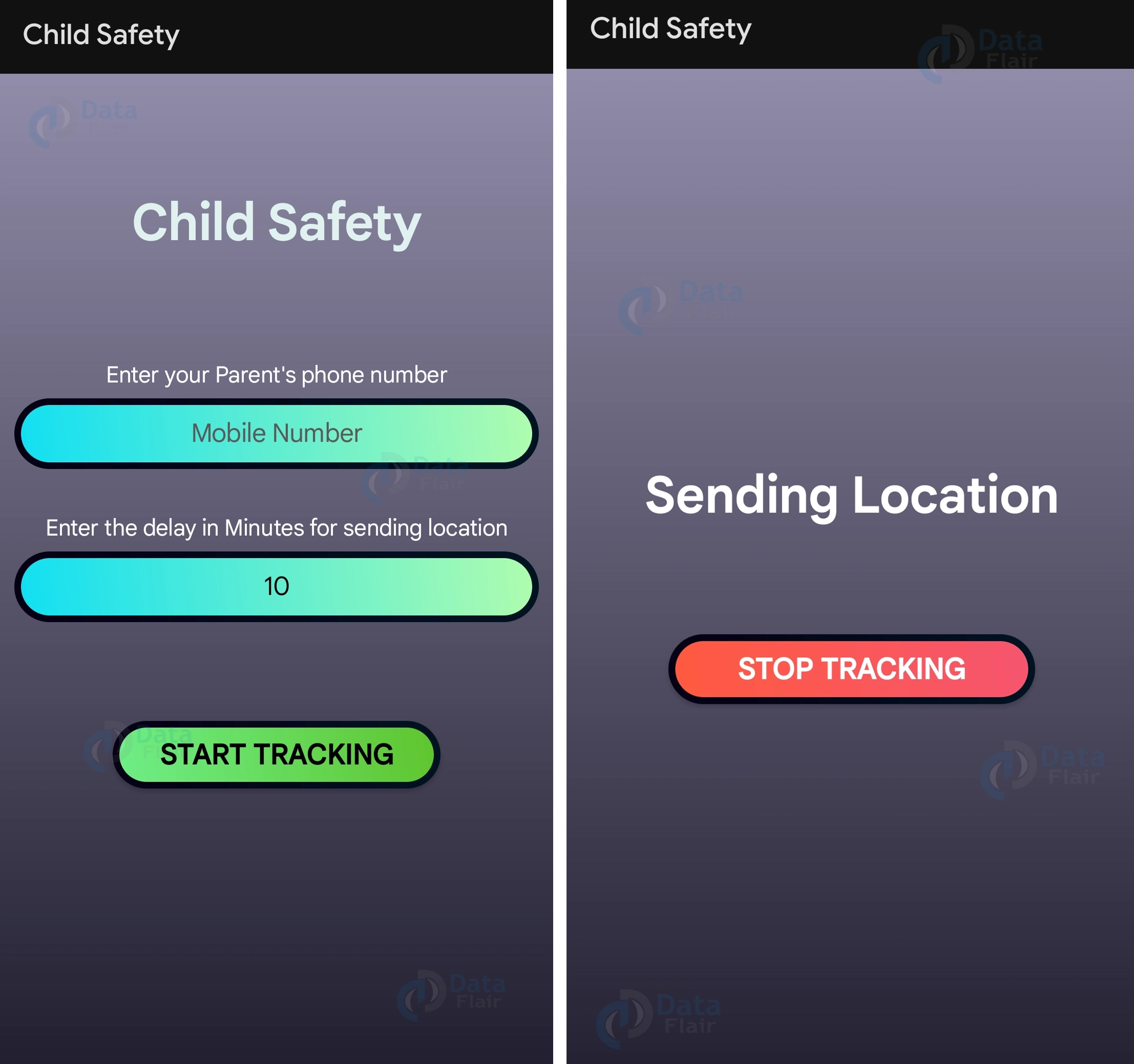
Step 1: Creating Main Activity layout and its activity: This is the main layout of the app where parents can enter their own phone number and delay time for sending the location SMS to their phone. Upon clicking on the start tracking button, the app will start sending the location to the parent via SMS.
activity_main.xml
<?xml version="1.0" encoding="utf-8"?>
<RelativeLayout xmlns:android="http://schemas.android.com/apk/res/android"
   xmlns:app="http://schemas.android.com/apk/res-auto"
   xmlns:tools="http://schemas.android.com/tools"
   android:layout_width="match_parent"
   android:layout_height="match_parent"
   android:layout_gravity="center"
   android:background="@drawable/background"
   android:orientation="vertical"
   tools:context=".MainActivity">

   <TextView
       android:id="@+id/title"
       android:layout_width="match_parent"
       android:layout_height="wrap_content"
       android:layout_marginTop="80dp"
       android:gravity="center"
       android:text="Child Safety"
       android:textColor="#E0F2F1"
       android:textSize="36dp"
       android:textStyle="bold" />

   <TextView
       android:id="@+id/subtitle"
       android:layout_width="match_parent"
       android:layout_height="wrap_content"
       android:layout_below="@+id/title"
       android:layout_marginTop="70dp"
       android:gravity="center"
       android:text="Enter your Parent's phone number"
       android:textColor="@color/white"
       android:textSize="16dp" />

   <EditText
       android:id="@+id/number"
       android:layout_width="match_parent"
       android:layout_height="50dp"
       android:layout_below="@+id/subtitle"
       android:layout_marginHorizontal="10dp"
       android:layout_marginTop="5dp"
       android:background="@drawable/gradiant3"
       android:hint="Mobile Number"
       android:inputType="number"
       android:textAlignment="center"
       android:textColor="@color/black"
       android:textColorHint="#5A5A5A" />

   <TextView
       android:id="@+id/subtitle1"
       android:layout_width="match_parent"
       android:layout_height="wrap_content"
       android:layout_below="@+id/number"
       android:layout_marginTop="30dp"
       android:gravity="center"
       android:text="Enter the delay in seconds for sending location"
       android:textColor="@color/white"
       android:textSize="16dp" />

   <EditText
       android:id="@+id/delay"
       android:layout_width="match_parent"
       android:layout_height="50dp"
       android:layout_below="@+id/subtitle1"
       android:layout_marginHorizontal="10dp"
       android:layout_marginTop="5dp"
       android:background="@drawable/gradiant3"
       android:hint="Delay in Minutes"
       android:inputType="number"
       android:textAlignment="center"
       android:textColor="@color/black"
       android:textColorHint="#5A5A5A" />

   <androidx.appcompat.widget.AppCompatButton
       android:id="@+id/track"
       android:layout_width="match_parent"
       android:layout_height="wrap_content"
       android:layout_below="@+id/delay"
       android:layout_marginStart="80dp"
       android:layout_marginTop="70dp"
       android:layout_marginEnd="80dp"
       android:background="@drawable/gradiant4"
       android:text="Start tracking"
       android:textColor="@color/black"
       android:textSize="20dp"
       android:textStyle="bold" />

</RelativeLayout>
MainActivity.java
// This is the main activity of the app. It is the first activity that is launched when the app is opened.
// It is used to get the parent's phone number and the delay between the next location update.

// Importing required packages
package com.dataflair.childsafety;

import androidx.appcompat.app.AppCompatActivity;
import androidx.core.app.ActivityCompat;

import android.Manifest;
import android.content.Intent;
import android.content.SharedPreferences;
import android.os.Bundle;
import android.view.View;
import android.widget.Button;
import android.widget.EditText;
import android.widget.Toast;

// Creating the main activity
public class MainActivity extends AppCompatActivity {

   // Declaring required variables
   private EditText number;
   private EditText delay;

   @Override
   protected void onCreate(Bundle savedInstanceState) {
       super.onCreate(savedInstanceState);
       setContentView(R.layout.activity_main);

       // Getting the required views
       Button track = (Button) findViewById(R.id.track);
       number = (EditText) findViewById(R.id.number);
       delay = (EditText) findViewById(R.id.delay);

       // Setting the default values for the delay in minutes
       delay.setText("10");
       ActivityCompat.requestPermissions(this, new String[]{Manifest.permission.SEND_SMS, Manifest.permission.ACCESS_FINE_LOCATION}, 0);
       track.setOnClickListener(new View.OnClickListener() {
           @Override
           public void onClick(View view) {

               // Getting the phone number and the delay from the user
               Intent intent = new Intent(MainActivity.this, TrackActivity.class);
               SharedPreferences sharedPreferences = getSharedPreferences("parent's phone", MODE_PRIVATE);
               SharedPreferences.Editor editor = sharedPreferences.edit();

               // Validating the phone number
               String phnum = number.getText().toString();
               if (!validatePh(phnum)) {
                   Toast.makeText(MainActivity.this, "Phone number is not valid!", Toast.LENGTH_LONG).show();
               }

               // Saving the phone number and the delay in the shared preferences
               editor.putString("parent'sphone", phnum);
               editor.putInt("delaybeforenext", Integer.parseInt(delay.getText().toString()));
               editor.apply();

               // Starting the TrackActivity
               startActivity(intent);
           }
       });
   }

   // This method is used to validate the phone number
   private boolean validatePh(String s) {
       if (s.length() != 10) {
           return false;
       }
       return true;
   }
}

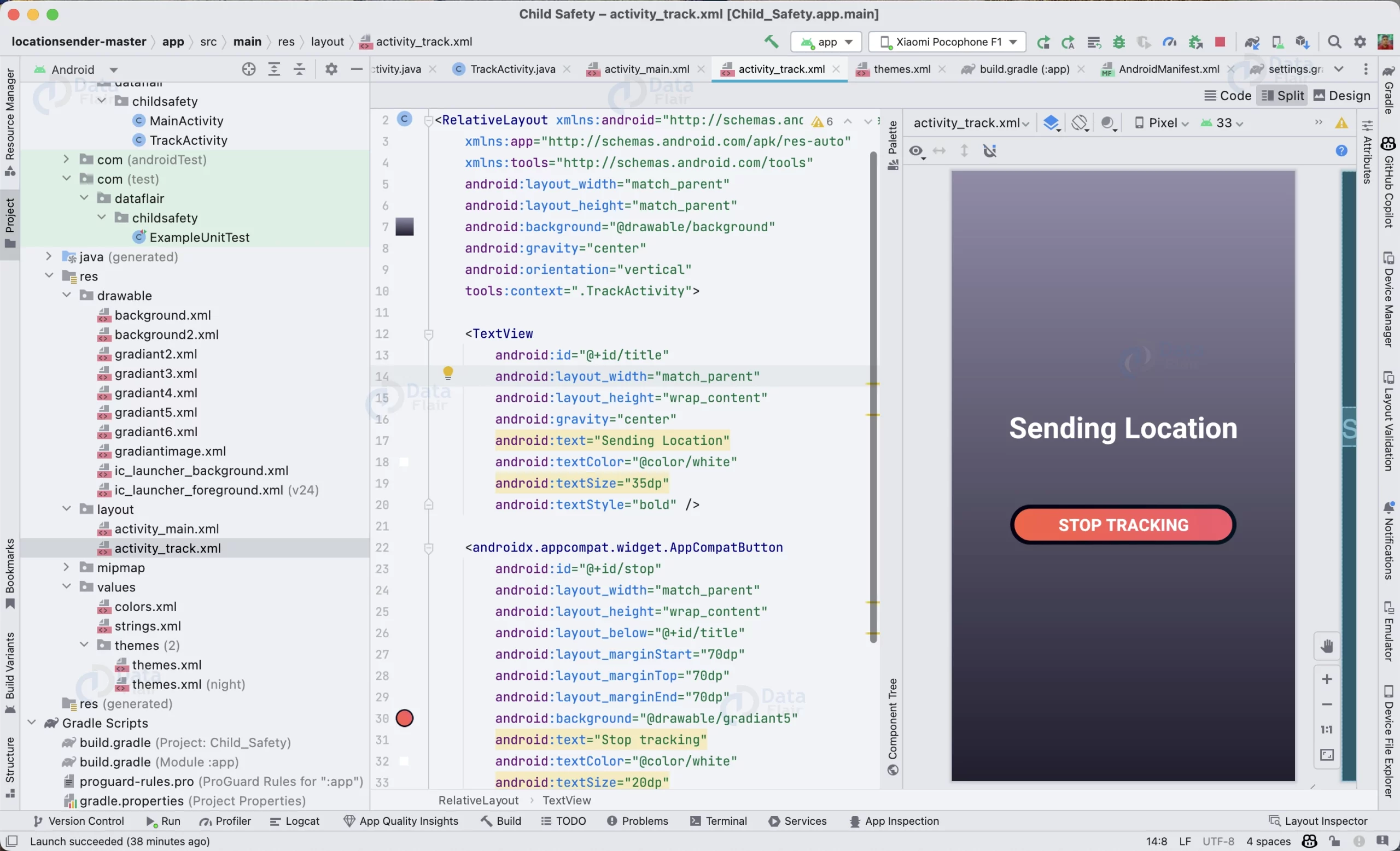
Step 2: Creating Track Activity layout and its activity: This activity will actually track the location of the child and send the SMS to the parent. Through this layout parents can stop the tracking of the child.
activity_track.xml
<?xml version="1.0" encoding="utf-8"?>
<RelativeLayout xmlns:android="http://schemas.android.com/apk/res/android"
   xmlns:app="http://schemas.android.com/apk/res-auto"
   xmlns:tools="http://schemas.android.com/tools"
   android:layout_width="match_parent"
   android:layout_height="match_parent"
   android:background="@drawable/background"
   android:gravity="center"
   android:orientation="vertical"
   tools:context=".TrackActivity">

   <TextView
       android:id="@+id/title"
       android:layout_width="match_parent"
       android:layout_height="wrap_content"
       android:gravity="center"
       android:text="Sending Location"
       android:textColor="@color/white"
       android:textSize="35dp"
       android:textStyle="bold" />

   <androidx.appcompat.widget.AppCompatButton
       android:id="@+id/stop"
       android:layout_width="match_parent"
       android:layout_height="wrap_content"
       android:layout_below="@+id/title"
       android:layout_marginStart="70dp"
       android:layout_marginTop="70dp"
       android:layout_marginEnd="70dp"
       android:background="@drawable/gradiant5"
       android:text="Stop tracking"
       android:textColor="@color/white"
       android:textSize="20dp"
       android:textStyle="bold"
       app:layout_constraintTop_toBottomOf="@+id/title" />

</RelativeLayout>
TrackActivity.java
// This activity is used to track the location of the child and send it to the parent's phone number

// Importing required packages
package com.dataflair.childsafety;

import static java.lang.Math.abs;

import androidx.annotation.NonNull;
import androidx.appcompat.app.AppCompatActivity;
import androidx.appcompat.widget.AppCompatButton;
import androidx.core.app.ActivityCompat;

import android.Manifest;
import android.content.Intent;
import android.content.SharedPreferences;
import android.content.pm.PackageManager;
import android.location.Location;
import android.os.Bundle;
import android.telephony.SmsManager;
import android.view.View;
import android.widget.Toast;

import com.google.android.gms.location.FusedLocationProviderClient;
import com.google.android.gms.location.LocationServices;
import com.google.android.gms.tasks.OnCompleteListener;
import com.google.android.gms.tasks.Task;

import java.util.Timer;
import java.util.TimerTask;

// Creating the TrackActivity
public class TrackActivity extends AppCompatActivity {

   // Declaring required variables
   FusedLocationProviderClient fusedLocationProviderClient;
   String message;
   Timer timer;
   AppCompatButton stop;
   int delay;

   @Override
   protected void onCreate(Bundle savedInstanceState) {
       super.onCreate(savedInstanceState);
       setContentView(R.layout.activity_track);

       // Getting the required views
       stop = (AppCompatButton) findViewById(R.id.stop);

       // Setting the onClickListener for the stop button
       stop.setOnClickListener(new View.OnClickListener() {
           @Override
           public void onClick(View view) {
               timer.cancel();
               Intent intent = new Intent(TrackActivity.this, MainActivity.class);
               startActivity(intent);
           }
       });

       // Getting the phone number and the delay from the shared preferences
       SharedPreferences sharedPreferences = getSharedPreferences("parent's phone", MODE_PRIVATE);
       String num = sharedPreferences.getString("parent'sphone", "");
       delay = sharedPreferences.getInt("delaybeforenext", 10);
       delay *= 60;

       // Checking if the required permissions are granted
       if ((ActivityCompat.checkSelfPermission(this, Manifest.permission.ACCESS_FINE_LOCATION) != PackageManager.PERMISSION_GRANTED
               && ActivityCompat.checkSelfPermission(this, Manifest.permission.ACCESS_COARSE_LOCATION) != PackageManager.PERMISSION_GRANTED)
               || ActivityCompat.checkSelfPermission(this, Manifest.permission.SEND_SMS) != PackageManager.PERMISSION_GRANTED) {
           Toast.makeText(this, "Required Permissions not granted", Toast.LENGTH_LONG).show();
       } else if (num.length() != 0) {

           // Getting the location of the child
           fusedLocationProviderClient = LocationServices.getFusedLocationProviderClient(this);

           // Sending the location to the parent's phone number
           startSending(num);
       }
   }


   // This method is used to send the location to the parent's phone number
   private void startSending(String n) {

       // Creating a timer task to send the location after every delay seconds
       timer = new Timer();
       TimerTask tt = new TimerTask() {
           @Override

           // This method is called after every delay seconds
           public void run() {

               // Checking if the required permissions are granted
               if (ActivityCompat.checkSelfPermission(TrackActivity.this, Manifest.permission.ACCESS_FINE_LOCATION) != PackageManager.PERMISSION_GRANTED && ActivityCompat.checkSelfPermission(TrackActivity.this, Manifest.permission.ACCESS_COARSE_LOCATION) != PackageManager.PERMISSION_GRANTED) {
                   return;
               }

               // Getting the location of the child
               fusedLocationProviderClient.getLastLocation().addOnCompleteListener(new OnCompleteListener<Location>() {
                   @Override
                   public void onComplete(@NonNull Task<Location> task) {

                       // Getting the location of the child
                       Location location = task.getResult();
                       if (location != null) {
                           boolean north = false, east = false;
                           if (location.getLatitude() >= 0) {
                               north = true;
                           }
                           if (location.getLongitude() >= 0) {
                               east = true;
                           }

                           // Creating the message to be sent to the parent's phone number
                           message = "Your child is at location : " + abs(location.getLatitude()) + " degrees " + (north ? "north, " : "south, ") + abs(location.getLongitude()) + " degrees " + (east ? "east" : "west") + ". Location: https://www.google.com/maps/search/?api=1&query=" + location.getLatitude() + "%2C" + location.getLongitude();

                           // Sending the message to the parent's phone number
                           SmsManager smsManager = SmsManager.getDefault();
                           smsManager.sendTextMessage(n, null, message, null, null);
                       }

                   }
               });


           }
       };

       // Scheduling the timer task
       timer.scheduleAtFixedRate(tt, 0, delay * 1000L);
   }

}
Now the app is complete to be used.
Android Child Safety App Output


Summary
Congratulations, you have successfully created a Child Safety app that allows parents to track their child’s location using their phone. You can now enter your phone number and delay time in minutes and start tracking your child’s location.
However, this is not the end. You can add more features to the app according to your needs, such as setting up geofencing, adding notifications, and more.