


Full Stack Web Development Courses with Real-time projects Start Now!!
CSS, or Cascading Style Sheets, is a styling language used to enhance the visual appeal of web pages. It is used to control the layout, colors, fonts, and other visual elements of a website. In this article, we will go over the basics of how to add CSS to a webpage.
Ways to add CSS to HTML
1. Inline CSS
The simplest way to add CSS to a webpage is by using inline styles. This method involves adding the CSS code directly to the HTML element using the “style” attribute. Here’s an example:
<html>
<head>
    <p style="color: cyan; font-size: 14px;">DataFlair</p>
</head>
</html>
Output:
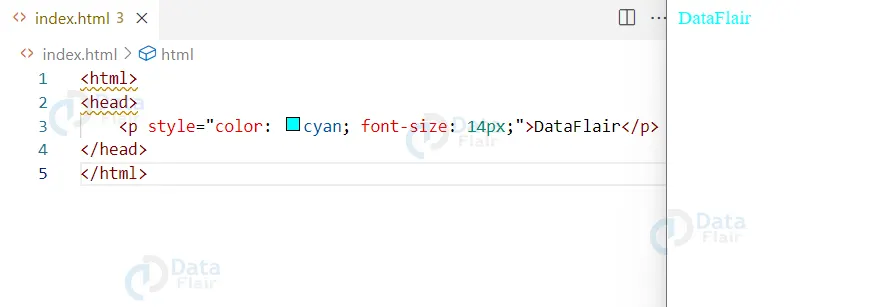
In this example, we are changing the text color to cyan and the font size to 14px for the “p” element.
2. Internal CSS
Another way to add CSS to a webpage is by using an internal stylesheet. This method involves creating a separate “style” element within the head of the HTML document and linking it to the elements on the page using CSS selectors. Here’s an example:
<html>
<head>
  <style>
    p {
      color: cyan;
      font-size: 25px;
    }
  </style>
</head>
<body>
  <p>DataFlair</p>
</body>
</html>
Output:

In this example, we are linking the CSS code to the “p” element, which will change the text color to cyan and the font size to 25px for all “p” elements on the page.
3. External CSS
Finally, you can add CSS to a webpage by linking to an external stylesheet. This method involves creating a separate .css file and linking it to the HTML document using the “link” element within the head of the HTML document. Here’s an example:
HTML
<html>
<head>
  <link rel="stylesheet" type="text/css" href="style.css">
</head>
<body>
  <p>DataFlair</p>
</body>
</html>
CSS
p {
  color: cyan;
  font-size: 25px;
}
Output:
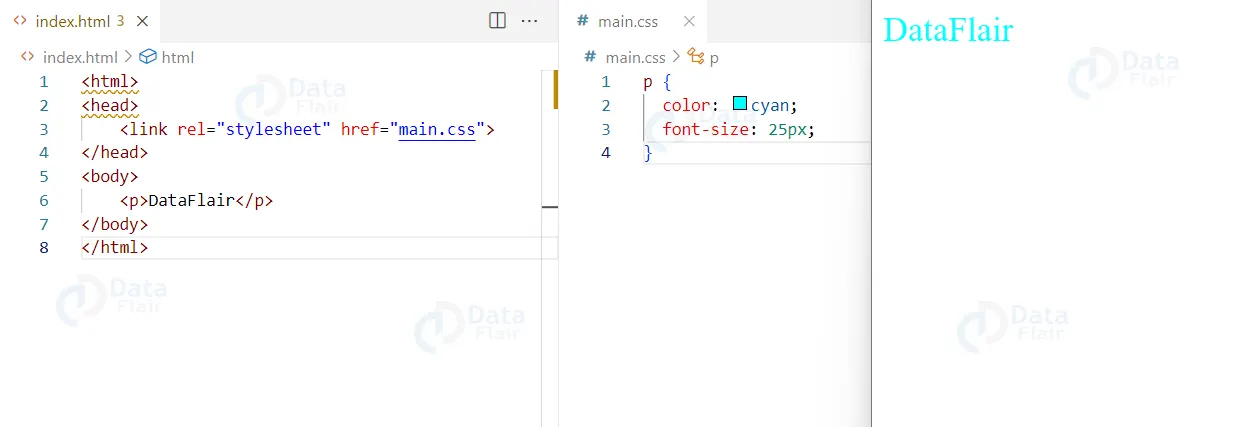
In this example, we are linking the external stylesheet “style.css” to the HTML document, which will change the text color to cyan and the font size to 25px for all “p” elements on the page.
In this context, there is dire need to ensure that the right method has been adopted depending on the size and needs of the project at hand. For small, single-page projects or most simple changes, inline CSS is the best option.
However, large scale projects or when better maintainability is required then internal or external stylesheets can be used. Third, external stylesheets have the feature that they will be cached by the browser and therefore facilitate an enhanced, faster and more efficient utilization across the several pages of the site.
It’s important to note that the order of CSS does matter, as the later style will overwrite the earlier one.
We can use any of the above methods to add CSS to your webpage, but using an external stylesheet is the best practice. It keeps your HTML and CSS separate, making it easier to maintain and update your website.
Conclusion
In conclusion, there are three main ways to add CSS to a webpage: inline styles, internal stylesheets, and external stylesheets.
Inline styles are the simplest method and involve adding the CSS code directly to the HTML element. Internal stylesheets involve creating a separate “style” element within the head of the HTML document and linking it to the elements on the page using CSS selectors. External stylesheets involve creating a separate .css file and linking it to the HTML document. It uses the “link” element within the head of the HTML document.